Invoice approval
Invoice approval is the process of reviewing, verifying, and authorizing supplier invoices before they are paid and recorded in your accounting system.

Accounts payable explained
Are manual payment processes slowing you down? As an AP manager, you know the pressure of keeping everything running smoothly — processing invoices, meeting payment deadlines, and managing vendor relationships.
But when manual processes dominate your workflow, it often feels like you’re spending more time fixing mistakes and chasing approvals.
Payment automation offers a way to automatically send your invoices for payment once the invoice is approved, automatically reconcile your invoices to your payments, and automatically push the method of payment to your ERP and mark your invoice as paid.
Payment automation, or vendor payment automation, simplifies and automates your entire payment process, from receiving invoices to approving and executing payments.
Instead of manually processing checks, wire transfers, and reconciliations, you can rely on payment automation software to handle these tasks automatically, ensuring payments are made on time and with accuracy.
This is especially helpful if you’re managing high invoice volumes (i.e. more than 20,000 invoices per year), multiple locations, or complex approval workflows, where manual processes often lead to delays, errors, and inefficiencies.
Payment run: A batch of approved payments processed at one time, typically on a scheduled cycle.
Payment method: How a supplier is paid: ACH, wire transfer, virtual card, or check.
Remittance advice: The notification sent to a supplier confirming what has been paid and which invoices it covers.
Three-way match: Verification that the invoice, purchase order, and goods receipt all align before payment is released.
ERP integration: The connection between your payment automation tool and your core accounting or enterprise resource planning system.
Payments as a service (PaaS): A model where a third-party provider handles full payment execution on your behalf, including supplier management, bank connectivity, payment method routing, and compliance, so your team doesn't need to manage that infrastructure directly.
For mid-market companies like yours, managing payments manually is not sustainable.
Every step requires someone to log in, check something, copy data, or wait for an email reply. That creates delays, and delays cost money: in late payment penalties, strained supplier relationships, and hours your team could spend on higher-value work.
And then there's fraud. According to the Association for Financial Professionals (AFP), 79% of organizations were victims of payments fraud attacks or attempts in 2024, and checks were the payment method most often targeted, with 63% of respondents reporting check fraud that year. For businesses still running manual, check-heavy payment processes, that's a significant and largely avoidable risk.
Here's why you should consider vendor payment automation:
Fewer errors: Manual payment processing introduces risk at every step. Keying in the wrong account number, duplicating a payment, or missing an invoice entirely are common issues. Automation applies consistent logic and validation rules so those mistakes don't happen.
Faster payment cycles: Automated approval workflows and payment runs mean invoices move from approved to paid in hours, not days. That gives you more flexibility to take advantage of early payment discounts.
Stronger cash flow visibility: When payments are automated and tracked in real time, you know exactly what's going out, when, and to whom. That makes cash flow forecasting far more reliable.
Better fraud prevention: Automated systems flag unusual payment requests, enforce dual-authorization rules, and maintain a full audit trail of every action. Moving away from checks to electronic payment methods also significantly reduces your exposure to check washing and mail theft fraud.
Supplier satisfaction: Suppliers notice when payments arrive on time and are accompanied by clear remittance information. Consistent, automated payments reduce supplier queries and build stronger relationships.
Payment automation integrates with your accounting or ERP system to streamline the entire payment process, from receiving invoices to executing payments.
By automating repetitive tasks, it removes the manual steps that often lead to delays and errors. Here’s how payment automation works in detail:
The process starts with electronically capturing invoices. Whether invoices come through email, online portals, or directly from vendors, the system digitizes and extracts key details like invoice numbers, amounts, and vendor information. OCR (Optical Character Recognition) technology is typically used to ensure accuracy, eliminating the need for manual data entry and speeding up the process.
If you’re a mid-sized company receiving hundreds of invoices daily, payment automation captures and extracts all the necessary details, drastically reducing the time your AP team spends on manual input.
Once invoices are captured, they move through a predefined approval workflow. With automation, you can customize workflows based on invoice amounts, departments, or vendor types. Invoices are routed to the appropriate approvers, who can review and authorize them from any device, whether they’re in the office or working remotely. This removes bottlenecks and ensures payments are approved on time.
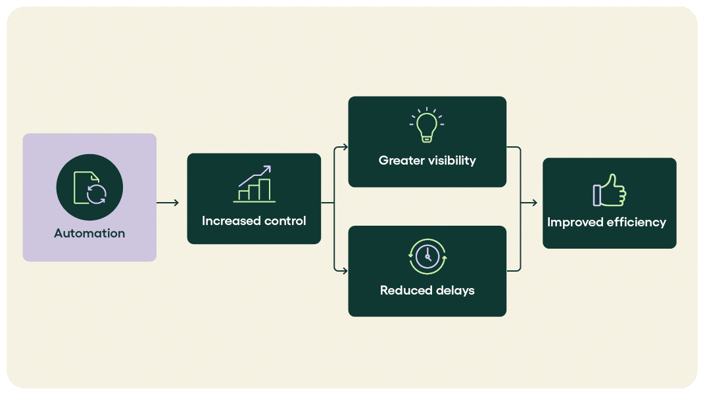
After approval, the system schedules and executes payments using the type of payment automation you have selected — ACH, virtual cards, wire transfers, or checks. You can batch payments or process them individually. The system ensures that payments are made on time and provides flexibility to prioritize payments based on due dates or early payment discounts.
For example, a hospitality business can use automation to schedule weekly payments, processing ACH transfers and virtual cards at the same time to ensure on-time payments and take advantage of early payment discounts.
Payment automation automatically reconciles payments by matching them with corresponding invoices, purchase orders, and receipts. If there are discrepancies, the system flags them for review. It also updates your financial records in real-time within your ERP system, ensuring everything stays accurate.
Throughout the entire process, you get real-time reporting and analytics. You can track payment statuses, monitor cash flow, and analyze payment trends. This gives you the visibility to optimize payment schedules, identify savings opportunities, and ensure compliance.
Reporting and analytics is so important to AP teams that improving it is the most important priority.
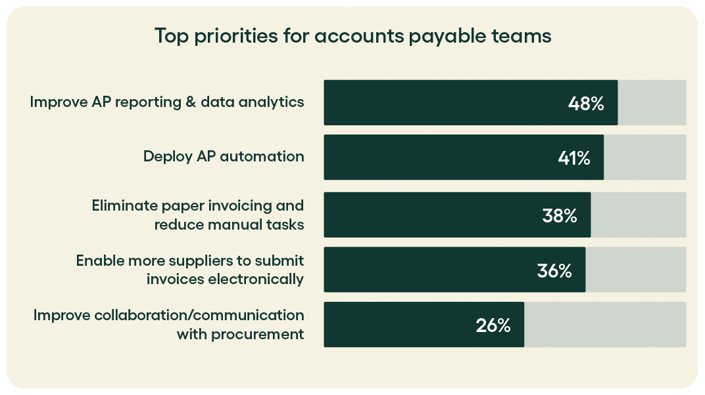
Many automation platforms provide vendor self-service portals, allowing suppliers to track payment statuses, and resolve discrepancies on their own, reducing the workload for your AP team and improving supplier relationships with more transparency.
For example, your company can offer a self-service portal where vendors can check the status of their payments, reducing the need for constant communication with your AP team.
One of the advantages of payment automation is that it gives you more control over how, and how efficiently, you pay. Here's a breakdown of the most common B2B payment methods used by organizations in the US and Canada:
ACH (Automated Clearing House): The most widely used electronic payment method in the US for B2B transactions. ACH transfers are low-cost, reliable, and easy to automate. They typically settle within one to two business days, though same-day ACH is available for time-sensitive payments.
Wire transfers: Faster than ACH and used for high-value or urgent payments. Wire transfers settle the same day, but carry higher per-transaction fees. They're best reserved for large supplier payments or cross-border transactions where speed matters.
Virtual cards: A single-use card number generated for a specific payment. Virtual cards are increasingly popular in AP because they add a layer of security (the number expires after one use), often generate rebates for the paying company, and create a clear digital audit trail. They're particularly useful for one-time or non-PO purchases.
Checks: Still common in B2B transactions, but the most fraud-prone payment method by far. As noted above, nearly two-thirds of organizations experienced check fraud in 2024. Automated payment platforms help organizations shift away from checks toward electronic methods, reducing both fraud risk and processing time.
International/cross-border payments: For businesses with suppliers in Canada or other countries, cross-border payments introduce currency conversion and compliance considerations. Automated platforms that support multi-currency payments simplify this significantly, removing the need for manual FX management or separate banking relationships.
Choosing the right mix of payment methods and automating the routing logic is where AP teams can unlock real efficiency gains.
When payment automation is set up well, the impact goes beyond just saving time.
Reduced processing costs: Automated payment runs cost significantly less per transaction than manual processing, particularly when you factor in staff time, error correction, and late payment fees.
Early payment discount capture: With faster approval cycles, your team can consistently hit early payment windows and negotiate better terms with suppliers.
Scalability: Whether you process 1,000 or 50,000 invoices a month, automated workflows scale without adding headcount.
Cleaner month-end close: Automated reconciliation means fewer outstanding items to resolve at close. Finance teams spend less time chasing down discrepancies and more time on analysis.
Despite the clear benefits, implementing payment automation comes with real obstacles.
Legacy system limitations: Older ERP systems may have limited API capabilities, making integration more complex than expected.
Inconsistent supplier data: Automation relies on accurate supplier master data, including bank details, payment terms, and preferred methods. Poor data quality creates exceptions that require manual intervention.
Change management: AP teams used to manual processes may be cautious about automation, particularly around payment controls. Clear communication and training make a significant difference here.
Fraud and security concerns: Automated payment systems need strong controls to prevent unauthorized changes to supplier bank details or payment amounts. Multi-factor authentication and dual authorization are standard requirements.
Approval bottlenecks: Automation speeds up the mechanical steps, but if approvers are slow to act, the overall cycle doesn't improve much. Mobile-friendly approval tools help here.
Payment automation doesn't require a complete overhaul of how you work. Most organizations implement it incrementally, starting with the highest-volume or most error-prone parts of the payment cycle. Here's a practical approach.
Before you automate anything, understand what you're working with. Document how invoices move from approval to payment today:
Who approves payments, and at what thresholds?
How are payments submitted to the bank?
How do you handle exceptions such as wrong amounts, missing POs, or disputed invoices?
How long does reconciliation take at month-end?
This exercise usually surfaces a few bottlenecks you didn't know were there.
Automation works best when the rules are clear. Define your payment approval thresholds, escalation paths, and authorized signatories before you configure anything. For example:
Payments under $5,000 approved by the AP manager
Payments between $5,000 and $50,000 requiring finance director sign-off
Anything above $50,000 going to the CFO
Without standardized rules, automated workflows become just as inconsistent as manual ones.
Payment automation tools need to talk to your ERP or accounting system. This integration is what allows approved invoices to flow automatically into payment runs, and for completed payments to reconcile back against the general ledger without manual intervention.
Check that your automation platform integrates with the systems you already use, whether that's Sage Intacct, Microsoft Dynamics, Oracle NetSuite, or another ERP.
Not every supplier should be paid the same way. Part of setting up automated payments is deciding which method applies to which supplier, and configuring that logic into your workflows. More on payment methods in the next section.
Configure the frequency and logic for your payment runs. Most organizations run payments weekly or twice a month, though some prefer daily runs for high-volume environments. Your automation platform should allow you to:
Group payments by due date to prioritize on-time and early payment discount opportunities
Select payment method by supplier preference or payment type
Exclude invoices that are still in dispute or under review
Sending remittance advice used to mean exporting a spreadsheet and emailing it manually. Automated platforms handle this as part of the payment run. Suppliers receive confirmation automatically, and your accounting system updates in real time. That alone can save your AP team several hours per payment cycle.
Automation isn't set-and-forget. Review your payment data regularly to spot patterns: invoices that frequently require exceptions, suppliers with recurring mismatches, or approval steps that create consistent delays. Use that insight to refine your rules and workflows over time.
At Rillion, the goal is to make AP work the way it should: smooth, controlled, and a lot less stressful.
Rillion's AP automation platform connects invoice processing directly to your payment workflows, so approved invoices move seamlessly into payment runs without manual handoffs. And with Rillion's payments as a service model, you don't need to build or maintain your own banking infrastructure. Rillion handles payment execution on your behalf, routing payments through the right method, managing bank connectivity, and keeping everything compliant, so your team stays focused on the work that actually needs their attention.
Payments are matched, validated, and reconciled automatically, with a full audit trail and ERP sync built in.
With Rillion, you can:
Run automated payment cycles on your preferred schedule
Apply approval rules and authorization thresholds across your organization
Pay suppliers via ACH, wire, virtual card, or eCheck based on their preferences and your policies
Send automated remittance notifications to suppliers
Reconcile payments directly against your ERP in real time
Maintain audit-ready records of every payment action
Connect with major ERP systems including Sage Intacct, Microsoft Dynamics, and Oracle NetSuite
If manual payment runs are slowing your team down, book a demo to see how Rillion's payment automation platform works in practice.