

Checks still move through many AP departments, not because they’re the best option, but because replacing them has felt complicated.
ACH is often the simplest path forward, yet many teams aren’t fully clear on how it works, what it requires, or how to roll it out at scale.
This article gives you a clear, practical view of B2B ACH, including what it is, how it functions, where it fits in your payment mix, how it improves your payment process and what it takes to implement it effectively.
What is business-to-business ACH?
Business-to-business ACH (often called B2B ACH or corporate ACH) is a way for companies to pay each other electronically through the Automated Clearing House network.
Instead of printing and mailing checks, money moves directly from one bank account to another in a secure, digital batch.
For accounts payable teams, this means vendor payments can be sent quickly, with fewer errors, and without the manual work that goes into preparing check runs. ACH is also predictable. Once a payment is initiated, it follows a standard settlement timeline and includes the remittance data vendors need to apply payments correctly.
Where ACH fits in a modern AP payment mix
Most finance teams don’t rely on a single payment type. They use a combination based on cost, speed, vendor preferences, and the level of control they need.
Here’s what ACH usually sits alongside:
- Checks: familiar, but slow and prone to fraud
- Wires: fast, but expensive and harder to scale
- Card payments: secure, with rebate potential
ACH typically becomes the “default” option for everyday vendor payments because it offers the best balance of cost, control, and reliability. Virtual cards complement ACH by adding rebates and enhanced security where they fit, while checks and wires generally remain reserved for exceptions, like vendors who refuse digital payments, urgent one-off payments, or international transfers.

This shift in how companies use each payment method mirrors broader industry trends.
The Association for Financial Professionals reports that ACH volume reached 7.4 billion payments in 2024, up more than 150% over the last decade, while checks now account for just 26% of B2B payments, down from 33% in 2022.
How B2B ACH works behind the scenes
From a user experience side, B2B ACH looks and feels simple. You approve a payment and the vendor gets paid. Et voila.
But behind the scenes, your bank, the vendor’s bank, and the Automated Clearing House network all coordinate to move the funds.
Here’s the basic flow:
- Your AP or ERP system creates a payment file. It includes the vendor’s bank account, routing number, payment amount, and remittance details.
- Your bank receives and validates the file. Once approved, the bank submits it into the ACH network.
- ACH processes payments in batches. The network routes each payment to the correct financial institution.
- The vendor’s bank posts the funds. Remittance data helps them match the payment to the correct invoice.
Most ACH payments settle within one to two business days, though many banks now support same-day ACH for eligible transactions.
A few things make this process work smoothly:
- Banks often require specific file formats, including NACHA-formatted files
- Internal approval workflows must be in place before payments are released
- NACHA rules govern settlement timing, error handling, and data standards
For AP teams, the biggest takeaway is that ACH isn’t difficult, but it does require the right setup between your bank, your ERP, and your internal approval process. The more of that workflow you automate, the easier ACH becomes.
What you stand to gain from introducing business ACH: 7 key benefits
So why have businesses been increasing their use of ACH for vendor payments over the last decade?
Because ACH solves many of the pain points that slow down AP teams, drain budgets, and expose companies to unnecessary risk. Here are the key benefits finance teams gain when they introduce business ACH into their payment process.
1. Lower payment costs
ACH is one of the most cost-effective payment methods available for B2B transactions. Checks require paper, printing, signatures, envelopes, postage, and manual labor. ACH removes nearly all of that overhead.
The Association for Financial Professionals reports that the median cost to issue a check is $2.01–$4.00, while the median ACH payment costs $0.26–$0.50. That gap adds up quickly for teams processing hundreds or thousands of monthly payments.
2. Faster, more predictable processing
Checks move on the postal service’s timeline. ACH moves on the banking system’s timeline.
And that makes delivery much faster and more predictable. Payments typically settle within one to two business days, and many banks now support same-day ACH for eligible transactions.
Controllers and CFOs get better visibility into when cash leaves the bank while an AP team can more confidently plan around vendor payments come month-end.
3. Reduced fraud exposure
Check fraud remains one of the most common types of payment fraud because physical documents are easy to intercept, duplicate, or alter. ACH reduces that risk significantly because payment data isn’t printed, mailed, or handled by multiple people.
AFP’s 2024 Payments Fraud Survey found that 63% of organizations experienced check fraud, compared to 38% experiencing ACH debit fraud. ACH doesn’t eliminate risk, but it dramatically shrinks the attack surface.
4. Less manual work for AP teams
Checks create work at every step. There’s printing, signing, stuffing, mailing, tracking, reissuing, and reconciling. ACH removes almost all of that. Once approvals are complete, payments can be sent in batches and processed digitally.
This frees AP teams from low-value, repetitive tasks and reduces the number of handoffs in the payment process.
5. Better remittance information for vendors
ACH supports structured remittance data, which makes it easier for vendors to match payments against open invoices. That means fewer payment-status inquiries, fewer misapplied payments, and fewer reconciliation delays.
It creates less back-and-forth and faster payments. A win for both AP teams and vendors.
6. Stronger controls and audit readiness
Paper-based payments create gaps that are hard to monitor. There’s manual signatures,informal approvals, and inconsistent documentation. Whereas, B2B ACH fits naturally into a structured approval workflow.
It gives finance teams:
- Digital audit trails
- Consistent approval steps
- Clear visibility into when payments were initiated, approved, and sent
As a result, audits are smoother and internal controls are strengthened, especially in multi-entity environments.
7. A foundation for payment automation
ACH is often the first step toward broader AP automation because it’s predictable, digital, and easy to integrate. Once ACH is in place, teams can introduce:
- Automated payment runs
- Vendor-specific payment rules
- Virtual card payments (to earn rebates)
- Automated reconciliation
- Integrated ERP posting
How to implement B2B ACH payments step-by-step
Introducing ACH into your payment workflow is straightforward when you break it into clear, practical steps. These are the same steps most mid-sized finance teams follow when transitioning away from checks and building a more modern AP process.
Step 1: Map your current payment process
You will need to start by documenting how payments move through your organization today. Here are the most important details to capture:
- Where invoices come from
- How approvals happen
- Who signs off on payments
- How check runs are created and released
- Which vendors already accept ACH
By collecting these details, you will get a clearer picture of where payment bottlenecks exist and where ACH can remove unnecessary steps such as manual signatures, physical check handling, and the time spent preparing and distributing paper payments
Step 2: Choose internal ACH setup or an automated ACH workflow
Next, decide whether you’ll manage ACH internally through your bank portal or run payments through an AP automation system. The difference comes down to how much manual work your team can reasonably support.
Managing ACH internally typically means:
- Creating NACHA-formatted files manually from your ERP
- Having IT maintain export templates or scripts
- Uploading files into your bank portal for every payment run
- Relying on a small group of users with bank permissions
- Handling ACH exceptions, errors, and returns manually
Using an automated ACH workflow means:
- ACH B2B payment files are generated automatically within your AP system
- Approvals happen in one place, not across email chains
- Bank connections are preconfigured and tested
- Payment runs follow consistent rules based on invoice type, amount, or vendor
- Remittance data and reconciliation happen automatically
Both methods work, but automation reduces operational effort and risk.
Step 3: Collect and validate vendor banking information
This is often the hardest phase. Not because ACH is complex, but because vendor onboarding takes time and coordination. Finance teams typically need to gather:
- Vendor account and routing numbers
- Bank name and remittance contact
- Authorization forms or confirmations
This information must be collected securely and validated. Email is risky and often leads to errors. Many teams use shared inboxes, spreadsheets, or PDFs, which makes tracking difficult.
Common issues AP teams run into:
- Vendors delay sending banking information
- Submitted details contain typos
- Bank accounts fail validation
- Vendors want reassurance about security
- AP spends days following up to close the loop
These challenges are why vendor enablement becomes the biggest barrier to ACH adoption and why many companies stall before reaching full rollout.
Step 4: Set up payment approvals
Your ACH workflow needs a clear set of approval rules to match (or improve upon) your existing check controls. Most organizations formalize:
- Approval thresholds (e.g., under $10K requires one approver, over $10K requires two)
- Segregation of duties (who prepares, who approves, who releases payments)
- Role-based access inside the ERP or AP system
- Backup approvers for month-end and vacation coverage
- Cutoff times to ensure payments settle when expected
Step 5: Test file formats and bank connections
Before processing real vendor payments, you need to confirm that your payment files and bank connection work the way your bank expects.
This typically starts with reviewing your NACHA file structure to ensure every field maps correctly from your ERP or AP system. Even small formatting differences, such as how addenda records or vendor IDs are handled, can cause a B2B ACH payment file to fail.
Most banks will ask you to run a series of test transactions. These often include prenotes or zero-dollar entries so you can verify that vendor account information is accurate and that the bank can accept your files without errors.
It is also important to confirm your bank’s cutoff times so you know when payments will settle, especially if you plan to use same-day ACH.
Finally, make sure your remittance information displays correctly for the vendor. This helps prevent confusion on their end and reduces reconciliation questions. By completing these tests early, you avoid payment failures later and ensure the workflow is stable before going live.
Step 6: Roll out your vendor conversion plan
Once the technical foundation is in place, it’s time to bring vendors onto ACH. A structured approach makes this process manageable.
Most teams find success by:
- Identifying the vendors paid most frequently or for the highest amounts
- Sending a standard ACH enrollment form or secure onboarding link
- Explaining benefits clearly: faster payments, cleaner remittance data, fewer delays
- Tracking who has responded and who still needs follow-up
- Planning multiple outreach attempts because vendors often need reminders
- Offering fallback methods for vendors who prefer checks or card payments
This step takes persistence. For many organizations, vendor enablement is where ACH rollout slows down, which is why the next section focuses on this challenge specifically.
Your biggest B2B ACH implementation challenge: Vendor enablement
Adoption is the make-or-break factor in any initiative. HR can launch a new benefits program, but it won’t matter if employees don’t use it.
Product teams can spend months building a powerful new feature, but the real value only appears when customers adopt it.
ACH works the same way. And getting vendors to enroll in ACH requires more coordination, and more follow-through, than teams expect.
Because vendors must share sensitive banking details, many hesitate to do that over email. Now that hesitation could be assuaged by communicating how secure the process is but you also may need to see if they’re worries are about ACH fees as well as a resistance to change.
To get the vendor on board, AP teams often:
- Send repeated outreach requests
- Track responses in spreadsheets
- Validate banking information manually
- Follow up when numbers don’t match or forms are incomplete
- Resolve payment returns when details are outdated or incorrect
Each interaction takes time. Multiply that across hundreds or thousands of suppliers, and vendor conversion becomes the most resource-intensive part of ACH implementation.
This is the true barrier to ACH adoption. But there’s good news: Rillion can help.
How Rillion Pay helps companies move from checks to ACH (without extra AP work)
These workload and coordination challenges are exactly where an automated payments solution can make the biggest difference. Rillion Pay takes on the operational steps behind ACH and virtual card payments so AP teams don’t have to manage them manually.
Rillion Pay is the payments layer of the Rillion platform.
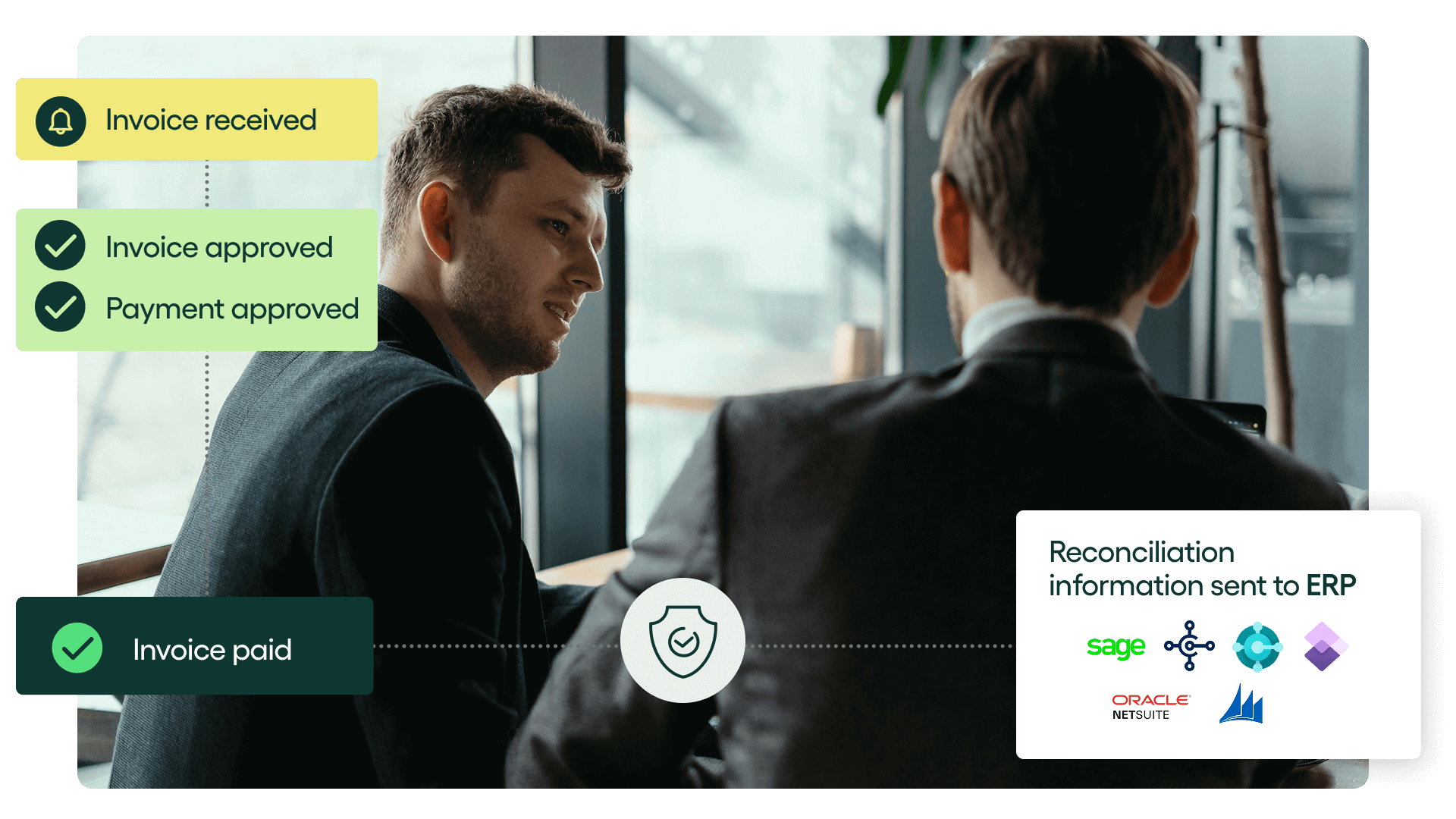
The AP automations side of the platform automates invoice capture, coding, approvals, matching, and ERP updates. Rillion Pay extends that automation to executing secure, accurate vendor payments, with AI assisting in the background to validate vendor data, surface exceptions early, and reduce the manual review AP teams typically carry.
Here’s what Rillion Pay manages on behalf of AP teams:
- Vendor onboarding: a secure enrollment process where vendors enter and update their banking details, with validation built in.
- Payment execution: ACH and virtual card payments sent automatically once invoices reach payment-ready status, no bank portals or NACHA files. (Plus, if you use virtual card payments you’ll earn a rebate with every purchase.)
- Remittance delivery: vendors receive clear, structured remittance details without AP sending emails or attachments.
- Exception handling: issues such as incorrect account numbers or returned payments are resolved directly with vendors.
Because Rillion Pay connects directly with ERPs like Microsoft Dynamics, NetSuite, Sage, and SAP Business One, payment data posts cleanly without manual entry.
Finance leaders also gain better visibility across the entire payment cycle. Rillion’s analytics tools show payment status, vendor adoption, exceptions, and cash flow impact in real time, making it easier to support audits and month-end close.
Ready to eliminate checks for good?
If you’re looking to phase out checks, reduce fraud risk, and build a faster, more scalable payment operation, Rillion Pay makes the transition straightforward.
Book a demo here and join 3,000+ companies already transforming accounts payable.
Corporate ACH | FAQs
What is corporate ACH and how is it different from consumer ACH?
Corporate ACH refers to ACH payments exchanged between businesses, typically for vendor invoices, reimbursements, or recurring service fees.
The mechanics are the same as consumer ACH, but corporate ACH includes additional formats and data fields that support business requirements such as remittance details, addenda records, and higher transaction limits.
Is ACH safe for B2B payments?
Yes. ACH is one of the safest ways for businesses to move money because payments are authenticated, transmitted through a regulated network, and traceable end-to-end.
Unlike checks, ACH doesn’t expose account information on physical documents that can be intercepted or altered. When paired with secure vendor onboarding and validation, which Rillion Pay manages as part of the payment process, ACH significantly reduces payment fraud risk.
How do I transition vendors from checks to ACH?
The transition starts with communicating the benefits to vendors and collecting accurate bank information through a secure process.
The biggest workload comes from tracking who has responded, validating details, and managing corrections. Many organizations struggle to keep up with this volume. Rillion Pay simplifies the shift by handling vendor outreach, enrollment, validation, and exception resolution for you, so AP doesn’t have to manage onboarding manually.
Can ACH be automated through AP software?
Yes. ACH can be fully automated when AP software handles the steps that usually require manual effort, such as vendor enrollment, payment routing, file generation, remittance delivery, and reconciliation.
With Rillion Pay, ACH runs inside the same workflow as the rest of your payment process. Invoices are approved, and payments are executed automatically
Should you use ACH or virtual cards?
Most organizations benefit from using both. ACH is low cost, reliable, and ideal for recurring vendor payments or high-volume transactions.
Virtual cards offer stronger security and generate rebates, which can offset AP processing costs. A hybrid payment strategy lets you reduce expenses with ACH while capturing revenue and additional control with virtual cards. Rillion Pay supports this by routing each payment to the method that best matches vendor preferences and your payment policies