


Not long ago, most accounting work still relied on spreadsheets, manual data entry, and the usual month-end scramble to get everyone's numbers to agree.
Today, AI can automate much of that work, helping finance teams reduce errors, close the books faster, and handle growing workloads without adding headcount at the same pace.
But with every vendor suddenly marketing itself as "AI-powered," choosing the right platform has become harder than ever.
To help you separate the hype from the tools that actually deliver value, we've rounded up the best AI tools for accounting firms and finance teams, covering a range of use cases and budgets.
For each platform, we'll explain what it does, how it uses AI, who it's best for, what it costs, and where it falls short so you can find the right fit for your team.
Here’s a glimpse at the tools to come:
-
Rillion — AI accounts payable automation
-
TaxDome — AI practice management
-
QuickBooks — AI accounting and bookkeeping
-
Ramp — AI expense management
-
Numeric — AI financial close automation
-
Datarails — AI financial planning and forecasting (FP&A)
-
ChatGPT & Claude — General-purpose AI assistants
What to look for in an AI accounting or finance tool
Many finance platforms on the market now claim some kind of AI edge. They’re not hard to find. The hard part is telling which ones actually save your team time versus which ones bolted a chatbot onto an old interface and called it innovation.
A few things worth scrutinizing before you sign anything:
-
Does it fit into what you already run? Good AI tools don't ask you to tear out your finance stack and start over. They plug into your ERP, your accounting software, your banking and payroll systems — the tools your team has already built workflows around.
-
Can you actually trust its output? Finance is the wrong place for a black box. Push vendors on this: can the tool explain why it flagged something or made a recommendation? Is there an audit trail? And critically, does a human still sign off on anything that matters, or is the AI making calls on its own?
-
Will your team survive rolling it out? The most sophisticated AI in the world is worthless if it takes half a year to implement or forces everyone to relearn how they work. Ask what onboarding actually looks like to avoid surprises and potential delays.
-
What does it really cost, long-term? The subscription price is just the opening bid. Factor in implementation fees, paid add-ons, AI features that turn out to be gated behind the enterprise tier, and whether the pricing still makes sense if your team doubles in size.
The vendors worth your time will welcome these questions. The ones that dodge them are telling you something too.
7 best AI tools for accounting firms and finance teams
From bookkeeping and accounts payable to financial close, FP&A, and practice management, these are the AI tools making the biggest impact across accounting and finance:
1. Rillion — AI accounts payable automation
Rillion is an AI-powered accounts payable automation platform that helps finance teams digitize the entire invoice-to-payment process.
The platform captures invoice data with over 90% accuracy, recommends general ledger coding, and routes invoices to the right approvers automatically.
It also connects with more than 50 leading ERPs and gives finance teams a centralized view of accounts payable across multiple entities, helping reduce errors, speed up month-end close, and maintain complete visibility over spend.
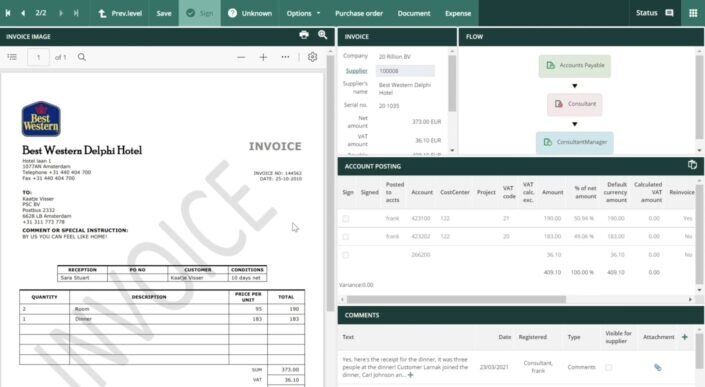
Best for: Mid-market finance teams processing high invoice volumes, especially multi-entity organizations that need centralized AP visibility and automation.
Core features:
- AI-native invoice capture: Extracts invoice data across different formats with over 95% accuracy from the first invoice, while recommending the correct general ledger codes based on previous coding patterns.
- AI-powered approval workflows: Automatically routes invoices to the right approvers using customizable rules or AI-driven recommendations, with support for role-based approval paths.
- 3-way purchase order matching: Matches invoices against purchase orders and goods receipts to improve accuracy, reduce manual checks, and strengthen compliance.
- Automated payments: Automates vendor payments, with support for secure virtual cards and automated reconciliation.
- Multi-entity management: Manage invoices, approvals, and spend across multiple companies or business units from one centralized dashboard with real-time visibility.
- Reporting and spend analytics: Track invoice status, spending patterns, and AP performance with reporting that provides visibility across entities and business units.
- 50+ ERP integrations: Sync invoices, approvals, and payments directly with more than 50 leading ERP systems (including Microsoft Dynamics, NetSuite, Sage Intacct, and SAP Business One) to eliminate double entry and keep financial data accurate.
- Riley AI assistant: Ask natural-language questions about invoices, suppliers, or approval workflows and receive instant answers directly within the platform.
Pros:
- AI purpose-built for accounts payable workflows
- Excellent support for multi-entity finance teams
- Deep ERP integration with 50+ leading systems
- High invoice capture accuracy from the first invoice
- Fast, intuitive approval experience across desktop and mobile
- Reduces manual data entry and double entry
- Designed for high-volume invoice processing
Cons:
- May offer more functionality than smaller AP teams need
- Some advanced configuration requires implementation time
- Custom pricing requires contacting sales
Pricing:
- Essential: Custom pricing. Includes invoice automation, approval workflows, multi-entity management, reporting, and Riley AI Assistant. AI-native invoice capture, PO matching, document management, payments, and other modules are available as add-ons.
- Professional: Custom pricing. Adds AI-powered coding and approval workflows, Riley AI Assistant Pro, AP analytics and industry benchmarks, recurring invoice automation, and a dedicated Customer Success Manager.
- Premium: Custom pricing. Includes everything in Professional, plus an Automation Coach and Service Delivery Manager for enterprise implementation and ongoing optimization.
2. TaxDome — AI practice management
TaxDome is an end-to-end practice management platform that puts AI at the center of how accounting, tax, and bookkeeping firms run their operations.
With its expanding suite of AI-powered capabilities, it's becoming increasingly popular with mid and large sized firms looking to automate high-volume work and surface the insights that matter.
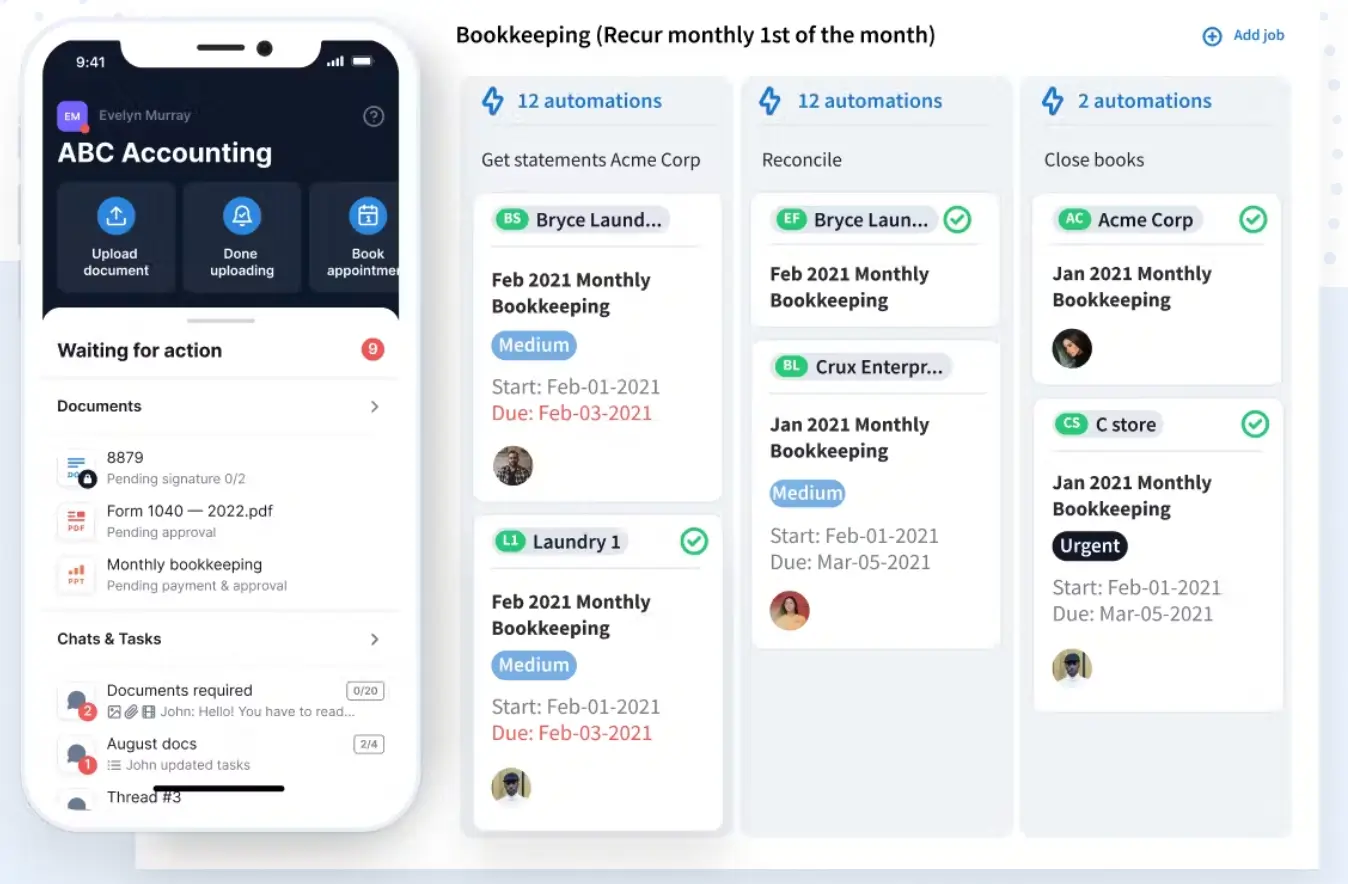
Best for: Mid to large sized tax firms that want a single source of truth for their entire practice — with AI doing more of the heavy lifting on document organization, data entry, and reporting.
Core features:
- AI-powered intake and data entry: Run the entire tax prep workflow in one place, from personalized organizers and document collection through to AI-powered data entry, return delivery, and automated estimated payment reminders. Powered by TaxDome's integration with Juno, which extracts form data with up to 99% accuracy and sends it directly into your tax software.
- TaxDome AI document organization: Automatically renames and tags incoming client documents using AI, reducing manual admin and keeping every client file clean and searchable from day one.
- AI-powered reporting and insights: Provides real-time visibility into firm performance with AI-driven analytics. Tracks team output, workflow efficiency, and revenue — surfacing the insights that matter without manual reporting.
- Integrated CRM and secure client portal: Manage client interactions and relationships through a user-friendly client portal — available on desktop and mobile via the client app — that facilitates secure document sharing, e-signatures, and communication, all in one place.
- Automated workflows and billing: Automate billing processes and streamline workflows with recurring billing, automated reminders, and payment processing through TaxDome Payments.
- Document storage and e-signatures: Unlimited cloud storage with built-in e-signature, PDF editing, document annotations, merging, and secure storage — all without third-party tools.
- Mobile app: Manage your practice from anywhere with the TaxDome firm app. Clients get their own dedicated app to scan and upload documents, securely chat, sign, and pay from their phones.
- Secure communication: Built-in secure messenger with chat, SMS, and email integrated within the CRM and client portal for encrypted communication between your team and clients.
Pros:
- AI built into core workflows, not bolted on
- All features, one platform
- Built specifically for accounting firms
- A client experience clients actually use
- Scales with your firm
- Strong security standards
- Saves firms significant money
Cons:
- Learning curve at setup
- Per seat pricing
Pricing:
TaxDome Essentials:
- 3 years: $700/year per user
- 2 years: $750/year per user
- 1 year: $800/year per user
TaxDome Pro:
- 3 years: $900/year per user
- 2 years: $950/year per user
- 1 year: $1,000/year per user
TaxDome Business:
- 3 years: $1,100/year per user
- 2 years: $1,150/year per user
- 1 year: $1,200/year per user
3. QuickBooks — AI accounting and bookkeeping
QuickBooks pairs its cloud accounting software with Intuit Intelligence, the built-in AI layer that handles routine bookkeeping work like categorizing transactions, reconciling accounts, and generating financial reports for a business's or client's books.
It's included on every QuickBooks plan, and it comes with a chat-based AI assistant that answers business questions on the spot, plus AI agents dedicated to tasks like identifying tax errors before you file.
Move up to the higher-tier plans, and you gain more capability: AI that flags accounting errors, delivers tailored financial insights, supports customer follow-ups, and speeds up project management tasks.
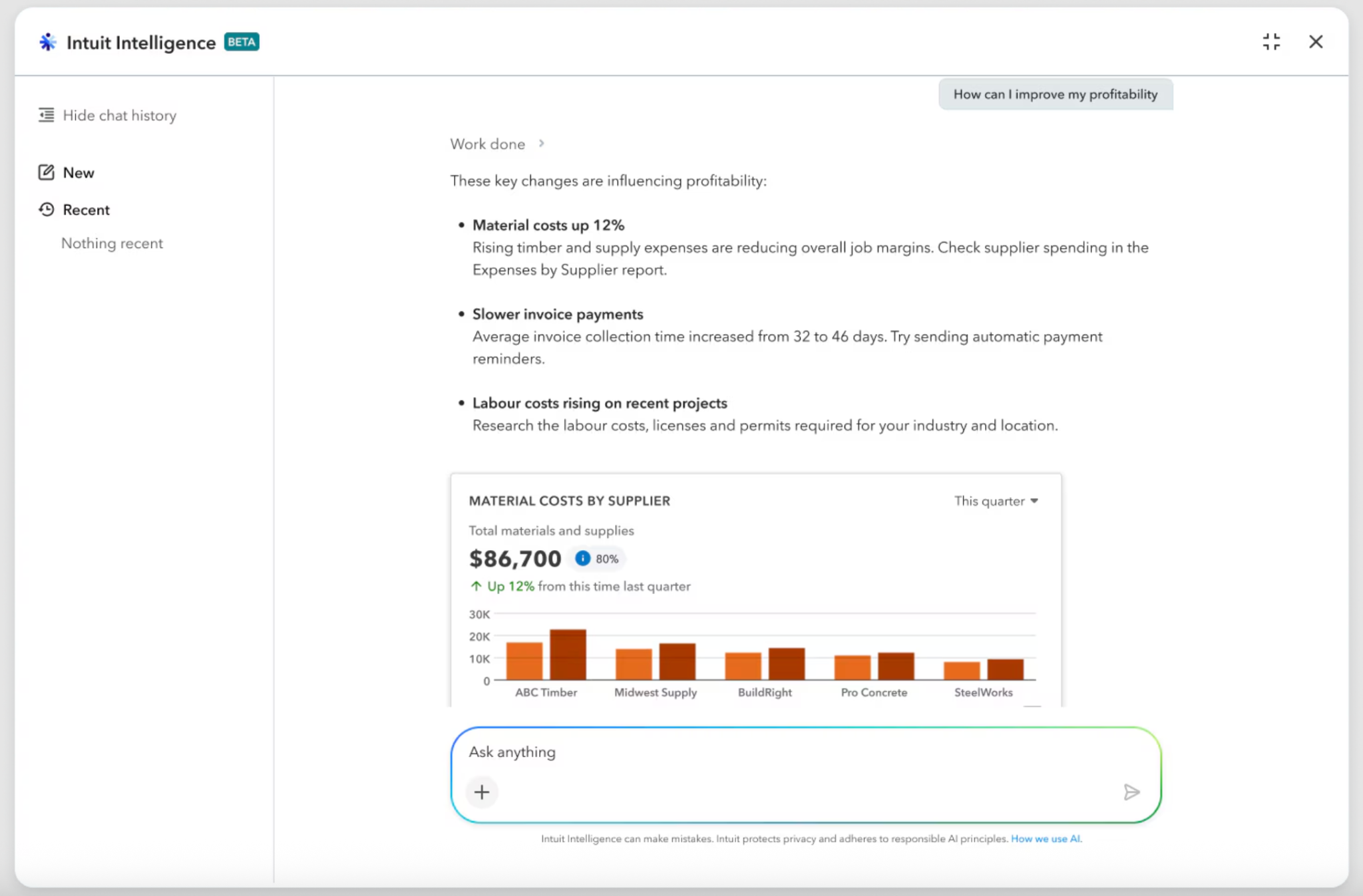
Best for: Small and mid-sized accounting firms and finance teams looking for AI-powered bookkeeping and accounting software that's easy to implement and scale.
Core features:
- Intuit Intelligence chat assistant
- AI-powered transaction categorization
- AI-assisted account reconciliation
- Accounting AI for finding and fixing transaction errors
- Finance AI for tailored business insights
- Customer AI for lead tracking and follow-ups
- Project Management AI for faster project setup
- Real-time financial reports and dashboards
- Income, expense, invoicing, and bill management
- Bank, payroll, and 650+ third-party app integrations
Pros:
- Accessible pricing with plans ranging from US$38 to US$275 per month
- Connects with 650+ third-party apps
- Full-featured mobile app for managing accounting tasks on the go
Cons:
- Many advanced AI capabilities are only available on higher-tier plans
- Customer support quality can be inconsistent
- Subscription price increases have been a recurring concern among long-term users
Pricing:
- Simple Start: US$38/month (1 user, with access for 2 accountants)
- Essentials: US$75/month (3 users, with access for 2 accountants)
- Plus: US$115/month (5 users, with access for 2 accountants)
- Advanced: US$275/month (25 users, with access for 3 accountants)
4. Ramp — AI expense management
Ramp is an AI-powered expense management platform that brings corporate cards, reimbursements, and spend controls together in one place.
Its AI captures and matches receipts, fills in memos and categories, recommends approval actions, and checks every expense against company policy. Compliant transactions move through automatically, while only exceptions are flagged for review.
Ramp then codes and syncs expenses to connected accounting systems, cutting down on manual work and giving finance teams a real-time view of company spending.
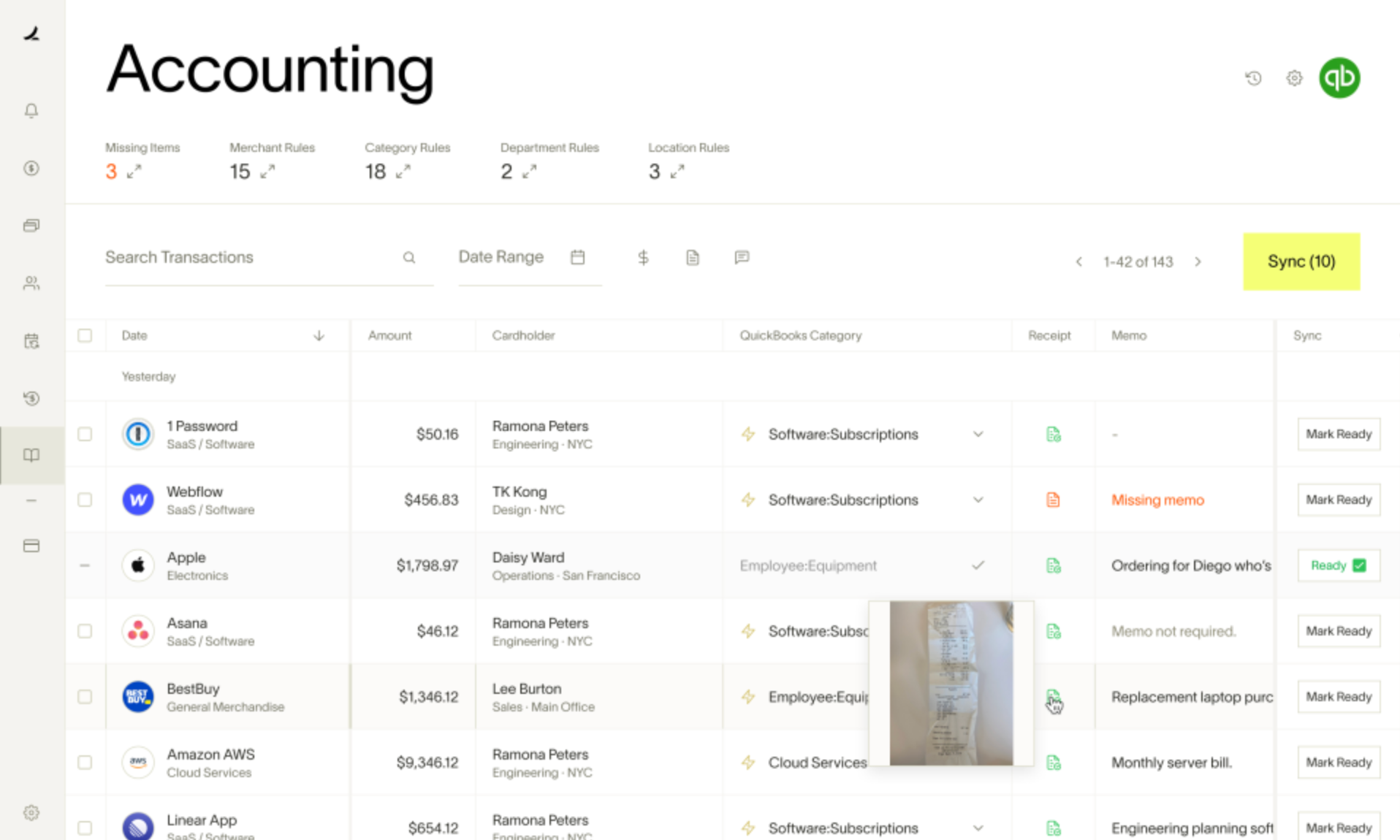
Best for: Finance teams of all sizes looking to streamline expense management and enforce spending policies at scale.
Core features:
- AI-powered receipt capture and transaction matching
- Automated expense categorization and memo creation
- Policy Agent for reviewing expenses and flagging violations
- AI-recommended actions for spend requests
- Corporate cards with built-in limits and spending controls
- Automated reminders for missing receipts and information
- Natural-language assistant for policy and card questions
- Accounting coding and ERP synchronization
- Real-time expense, budget, and spend reporting
- Employee reimbursements and mobile expense submission
Pros:
- Free plan available with AI-assisted expense management features
- 200+ integrations with leading accounting, ERP, and business tools
- Real-time visibility into company spending and budgets
Cons:
- Most advanced AI automation features require a paid Plus plan
- Setup can feel tedious before everything is configured
- One user noted that AI-powered receipt matching isn't always perfect
Pricing:
- Free: $0/user/month
- Plus: $15/user/month + platform fee (annual billing)
- Enterprise: Custom pricing
5. Numeric — AI financial close automation
Numeric is an AI-native financial close platform built to automate month-end close.
AI is woven through the whole process, helping accounting teams automate reconciliations, investigate discrepancies, explain account variances, monitor close performance, and catch bottlenecks before they cause delays.
On the more advanced side, it also offers technical accounting guidance, automated cash reconciliations, and support for custom AI workflows.
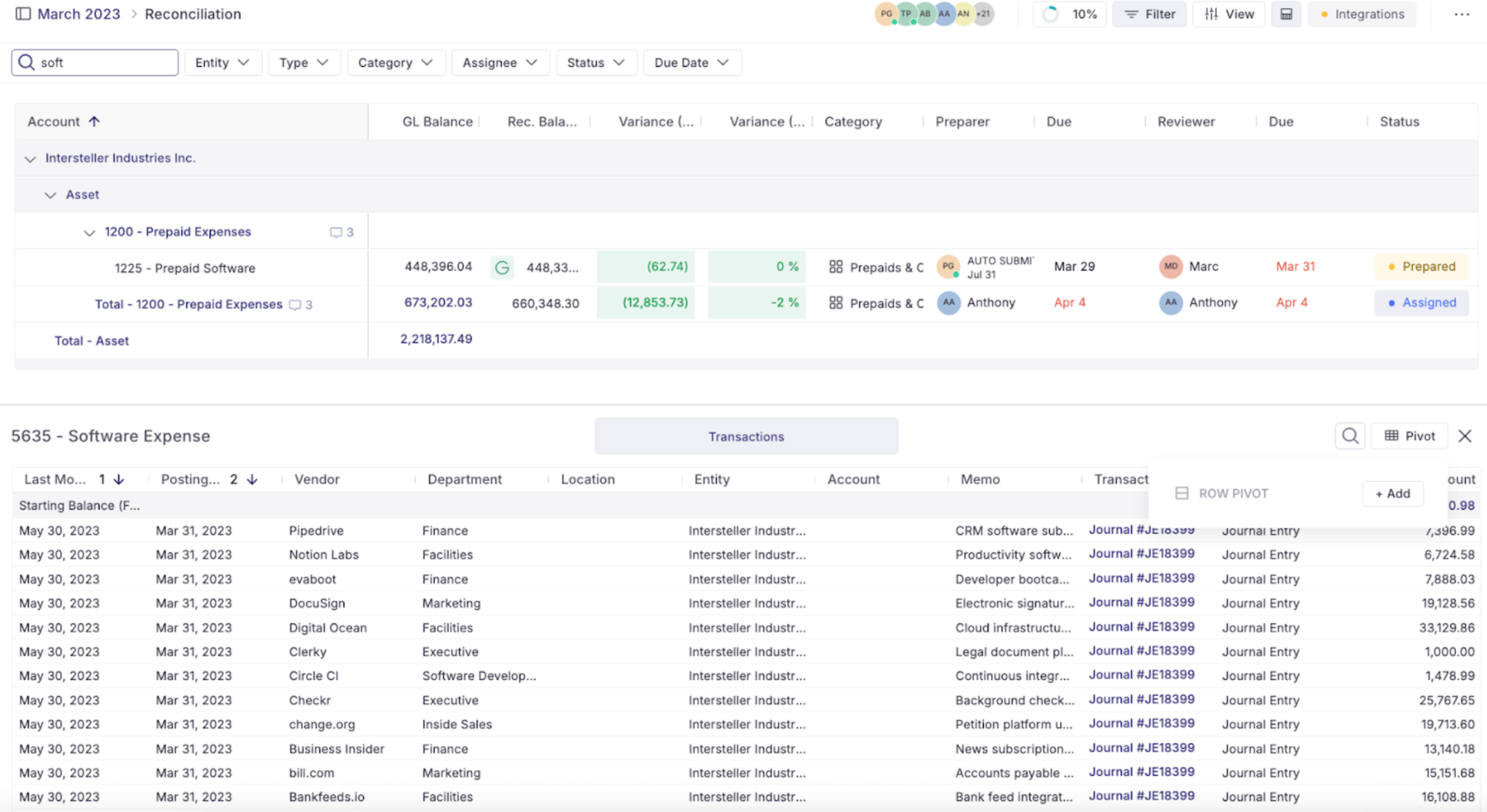
Best for: High-growth companies with accounting and finance teams looking to automate the month-end close and improve close accuracy with AI.
Core features:
- AI-powered close management
- Automated account reconciliations
- AI-generated variance (flux) analysis
- Transaction monitoring and anomaly detection
- Technical accounting AI assistant
- Cash matching and journal entry automation
- Real-time ERP integrations
- AI-powered close insights and bottleneck detection
- CFO-ready reporting
Pros:
- AI purpose-built for accounting and the month-end close
- Users praise its intuitive interface and quick implementation
- Technical accounting AI assistant for GAAP, IFRS, and UK GAAP guidance
Cons:
- Advanced automation features require Growth or Enterprise plans
- Custom pricing for higher-tier plans
- Flux reporting offers limited flexibility for custom comparison periods
Pricing:
- Essentials: Starts at $30/user/month
- Growth: Custom pricing
- Enterprise: Custom pricing
6. Datarails — AI financial planning and forecasting (FP&A)
Datarails is an AI-powered FP&A platform built for finance teams that rely on Excel for budgeting, forecasting, and financial reporting.
It doesn't ask teams to abandon the spreadsheets they've spent years building. Instead, it automatically brings live financial data from hundreds of business systems into those models, creating a governed, audit-ready foundation for AI-powered analysis.
From there, AI helps generate forecasts, analyze performance, detect anomalies, answer financial questions, and model different business scenarios, all without forcing teams to rebuild their existing workflows.
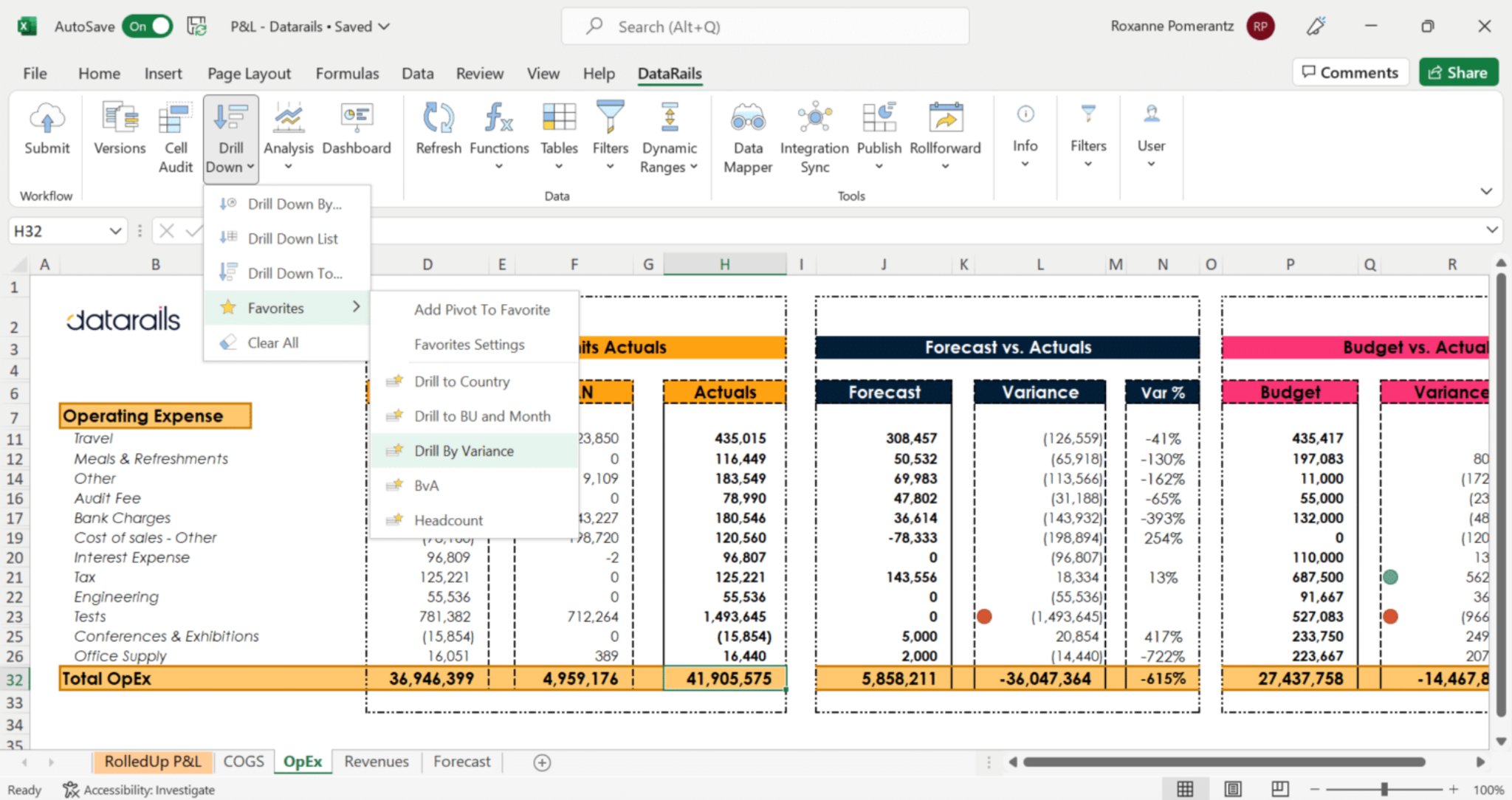
Best for: Finance and FP&A teams looking to modernize planning and forecasting without replacing their existing Excel models.
Core features:
- AI-powered budgeting and forecasting
- Scenario modeling
- AI-powered financial reporting
- AI-generated financial insights
- Anomaly detection
- Automated data consolidation
- Excel-native planning and analysis
- 600+ business system integrations
- Natural language AI queries
- Real-time dashboards
Pros:
- Excel-native platform that works with existing financial models
- Connects data from 600+ business systems
- Built-in audit trails, permissions, and version control
Cons:
- Custom pricing requires contacting sales
- Requires well-structured financial models to get the most from its AI
- Initial onboarding can be time-intensive
Pricing:
- Professional: Custom pricing
- Premium: Custom pricing
- Expert: Custom pricing
7. ChatGPT & Claude — General-purpose AI assistants
Unlike the other tools on this list, ChatGPT and Claude aren't purpose-built finance platforms. Instead, they're flexible AI assistants that help accountants and finance teams work faster across a wide range of everyday tasks.
They can summarize financial statements, analyze spreadsheets, explain accounting concepts, draft variance commentary and board reports, answer questions about financial data, build financial models from prompts, and assist with policies, procedures, and client communications.

Best for: Finance professionals who need an AI assistant for document drafting, spreadsheet analysis, financial research, and day-to-day work.
Core features:
- Natural language question answering
- Spreadsheet and financial document analysis
- Financial research and information synthesis
- Report, memo, and policy drafting
- Financial model generation from prompts
- Document summarization
- File uploads and analysis
- Writing and editing assistance
Pros:
- Extremely flexible across a wide range of finance and accounting tasks
- No implementation or software integration required
- Can analyze uploaded spreadsheets and financial documents
- Free versions available
Cons:
- Not purpose-built for accounting or finance workflows
- No direct connection to your ERP or accounting system by default
- AI-generated outputs should always be reviewed before making financial decisions
Pricing:
- ChatGPT: Free; Plus US$20/month; Pro US$100/month; Business US$25/user/month; Enterprise: Custom pricing.
- Claude: Free; Pro US$20/month; Max from US$100/month; Team US$25/user/month; Enterprise: Custom pricing.
How to choose the right AI tool for accounting and finance
The best AI investment is the one that removes your biggest bottleneck first. Identify which process is costing your team the most time, then choose the tool that's purpose-built to solve that problem.
Need better practice management? TaxDome is a solid fit. For bookkeeping, QuickBooks is still hard to beat. Ramp stands out for expense management, Numeric handles month-end close well, Datarails covers planning and forecasting, and ChatGPT or Claude work well for everyday research and drafting.
And if accounts payable is where things tend to get stuck, it's worth taking a closer look at Rillion and how it automates invoice processing from receipt through payment.
The takeaway: no single platform is built to do everything. The best results come from choosing software designed for the one workflow you most need to improve.