


Moving from Dynamics GP to Business Central is a good time to look closely at your AP setup.
Your invoice workflows, approval rules, coding, and payment process all need to work after the move. Carrying the same AP tool across only works if it can support Business Central and the complexity your team already handles.
This guide compares eight AP automation tools for Microsoft Dynamics, including Business Central, GP, and Dynamics 365 Finance, based on integration, invoice capture, PO matching, approvals, payments, and migration fit.
We cover:
- Rillion: Best for complex AP across GP, Business Central, and D365 Finance
- Continia Document Capture: Best for teams that want AP to stay inside Business Central
- Stampli: Best for collaboration-heavy approvals
- Medius: Best for enterprise spend management on Dynamics
- Yooz: Best for easy setup across several Dynamics versions
- Fidesic: Best for Dynamics teams that want a specialist in GP and Business Central
- Zetadocs Capture: Best for simple, low-setup capture inside Business Central
- Business Central Payables Agent: Best for low-volume teams that want to stay native
Best AP automation for Microsoft Dynamics at a glance
| Tool | Best for | Dynamics support (GP / BC / D365 Finance) | Standout feature |
| Rillion | Complex AP across Dynamics | Yes / Yes / Yes | Rillion Capture for AI invoice capture and coding |
| Continia Document Capture | Keeping AP inside Business Central | No / Yes / No | Advanced Capture for line-level invoice data |
| Stampli | Collaboration-heavy approvals | Yes / Yes / Yes | Billy for AI coding, routing, and invoice work |
| Medius | Enterprise AP and spend management | No / Yes / Yes* | Medius Copilot for AI help during invoice review |
| Yooz | Broad Dynamics support with a simple setup | Yes / Yes / Yes | YoozProtect for invoice and payment fraud checks |
| Fidesic | Dynamics GP and BC specialists | Yes / Yes / No | MagiCapture for template-free invoice capture |
| Zetadocs Capture | Simple AP automation inside BC | No / Yes / No | Smart Invoice Capture with AI and BC data |
| Business Central Payables Agent | Low-volume teams that want to stay native | No / Yes / No | Purchase Document Drafts for AI-assisted invoice entry |
Note: *Medius supports several Microsoft Dynamics products, including Business Central, D365 Finance, AX, and NAV, but Dynamics GP is not currently listed among its supported integrations.
Moving from Dynamics GP to Business Central? Your AP tool should be able to move too
Moving from Dynamics GP to Business Central is a good time to review more than the ERP itself. Your AP setup matters too.
AP automation tools connect closely to the ERP. They pull in vendor records, POs, coding data, and approval rules, then send approved invoices and payment data back.
If your current AP tool only supports GP, it may not follow you to Business Central. That can turn an ERP move into an AP replacement project at the same time.
The better option is to plan both together. An AP platform that supports GP and Business Central can give finance more room to move at its own pace, especially if different companies or teams switch systems at different times.
Before choosing an AP vendor, ask three questions:
- Do you support both GP and Business Central today? If your move will happen in stages, the same AP platform should be able to support both systems during the transition.
- What carries over when we move? Ask about approval flows, coding rules, invoice history, supplier data, and document archives.
- Can AP keep running during a phased migration? Larger companies may move one entity or business unit at a time. Your AP tool should be able to support that setup without forcing finance to run two separate processes.
The goal is to avoid rebuilding AP twice. If your provider can support both systems, you can keep invoice processing stable while the wider ERP migration moves forward.
Does Business Central have AP automation?
Yes, Business Central includes some AP automation, but it may not cover every workflow a larger finance team needs.
Business Central can handle purchase invoice entry, approval workflows, and basic matching. Microsoft has also added the Payables Agent, a Copilot feature that can read PDF invoices sent by email and create draft purchase invoices for review.
That takes some data entry off the AP team, but there are limits.
- Draft invoices still need review before they move forward.
- Copilot usage can add credit costs, depending on your setup and plan.
- Payables Agent is available for Business Central online, not on-premises.
- Approval workflows can be basic across several companies, especially when rules differ by entity or spend type.
- PO matching is more limited than what specialist AP tools can offer for complex, multi-line invoices.
For lower-volume teams, the native tools may be enough. As invoice count, companies, and approval rules grow, many teams add a dedicated AP platform for deeper capture, matching, routing, and control.
How we chose the best AP automation for Microsoft Dynamics
We looked at how each platform fits a real Microsoft Dynamics AP setup, with extra weight on Business Central and teams moving from GP.
We assessed each platform on:
- Dynamics versions supported: We checked whether each tool works with Business Central, GP, D365 Finance, AX, or other Dynamics products. This is mostly important for teams that may run more than one version during a migration.
- Integration method: We looked at whether the connection uses an AppSource extension, API, native add-on, or another connector, and how much data moves between the AP tool and Dynamics.
- Invoice capture: We compared how each platform handles invoice data, line items, coding, and different document formats.
- PO matching: We looked at support for 2-way and 3-way matching, multi-line POs, receipts, tolerances, and how exceptions are handled.
- Approval workflows: We checked how flexible routing is across departments, companies, approvers, and spend levels.
- Multi-company support: For larger Dynamics setups, we looked at whether finance can manage several companies from one AP workflow.
- Payments and pricing: We compared payment options, how payment data flows back to Dynamics, and whether pricing is based on users, volume, modules, or a custom quote.
1. Rillion
Best for complex AP across GP, Business Central, and D365 Finance

Rillion is an AP automation platform for finance teams that need more control over invoice capture, matching, approvals, and payments than their ERP provides on its own.
For Microsoft Dynamics users, one of its main advantages is coverage. Rillion supports Dynamics GP, Business Central, D365 Finance, and AX, so the same AP platform can sit around different Dynamics environments.
Its Business Central integration is listed on Microsoft AppSource. Business Central remains the system of record, while Rillion handles more of the work around each invoice and sends approved data back to the ERP.
How Rillion works with Business Central
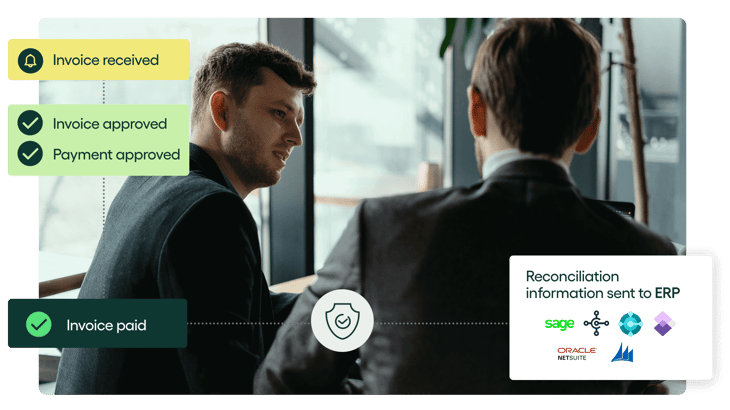
Rillion handles the invoice process from capture through payment, while keeping Business Central data in sync. It reads invoices from PDFs, scans, XML, and other formats, then extracts key details such as supplier names, amounts, and line items.
For PO invoices, Rillion uses 2- and 3-way matching to check details against purchase orders and goods receipts, including complex multi-line POs. It can also suggest GL codes, cost centers, and approval routes based on past invoice history, while sending exceptions to the right people for review.
Once approved, invoices can move through Rillion Pay using ACH, virtual cards, eChecks, or wires, with payment data synced back to Business Central.
Key features
- AI invoice capture and auto-coding: Pulls invoice data and suggests coding based on past invoice history.
- 2-way and 3-way PO matching: Checks invoices against purchase orders and receipts, including more complex multi-line POs.
- Multi-company AP management: Lets finance manage invoices across several companies from one workspace.
- Flexible approval workflows: Routes invoices based on rules such as company, department, amount, or approver.
- Unlimited users and companies: Gives every approver access without adding per-user fees.
- Searchable invoice archive and audit trail: Keeps invoice history, approvals, and changes easy to trace.
Rillion's standout feature: AI invoice capture
Rillion's AI capture does more than copy invoice fields into the system. It reads both header and line-level data and works across different supplier layouts without needing a template for each one.
Rillion Capture can extract invoice data with 95% accuracy from the first invoice. It also validates extracted data against your master data and supports custom rules to handle supplier-specific exceptions, reducing manual corrections and improving automated invoice matching.
Who Rillion is built for
Rillion is a good fit for Dynamics teams where AP has become more complex than basic invoice entry and approval.
It is suitable for:
- GP teams preparing for Business Central that do not want to replace their AP platform again during the move
- Multi-company finance teams that need one view of invoices across several legal entities
- PO-heavy businesses dealing with long or complex purchase orders
- High-volume AP teams that want more invoices coded, matched, and routed before staff step in
- Companies with many approvers, since Rillion includes unlimited users across its plans
See how Robinson Lumber streamlined AP processes with Rillion
Moving from Dynamics GP?
Rillion supports both Dynamics GP and Business Central. Your team can use Rillion to automate AP around GP today and continue using Rillion if Business Central becomes its next ERP.
Explore a simpler way to do AP.
2. Continia Document Capture
Best for teams that want AP to stay inside Business Central
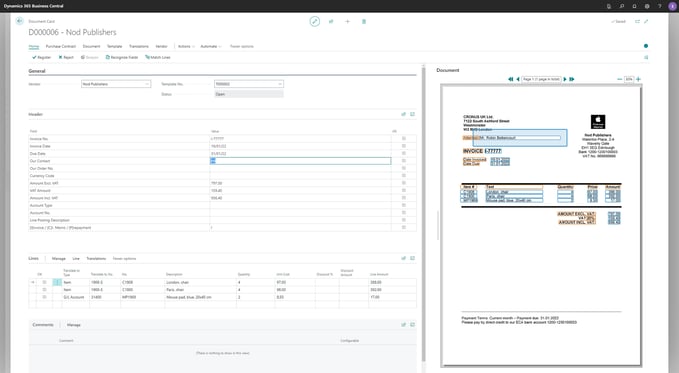
Continia Document Capture is built directly into Microsoft Dynamics 365 Business Central.
It allows you to capture invoices, match them to purchase orders, route approvals, and store documents without moving to a separate AP platform.
Because of this native set up, AP users can work from the same Role Center and records they already use.
Dynamics support
Continia Document Capture supports Business Central and Dynamics NAV. However, it does not support Dynamics GP.
It installs as an extension inside Business Central, so there is no separate AP system or outside ERP connector to maintain.
Key features include:
- Invoice capture: Reads incoming invoices and enters key header and line data into Business Central.
- Approval workflows: Sends invoices to the right people for review while keeping the process inside Business Central.
- Document archive: Stores original invoices and related files against Business Central records for easy search and audit work.
- Multi-entity support: Works with multi-entity Business Central setups, including support for Binary Stream Multi-Entity Management.
Continia's standout feature: AI account suggestion
Continia's AI account suggestion learns from past invoices and can suggest the right G/L account, item, or other account type from the invoice data it reads.
This can cut down the coding work that remains after an invoice has been captured.
Who Continia Document Capture is built for
Continia fits teams already committed to Business Central that want AP to feel like part of the ERP. It also suits companies that prefer to buy and manage their Business Central tools through a Microsoft partner.
Watch-out
Continia does not support Dynamics GP, so a GP team moving to Business Central cannot use the same AP setup on both ERPs during a phased move.
3. Stampli
Best for collaboration-heavy approvals
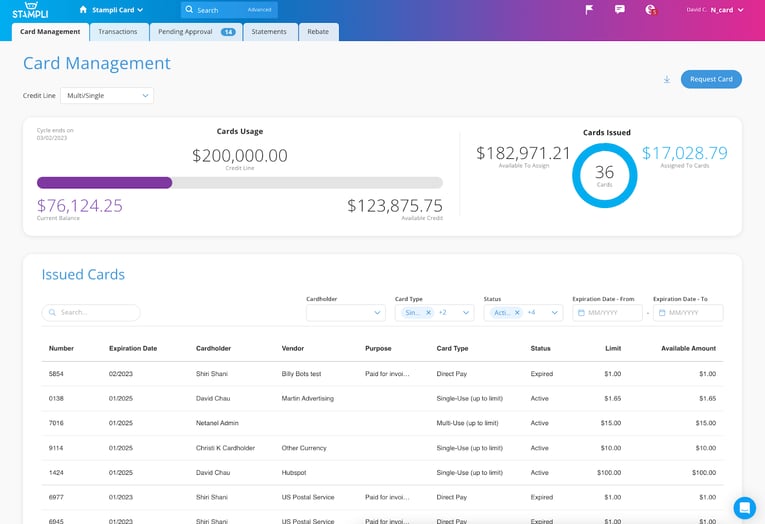
Stampli is a procure-to-pay platform. It keeps invoice data, approvals, comments, supporting documents, payments, and audit history in one workspace.
You can ask questions, tag approvers, and resolve issues on the invoice itself instead of moving the conversation into email or Teams.
Dynamics support
Stampli supports Dynamics GP, Business Central, and D365 Finance. Its GP integration uses Stampli Bridge to connect with on-prem GP through Microsoft technologies such as eConnect, while its Business Central integration syncs vendors, GL accounts, dimensions, POs, receipts, invoices, and payments between the systems.
Key features include:
- Invoice capture and coding: Pulls invoice data into Stampli and suggests coding based on past activity.
- Invoice-level collaboration: Keeps questions, comments, documents, and approval history beside the bill.
- Flexible approvals: Routes invoices to the right people while keeping approval status visible.
Stampli's standout feature: Billy
Billy is Stampli's AI assistant. It learns from past invoices and can suggest coding, identify vendors, predict approvers, and fill invoice fields before a person reviews the work.
Who Stampli is built for
Stampli works well for Dynamics teams where invoice approval involves several people, locations, or departments. It also fits companies moving from GP to Business Central because both systems are supported.
Watch-out
Steve M., a mid-market reviewer on G2, rated Stampli 5/5 and loved its ease of use, but said viewing a full invoice could sometimes feel confusing. Shelby D. raised a similar point about zoom and finding details within invoices.
Related read: 12 best Stampli alternatives for AP automation in 2026
4. Medius
Best for enterprise spend management on Dynamics
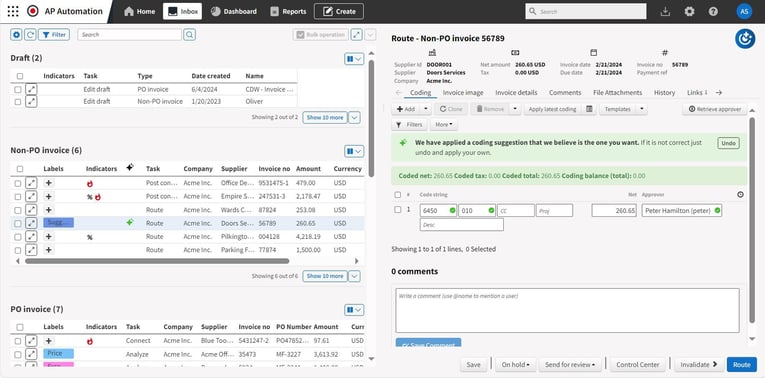
Medius is an AP automation and spend management platform for larger finance teams. It covers invoice capture, coding, PO matching, approvals, payments, fraud controls, and supplier management.
For Dynamics users, Medius is a good addition when AP spans multiple entities or needs to connect with a broader procure-to-pay process.
Dynamics support
Medius supports Business Central, D365 Finance & Operations, Dynamics AX, and Dynamics NAV.
Its Business Central and D365 Finance integrations have passed Microsoft AppSource validation, while AX and NAV use pre-built or managed integrations.
Note: Medius does not currently list Dynamics GP among its supported Dynamics integrations.
Key features include:
- Multi-way matching: Checks invoice lines against POs, receipts, and other records before payment.
- Fraud and risk checks: Uses AI to flag duplicate invoices, unusual activity, and changes that may need review.
- Wider spend tools: Adds procurement, payments, expenses, sourcing, and supplier management when needed.
Medius's standout feature: Medius Copilot
Medius Copilot is an AI assistant built into the invoice approval process. Approvers can ask questions about an invoice, supplier, amount, or payment history and get an answer without going back to AP.
Who Medius is built for
Medius is best suited to mid-market and enterprise Dynamics teams with high invoice volumes, multiple entities, and broader spend-management needs.
Watch-out
Brian A., a G2 reviewer, praised Medius for its strong OCR and flexible rules. But said it was expensive compared with similar tools and found parts of the online documentation hard to use.
G2 also reports an average implementation time of about five months, so larger teams should plan for a more involved rollout.
5. Yooz
Best for easy setup across several Dynamics versions
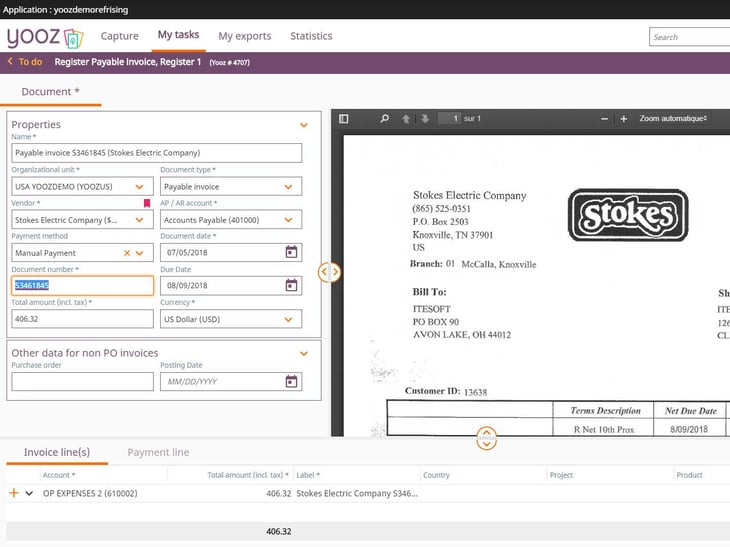
Yooz is a cloud-based purchase-to-pay platform that covers approvals, payments, and purchasing.
Yooz also keeps the AP experience relatively simple. Invoices move through one workflow, while Dynamics remains the accounting system of record.
Dynamics support
Yooz supports Dynamics GP, Business Central, D365 Finance & Operations, AX, NAV, and SL.
For Business Central, Yooz uses an API-based connector that moves invoice data, accounting entries, master data, and payment status between the systems.
Key features include:
- Line-level PO matching: Matches invoice lines against orders and receipts and flags differences for review.
- Configurable approvals: Routes invoices based on company rules, amounts, and other conditions.
- Bi-directional ERP sync: Sends approved invoice data into Dynamics and brings payment status back into Yooz.
Yooz's standout feature: YoozProtect
YoozProtect adds fraud checks throughout the AP process. It uses AI and document analysis to flag suspicious invoices, unusual vendor amounts, and changes to payment details before money leaves the business.
Who Yooz is built for
Yooz fits Dynamics teams that want a cloud AP platform with broad ERP support and a simpler day-to-day interface.
Watch-out
Several users had comments on Yooz's workflow flexibility. Abbas N., a mid-market reviewer on G2, rated Yooz 4/5 and liked how it organized invoice processing and approvals.
But he also said some approval flows and settings could feel rigid and wanted easier customization.
6. Fidesic
Best for Dynamics teams that want a specialist in GP and Business Central
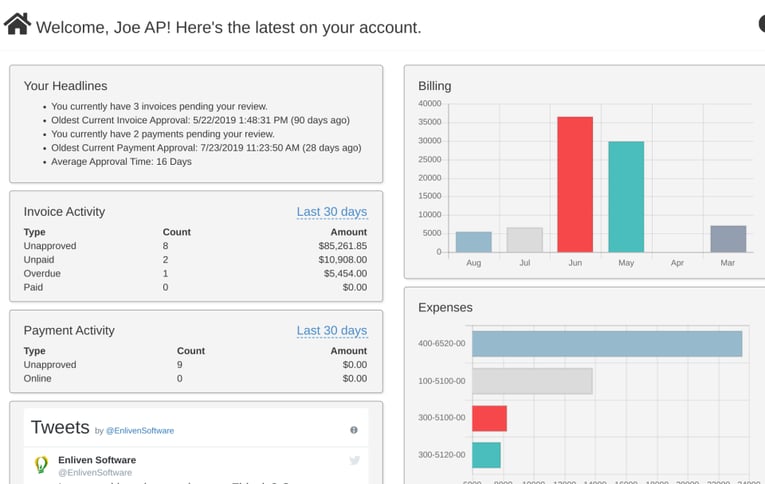
Fidesic focuses specifically on Microsoft Dynamics. It supports Dynamics GP and Dynamics 365 Business Central, which makes it a more specialized option than broader AP platforms that connect with many ERPs.
This specialization can appeal to finance teams that want a provider with deeper knowledge of AP workflows inside the Microsoft ecosystem.
Dynamics support
Fidesic supports Dynamics GP and Business Central. Its Business Central app is Microsoft approved and available through AppSource. Data also syncs across vendors, dimensions, GL records, and other AP information.
Key features include:
- RouteWise: Lets teams build approval workflows based on vendor, location, entity, GL account, or invoice value, with approvals available by email or mobile.
- JustPay: Handles vendor payments through checks, ACH, and mixed payment batches, with Positive Pay support.
- VendorVault: Gives vendors a self-service portal to submit invoices and view payment history.
Fidesic's standout feature: MagiCapture
MagiCapture is Fidesic's AI-powered invoice capture tool for GP and Business Central. It reads invoices without vendor templates and learns from previous submissions.
Who Fidesic is built for
Fidesic is a good fit for companies committed to the Microsoft Dynamics ecosystem, especially multi-location teams running GP or Business Central. It also fits organizations moving from GP-to-BC because the same AP platform supports both systems.
Watch-out
One limitation is how pricing scales with users. Rachel T., an accounting manager, loved Fidesic's Dynamics GP integration and AP workflow but noted that per-user pricing can add up when many supervisors only approve invoices occasionally.
7. Zetadocs Capture
Best for simple, low-setup capture inside Business Central
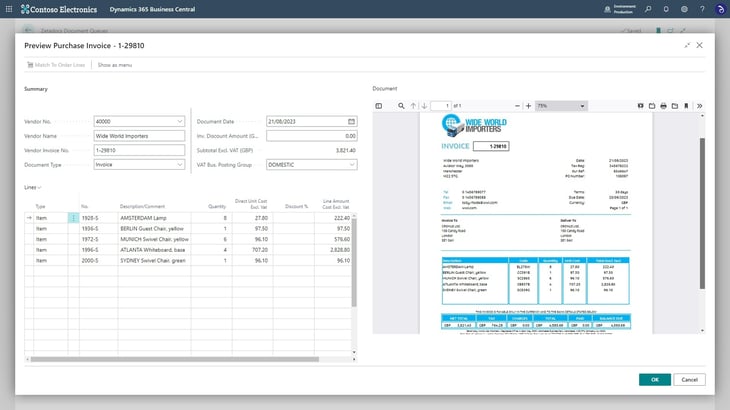
Zetadocs Capture sits inside Business Central and helps finance teams get supplier invoices into the ERP faster, match them to orders, and keep the source documents easy to find.
Documents can also be stored in SharePoint and opened from the related Business Central record.
Dynamics support
Zetadocs Capture supports Dynamics 365 Business Central 14 and later, including cloud and on-premises deployments. It is available through Microsoft Marketplace and works as an extension inside Business Central.
Key features include:
- Batch processing: Lets AP users review and match several invoices in one run instead of returning to the queue after each invoice.
- Receipt status: Shows whether matched PO lines have been received before an invoice moves forward.
- Order matching tolerance warnings: Flags possible matching issues before an invoice is processed.
- Zetadocs documents FactBox: Keeps original invoices in SharePoint and links them to the right Business Central record.
Zetadocs Capture's standout feature: Smart Invoice Capture
Smart Invoice Capture combines template-free OCR with Business Central data.
As invoices arrive, Zetadocs extracts the details and checks them against vendor, item, and GL records in Business Central.
It also remembers past mappings. If an AP user links a certain invoice line to a GL account or item code, Zetadocs can use that choice the next time a similar invoice arrives.
Who Zetadocs Capture is built for
Zetadocs suits small and mid-sized Business Central teams that want to cut invoice entry without adding another large finance platform.
Watch-out
Zetadocs is much narrower than the larger AP platforms in this list. It is focused on Business Central, so it will not support a team that still needs Dynamics GP during a phased migration.
8. Business Central Payables Agent
Best for low-volume teams that want to stay native
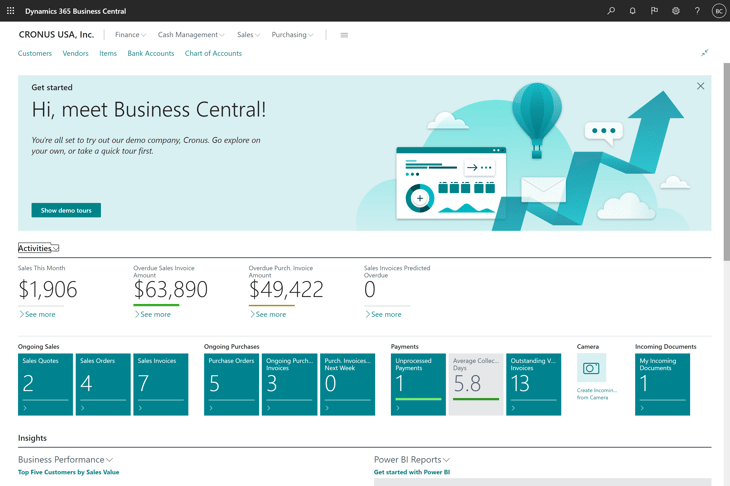
Microsoft's Payables Agent gives Business Central users a native way to automate the first part of invoice processing. Teams can let the agent monitor an invoice mailbox, read incoming PDFs, identify the vendor, and prepare a purchase invoice for review.
The agent still keeps a person in control. It creates drafts and asks a supervisor to step in when it cannot match a vendor or needs a decision. It does not post invoices on its own.
Dynamics support
Payables Agent is built for Business Central online only. It does not support Dynamics GP or D365 Finance, and Copilot features are not available for Business Central on-premises.
Key features include:
- Mailbox monitoring: Watches a set AP inbox and starts work when PDF invoices arrive.
- Azure document intelligence: Extracts vendor names, dates, totals, and invoice lines from PDFs.
- Vendor matching: Checks invoice details against vendor records and can suggest a new vendor when no match exists.
Payables Agent's standout feature: Purchase Document Drafts
Users can see the values Payables Agent suggested, why it chose them, and which fields still need attention.
Once the draft is approved, the agent turns it into an unposted purchase invoice for the normal Business Central process.
Who Payables Agent is built for
Payables Agent is best suited to smaller Business Central teams with simple invoice flows.
Watch-out
Payables Agent keeps the setup simple, but it comes with some clear limits. It does not support approval workflows or anomaly detection, and regular use consumes Copilot Credits.
Email processing is also limited to PDF invoices, with caps on file size, page count, and daily volume.
How to choose AP automation for Microsoft Dynamics
When choosing an AP tool, you need to understand how your Dynamics setup works today and where it is heading.
A platform that fits Business Central now may become a problem if you still run GP, add more companies, or move to D365 Finance later.
Use these points to narrow the list:
- Start with the Dynamics versions you will run over the next three years: Check what you use now and what is on your roadmap. If you are moving from GP to Business Central, ask whether the same AP platform can support both during the change.
- Decide between embedded and connected AP: Some tools work inside Business Central, while others connect to it as a separate platform. Embedded tools can feel simpler. Connected platforms may offer more depth for larger or more complex AP teams.
- Check multi-company support: If you manage several entities, find out whether AP can work across them from one place. Also check how coding, approval rules, and ERP data are kept separate.
- Test your hardest PO workflow: Basic matching is not enough for every business. Test long POs, partial receipts, price changes, split deliveries, and invoices with many lines.
- Look closely at approvals: Check whether rules can change by company, department, amount, or invoice type. Mobile and email approval can also matter when managers are outside finance.
- Test AI with your own invoices: Ask the vendor to capture and code real invoices from your business. This gives you a better view of accuracy than a standard demo.
- Decide how far payments should go: Some platforms stop once an invoice is approved. Others support ACH, virtual cards, checks, or wires and send payment data back to Dynamics.
- Understand the full pricing model: Check whether pricing is based on users, invoice volume, entities, modules, or payment use. Per-user pricing can become costly when many people only approve invoices from time to time.
- Ask about migration and support: For a GP-to-BC move, find out what happens to approval rules, invoice history, supplier data, and integrations. Local support or an experienced Dynamics partner can also make the change easier.
Keep AP moving while your ERP changes
Planning a move from Dynamics GP to Business Central? Rillion can support AP across both systems, so you do not have to rebuild everything at once.
AP automation for Microsoft Dynamics FAQs
What happens to my AP automation when I move from Dynamics GP to Business Central?
That depends on your AP provider. If it supports both Dynamics GP and Business Central, you may be able to keep the same AP platform and change the ERP connection.
Before migrating, check what happens to workflows, coding rules, invoice history, and integrations.
When does Dynamics GP support end?
Microsoft will end technical support, product enhancements, and regulatory updates for Dynamics GP on December 31, 2029.
Security updates and patches, where required, will continue until April 30, 2031.
That gives GP users time to plan a migration to Business Central or another platform.
What is Bridge to the Cloud 3?
Bridge to the Cloud 3 (BTC3) is a Microsoft offer for eligible customers moving from on-premises Dynamics products to Dynamics 365 online.
What's the best AP automation for Dynamics 365 Finance?
Rillion is a strong option for complex Dynamics AP, especially for teams also running GP or Business Central.
Medius may suit larger organizations that want AP automation as part of a broader spend-management platform.
Dynamics 365 Finance also has native invoice automation, so the right choice depends on your invoice volume, matching, approvals, and payment requirements.
How long does it take to implement AP automation with Business Central?
There is no standard timeline.
A simple Business Central extension may be relatively quick to deploy. Multi-company setups, custom approvals, complex PO matching, payments, and integrations usually require more work.
Ask each vendor for an implementation plan based on your ERP setup, invoice volume, integrations, and migration requirements.