
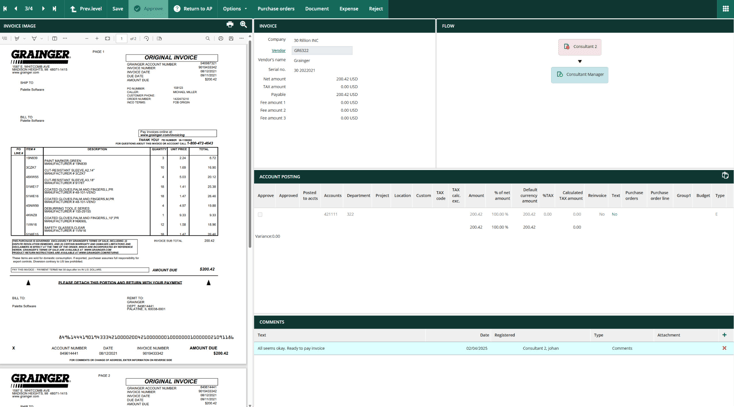


It's easy to assume that any tool advertising a SAP integration will work with your ERP. But that's not always the case. Some platforms connect directly to SAP Business One, others are built for S/4HANA or ECC, and a few support multiple SAP environments.
Beyond compatibility, there's also the question of how well each tool handles your day-to-day AP processes. A small finance team managing hundreds of invoices has different needs and budget constraints compared to an enterprise processing thousands across multiple entities.
To help you find the right fit, we've compared eight AP automation solutions for SAP, covering their compatibility, main features, key differentiators, and the types of businesses they're best suited for.
Which SAP do you run?
Before comparing AP automation tools, you need to know which version of SAP your business uses. SAP Business One and SAP S/4HANA/ECC serve different types of organizations, and the AP software that works well with one won't necessarily work with the others.
Here's how they differ:
-
SAP Business One: Built for small and midsize businesses that need to manage accounting, inventory, purchasing, and other core operations without a large IT team. It typically requires less complex implementation and administration than enterprise SAP systems.
-
SAP S/4HANA and ECC: Designed for larger organizations with complex financial operations, multiple entities, and extensive ERP requirements. AP automation solutions for these systems often use SAP-certified connectors and involve longer, more technical implementation projects.
This distinction will help you narrow down the tools in our list:
-
If you use SAP Business One, start with Rillion, Yooz, and Stampli.
-
If you use S/4HANA, consider Rillion, Medius, Basware, Esker, and OpenText VIM.
-
If you’re still on ECC, consider Medius, Basware, Esker, and OpenText VIM, and confirm each tool supports S/4HANA for when you migrate.
-
If you'd rather keep your AP operations within SAP, explore SAP's native automation options.
A note for ECC users: SAP's mainstream maintenance for eligible ECC systems ends December 31, 2027, with optional extended maintenance through 2030. Choose an AP automation tool that also supports S/4HANA so you don't have to replace it when you migrate.
Read: What is AP automation? With AP Automation Benefits & Best Practices
Best AP automation tools for SAP at a glance
|
Tool |
Best for |
SAP versions supported |
How it connects |
Stand-out feature |
|
Rillion |
Mid-market businesses needing AI-native AP automation |
Business One, S/4HANA |
Native Business One integration; S/4HANA via custom integration |
Template-free AI invoice capture |
|
Yooz |
Centralized approvals across multiple locations |
Business One, S/4HANA, ECC |
Prebuilt ERP connectors for fast setup |
Centralized approval management |
|
Stampli |
Teams with collaboration-heavy invoice approvals |
Business One, S/4HANA, ECC |
File-based Business One integration; prebuilt ECC/S/4HANA connectors |
Invoice-centered collaboration hub |
|
Medius |
AI-driven AP automation for mid-to-large organizations |
S/4HANA, ECC |
Managed integrations, including an SAP-certified S/4HANA connector |
AI-powered fraud and risk detection |
|
Basware |
Multinational businesses managing e-invoicing compliance |
S/4HANA, ECC |
Enterprise ERP integrations |
Global e-invoicing compliance network |
|
Esker |
Businesses automating both AP and AR |
S/4HANA, ECC |
Prebuilt SAP integrations, including SAP-certified S/4HANA connectivity |
Combined source-to-pay and order-to-cash automation |
|
OpenText VIM |
Large enterprises managing AP directly in SAP |
S/4HANA, ECC |
Embedded within SAP financial workflows |
Deep SAP integration |
|
SAP-native options |
Businesses expanding their existing SAP setup |
Business One, S/4HANA, ECC (varies by product) |
Built-in ERP functions and SAP application integrations |
Unified SAP ecosystem |
Need more support choosing the right fit? Here’s a guide to choosing the right AP automation for your business.
Does SAP have built-in AP automation?
Yes. SAP includes native accounts payable capabilities, but the level of automation depends on which version you use.
SAP Business One
SAP Business One supports basic AP automation through its purchasing and accounting modules. You can create purchase orders, link them to goods receipts and vendor invoices, and set up approval procedures based on conditions like invoice amounts or document types. These features work well for straightforward purchasing and approval processes.
However, invoice data entry remains largely manual, and routing becomes harder to manage when approvals involve multiple departments, locations, or exceptions. That's where third-party AP automation tools can help.
SAP S/4HANA and ECC
S/4HANA and ECC provide more advanced financial controls, invoice verification, posting, and payment processing. They can match invoices against purchase orders and goods receipts, enforce posting rules, and flag discrepancies for review.
However, the initial steps, like capturing invoice data, managing complex approval workflows, and handling line-item exceptions, usually require external help. This may come from SAP products like SAP Concur Invoice or third-party solutions like OpenText Vendor Invoice Management (VIM), which connect invoice processing workflows to SAP's financial records.
How we chose these tools
We evaluated these AP automation solutions against seven criteria that matter most to businesses using SAP:
-
SAP compatibility and certification: We considered which SAP versions each tool supports, whether it offers native integrations or SAP-certified connectors, and how reliably data syncs between systems.
-
Invoice capture accuracy: We prioritized tools that accurately extract invoice headers and line-item details from PDFs, emails, and scans, with minimal manual correction.
-
PO matching capabilities: We assessed how well each tool handles two-way and three-way matching, including lengthy purchase orders, partial deliveries, and invoice discrepancies.
-
Approval workflows: We looked for flexible, multi-step approval routing, mobile access, automated reminders, and clear visibility into pending approvals.
-
Payment capabilities: We considered supported payment methods, payment automation features, and how payment statuses sync back to SAP.
-
Implementation effort: We evaluated the complexity of connecting each tool to SAP, including IT requirements, configuration, and ongoing maintenance.
-
Pricing and company fit: We considered how well each tool's pricing structure, features, and implementation requirements align with the needs and budgets of businesses of different sizes.
1. Rillion
Best for mid-market companies on SAP Business One
Rillion is an AI-powered AP automation platform that helps businesses automate invoice capture, purchase order matching, approvals, and payments. It integrates natively with SAP Business One, extending the ERP's native AP capabilities without replacing it.
With Rillion, invoices move through a connected workflow: Capture → Match → Code and route → Approve → Pay.
The moment an invoice arrives via email or scan, the platform automatically captures and extracts every line item, matches it against purchase orders and goods receipts, predicts the correct GL coding, routes it through multi-step approval workflows, and sends approved invoices to Business One for posting.
Payments can then be processed through SAP or Rillion Pay, with information synchronized between both systems.
Key features of Rillion
-
AI-native invoice processing: Captures invoice headers and every line item from PDFs, email attachments, and scans, with no templates to build. Rillion’s AI then suggests GL coding and approval routing based on your historical transactions, getting more accurate with every invoice your team processes.
-
Flexible approval workflows: Extends Business One's basic approval procedures with customizable, multi-step routing, automatic reminders, and mobile approvals, even for invoices that require sign-off from several departments.
-
Advanced PO matching: Automates two-way and three-way matching across POs spanning multiple pages or hundreds of lines. Matching invoices move forward while discrepancies are flagged for review.
-
Two-way SAP synchronization: Keeps approvals, invoice postings, and payments updated across Rillion and Business One, which remains the financial system of record.
-
Recurring invoice and contract management: Automates the processing of recurring invoices, such as utilities, subscriptions, and leases. It matches invoices against contracts to verify amounts and terms, reduce manual checks, and keep recurring expenses under control.
-
Flexible vendor payments: Rillion Pay supports ACH, virtual cards, wire transfers, and e-checks, and synchronizes payment information back to Business One.
-
No per-user fees: With Rillion, businesses can give every relevant employee access to invoice approvals without increasing costs for each additional user.
-
Security and compliance: Rillion’s SOC 1 and SOC 2 compliance, data encryption, multifactor authentication, role-based permissions, and complete audit trails help protect financial information.
Standout feature: AI-native invoice capture
Unlike traditional OCR systems that require templates or vendor-specific training, Rillion's AI recognizes different invoice layouts immediately and captures line-item details, including item description, quantity, unit of measure, unit price, and line total.
Rillion reports over 95% extraction accuracy, which reduces the manual data entry and correction work that often slows AP teams down, especially when they receive invoices in different formats from hundreds of suppliers.
For the few suppliers whose invoices still don’t line up with your data, you can add custom capture rules that tell the AI how to read and correct them. For example, Rillion can fix item numbers, strip extra characters from PO numbers, or convert units of measure before the invoice reaches matching.
Cleaner data going in means more invoices match automatically, and your AP team has fewer exceptions to review by hand.
Who it's built for
Rillion is particularly suited to mid-market manufacturers, distributors, healthcare providers, and hospitality businesses using SAP Business One. It's designed for lean finance teams handling high invoice volumes, complex purchase orders, and multi-level approvals.
What users are saying
Rillion users have shared positive experiences with its SAP Business One integration, particularly its ease of implementation, flexibility, and customer support.
One reviewer praised Rillion's easy integration with SAP Business One, noting that it helps their team process payables quickly while maintaining control. They also appreciated the support team's responsiveness and product knowledge.
Another highlighted the implementation team's willingness to customize features around existing workflows and provide thorough training, which made the system easier to adopt.
2. Yooz
Best for centralized invoice approvals across multiple locations
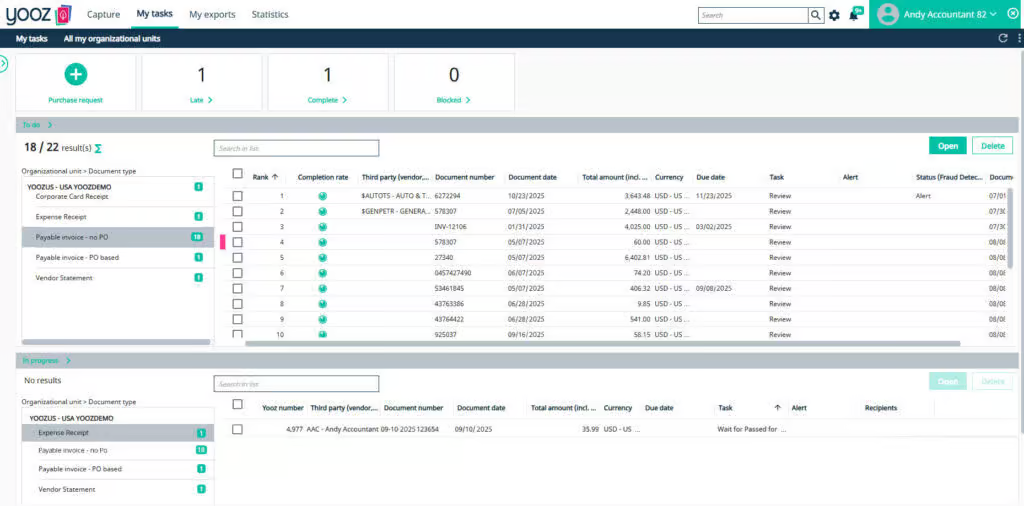
Yooz is a cloud-based AP automation platform that simplifies invoice handling, approvals, and payments. It supports SAP Business One, S/4HANA, and ECC through dedicated, bidirectional integrations.
Yooz offers prebuilt ERP connectors that simplify setup and reduce custom integration work. Once connected, it exchanges supplier records, purchase orders, accounting entries, and payment statuses with SAP.
AP teams can process and approve invoices in Yooz while keeping financial records synchronized with their ERP.
Key features of Yooz
-
Automated invoice processing: Captures invoices from email, scans, and digital files, then extracts relevant information and prepares accounting entries.
-
PO matching: Supports two-way and three-way matching with purchase orders and goods receipts, and flags any discrepancies.
-
Centralized approvals: Routes invoices to the right employees based on configurable rules, with reminders and escalations to prevent delays.
-
Fraud detection: Flags duplicate invoices, unusual amounts, and suspicious supplier information for additional review.
-
Payment tracking: Syncs approved invoices and accounting data with SAP, and retrieves payment statuses so AP teams can track which invoices have been paid and which are still outstanding.
Standout feature: Centralized approval management
Yooz's centralized approval management is especially useful for businesses operating across multiple locations. Employees can review invoice documents, verify details, and approve payments from a shared platform without relying on email chains or separate approval processes at each site.
Who it's built for
Yooz suits small, midsize, and larger businesses that want to standardize AP workflows across departments or locations, particularly those managing distributed approval teams.
What users are saying
Users appreciate Yooz's centralized approvals and simple onboarding. One reviewer praised how easily employees at different sites could access and approve invoices, as well as the straightforward setup and minimal training required.
However, another reviewer reported occasional inaccuracies in AI invoice matching that required manual corrections. They also mentioned software freezes and difficulties separating multiple invoices uploaded as a single file, which sometimes slowed down processing.
Read: 12 best Yooz competitors & alternatives for AP automation in 2026
3. Stampli
Best for collaborative invoice approvals
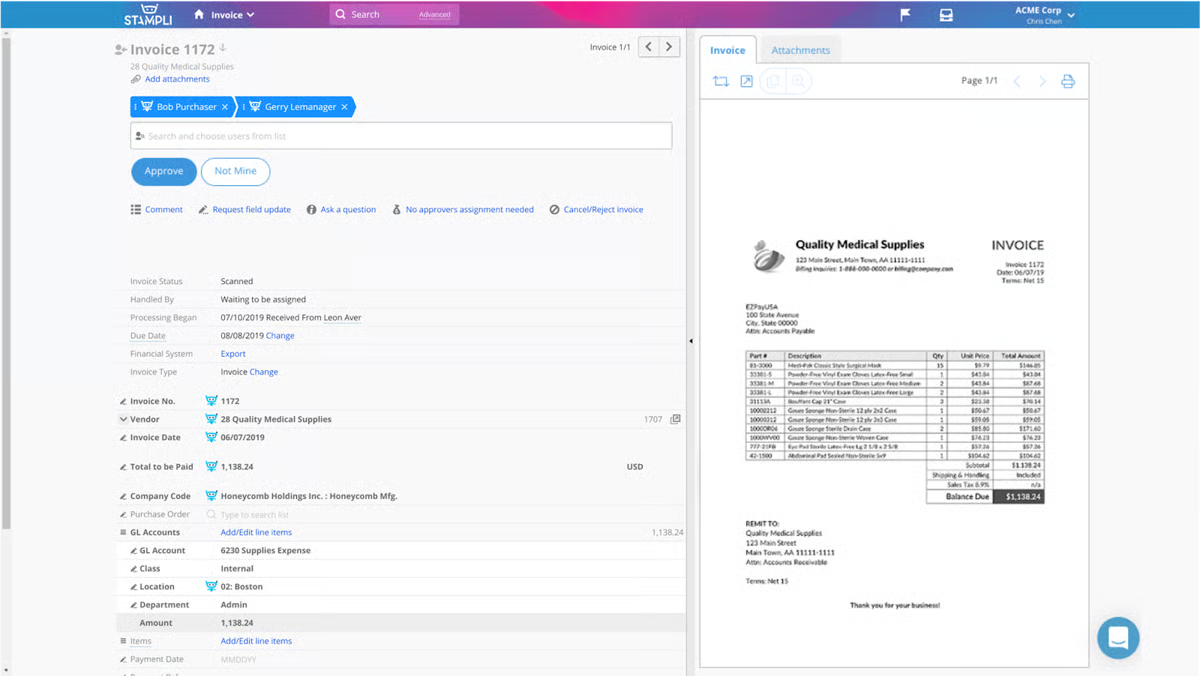
Stampli is an AP automation platform that brings invoice-related communication, documentation, and approvals into one place. It supports SAP Business One, S/4HANA, and ECC, allowing businesses to automate AP processes without replacing their existing ERP.
For Business One, Stampli uses a file-based integration to exchange invoice coding and payment data. Its ECC and S/4HANA integrations use prebuilt connectors for bidirectional data synchronization.
Across these environments, Stampli's collaboration tools help AP teams resolve invoice questions and collect approvals before posting financial records to SAP.
Key features of Stampli
-
Invoice-centered communication: Keeps conversations, supporting documents, and approval decisions attached to each invoice, reducing the need for scattered email threads.
-
AI assistant (Billy): Uses historical data and configured rules to suggest GL codes, identify discrepancies, and route invoices to the appropriate approvers.
-
PO matching: Compares invoices against purchase orders and receiving records, flagging quantity or pricing discrepancies for review.
-
Flexible approvals: Supports customizable approval chains, with employees able to review and approve invoices from different locations and devices.
-
Reporting and audit trails: Provides dashboards, invoice activity histories, and reporting tools to help finance teams monitor bottlenecks and maintain accountability.
Standout feature: Collaboration hub
Stampli's biggest strength is its invoice-centered collaboration hub. Instead of discussing invoice issues through separate emails or messaging apps, employees can ask questions, provide clarification, and approve costs directly within the invoice record.
Every conversation stays linked to the transaction, making it easier to resolve disputes and trace approval decisions.
Who it's built for
Stampli is ideal for businesses with decentralized AP operations, multiple office locations, or approval processes involving several departments. It particularly suits finance teams that spend considerable time chasing approvers and resolving invoice questions.
What users are saying
Users appreciate Stampli's ease of use and support for distributed approval workflows. One reviewer from a large organization with locations across the US explained how invoices could be sent to local employees to confirm that services were completed satisfactorily before moving through additional cost approvals.
That said, some users find it difficult to locate specific invoices or determine why approvals were delayed. One of them suggested more detailed status notifications and improved search and filtering tools to make troubleshooting easier.
Read: 12 best Stampli alternatives for AP automation in 2026
4. Medius
Best for AI-driven AP automation in enterprise SAP environments
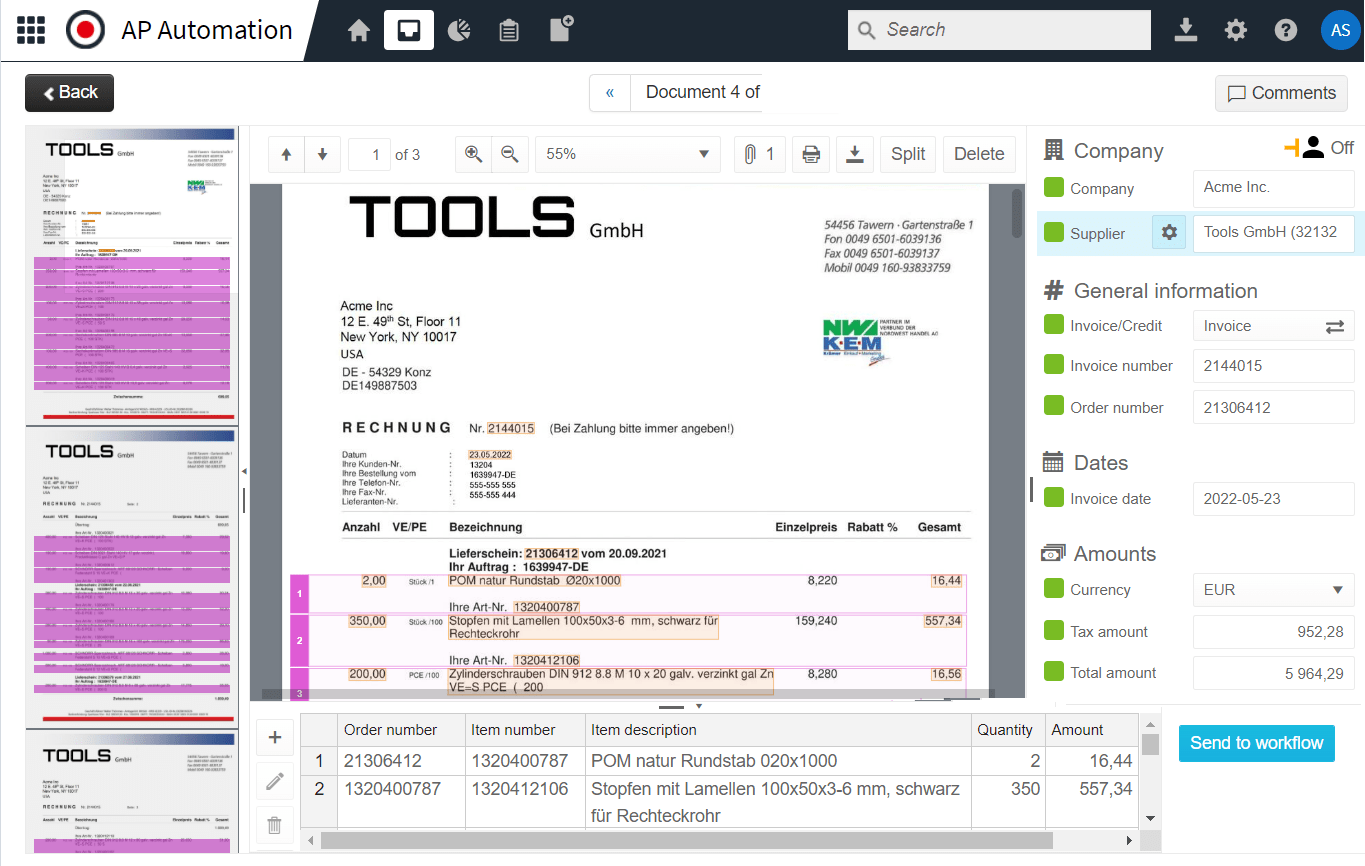
Medius is a spend management and AP automation platform designed for businesses with complex purchasing processes, high invoice volumes, and multiple legal entities. It brings invoice management, procurement, payments, and spend analytics together, helping finance teams manage their operations from one platform.
For SAP users, Medius offers managed integrations with S/4HANA and ECC, including an SAP-certified S/4HANA connector. These integrations synchronize supplier information, purchase orders, invoices, and accounting data between both platforms.
Medius handles invoice processing, matching, and approvals, while SAP remains the financial system of record.
Key features of Medius
-
Intelligent invoice processing: Automatically extracts invoice details, recommends accounting codes, and prepares invoices for matching or approval, so teams don’t have to enter information manually.
-
Complex PO matching: Handles invoices tied to multiple purchase orders, goods receipts, or contracts. When quantities or prices don't line up, the system flags the differences for review.
-
Configurable approval workflows: Finance teams can set approval rules based on invoice amounts, departments, or other conditions. Approvers can also review invoices remotely.
-
Fraud and risk detection: Medius can flag suspicious transactions, including duplicate invoices, unexpected supplier bank account changes, and unusual payment amounts.
-
Spend analytics: Dashboards show where money is going, how long invoices take to process, and which suppliers or departments generate the most exceptions.
Standout feature: Fraud and risk detection
Beyond checking invoices for duplicates, Medius’ dedicated Fraud & Risk Detection uses AI to identify suspicious supplier changes, unusual invoice amounts, and other potential fraud indicators before payments are released.
The platform also provides a centralized risk dashboard called Fire Station, where finance teams can investigate flagged transactions, track how risks were handled, and identify recurring patterns.
Who it's built for
Medius is geared toward mid-to-large organizations using SAP S/4HANA or ECC, especially those with multiple entities, high invoice volumes, and strict financial control requirements.
What users are saying
Medius reviews highlight both the benefits of its automation capabilities and some challenges with pricing and usability.
For example, a Medius Expense user praised how the software simplified expense reporting, approvals, and data exports. They also found it easier to investigate support issues and follow up on requests because everything was centralized.
On the downside, some users find Medius considerably more expensive than competing products. One reviewer also reported difficulties troubleshooting issues independently because the support documentation was either too limited or overly technical.
Read: 12 best Medius alternatives for AP automation in 2026
5. Basware
Best for global e-invoicing compliance
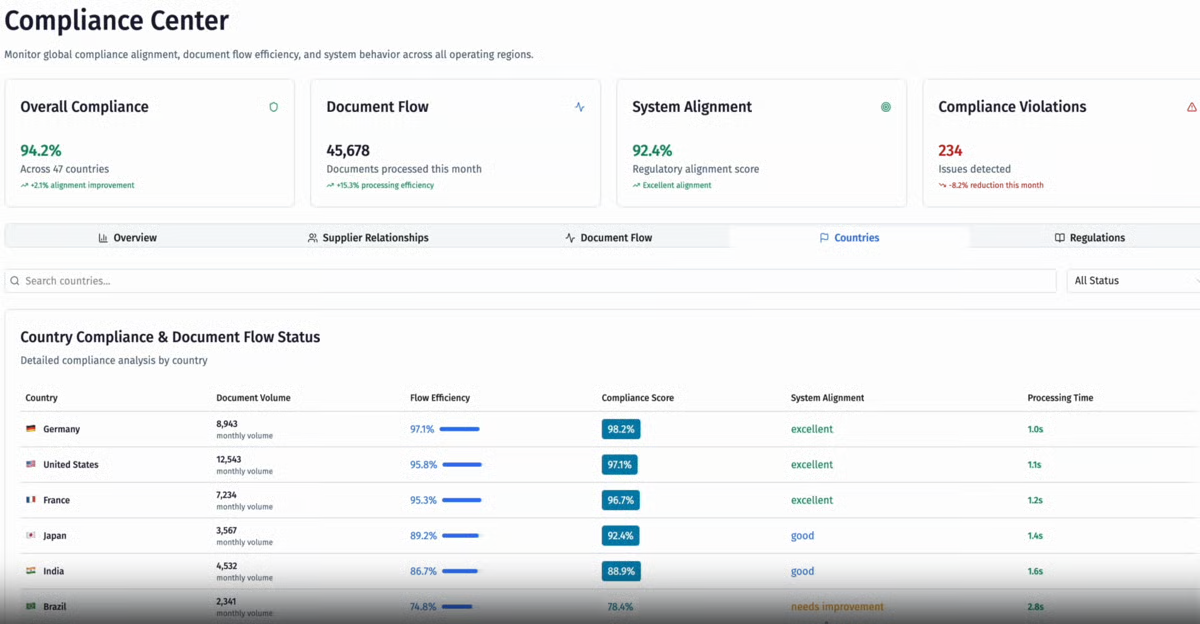
Basware is an enterprise AP automation platform that helps multinational businesses process supplier invoices while staying compliant with different countries' tax and e-invoicing regulations.
This platform connects with SAP S/4HANA and ECC, allowing supplier information, purchase orders, and accounting data to flow between both systems without manual transfers. It handles invoice capture, matching, and approvals before sending the approved transactions to SAP for posting and payment.
Key features of Basware
-
Automated invoice processing: Captures invoices in different formats, validates the information, and prepares them for matching, coding, or approval.
-
Advanced PO matching: Matches invoices against purchase orders, goods receipts, and contracts, even when transactions involve multiple documents or partial deliveries.
-
Flexible approval workflows: Routes invoices based on predefined business rules, so the right employees can review transactions and resolve exceptions before posting.
-
Multi-ERP integration: Connects with SAP and other ERP systems, allowing businesses with different subsidiaries or accounting platforms to manage AP through a shared process.
-
Spend visibility: Gives finance teams access to invoice processing metrics, supplier spending, and exception reports across entities and locations.
Standout feature: Global e-invoicing compliance network
Countries have different requirements for electronic invoice formats, tax reporting, validation, and archiving. Basware helps businesses meet these obligations through its e-invoicing network, with compliance coverage spanning more than 100 countries.
It also supports standards such as Peppol, making it easier to exchange compliant electronic invoices with suppliers and customers across borders.
Who it's built for
Basware is geared toward large enterprises with high invoice volumes, international suppliers, multiple legal entities, or operations spanning several countries. It's particularly relevant to SAP S/4HANA and ECC users who need to standardize AP processes while managing different e-invoicing regulations.
What users are saying
Basware receives positive feedback for its intuitive interface and ERP integration capabilities. A customer found everyday tasks like invoice reviews, PO matching, and approvals easy to navigate, even for employees who don't use the platform regularly.
They also highlighted how well the platform connects with SAP and other enterprise applications, reducing manual data entry and keeping financial records consistent.
The main drawback they identified was the learning curve for administrators. While routine AP tasks were straightforward, advanced configurations and troubleshooting sometimes required specialized technical knowledge.
Read: 13 best Basware competitors & alternatives for AP automation in 2026
6. Esker
Best for combined AP and AR automation in SAP
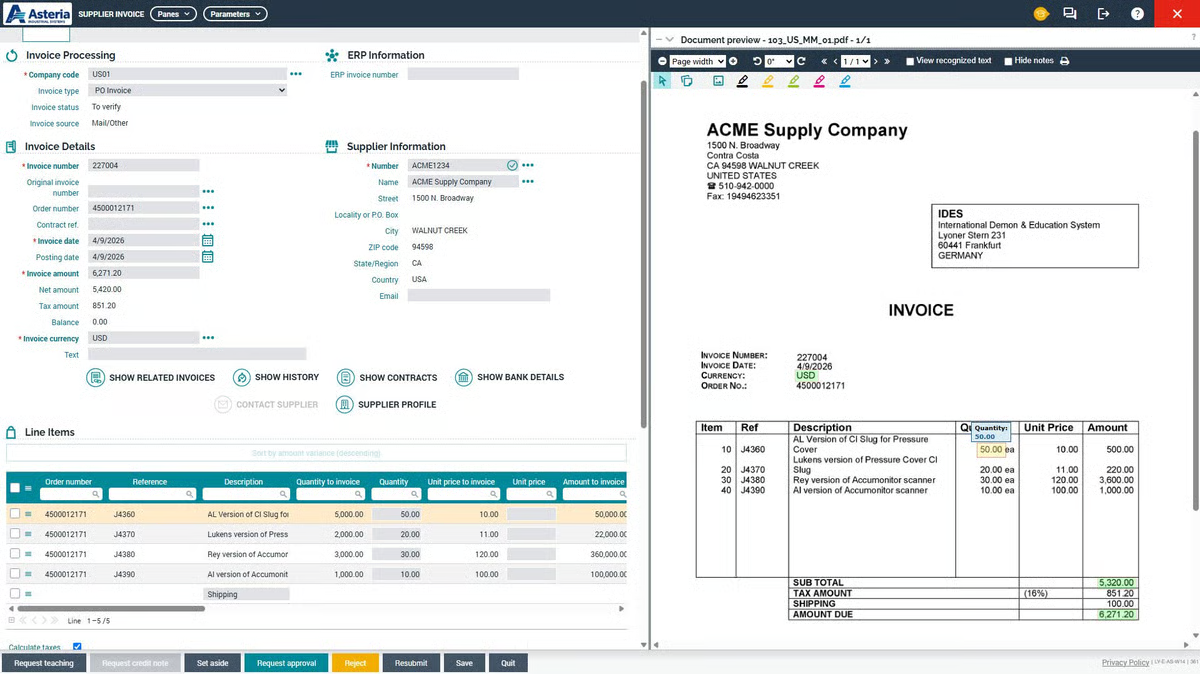
Esker is an AI-powered finance automation platform that helps businesses manage both sides of their cash flow: paying suppliers and collecting money from customers. Beyond invoice management, it supports purchasing, sales order processing, collections, and cash application.
Esker offers prebuilt integrations with SAP S/4HANA and ECC, including SAP-certified integration for S/4HANA Cloud. These connections let finance teams manage supplier and customer transactions in Esker while exchanging the relevant financial information with SAP.
Key features of Esker
-
AP invoice automation: Uses AI to read supplier invoices, extract relevant accounting information, and reduce the manual work required to prepare invoices for payment.
-
PO matching: Checks whether suppliers have billed for the correct items, quantities, and prices based on purchasing and receiving records. It then routes any inconsistencies through an exception workflow.
-
Accounts receivable automation: Helps AR teams apply incoming payments to customer invoices, follow up on overdue balances, and manage collections.
-
Customizable workflows: Businesses can adapt validation rules, approval sequences, and exception handling to their existing processes rather than working around rigid workflows.
-
SAP integration: Connects with SAP Financial Accounting (FI) and Materials Management (MM) to support invoice posting, purchasing transactions, and related financial processes.
Standout feature: Combined source-to-pay and order-to-cash automation
Rather than treating AP and AR as separate functions requiring different software, Esker supports both within a connected platform. This gives finance leaders a way to manage supplier obligations alongside customer payments and collections, with information flowing back to SAP.
Who it's built for
Esker suits mid-to-large businesses running SAP S/4HANA or ECC that want to improve working capital management by coordinating purchasing, payables, receivables, and collections.
What users are saying
Although it's an out-of-the-box solution, customers praise Esker for letting businesses tailor workflows to their existing processes. They also appreciate the continued assistance from its support team long after the initial setup.
That said, document processing doesn’t always work as it should. Some customers have encountered limitations with PO matching for EDI invoices, even when the same process works correctly for PDFs. Others have struggled with automated extraction when suppliers use inconsistent purchase order formats, which meant they had to manually intervene.
Read: 8 best accounts receivable and payable software | AP & AR automation solutions
7. OpenText VIM
Best for managing AP directly within SAP
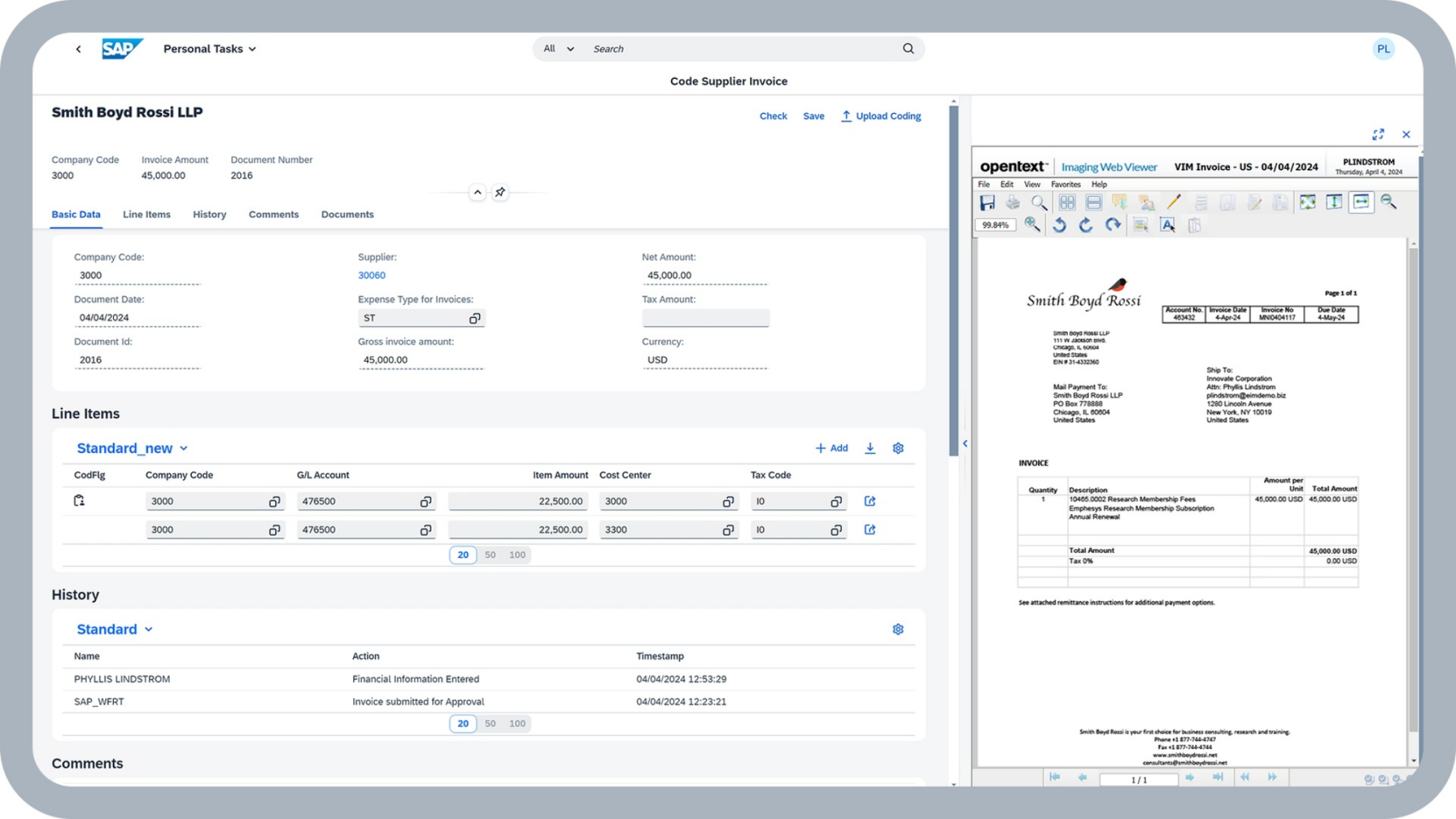
OpenText Vendor Invoice Management (VIM), also known as SAP Invoice Management by OpenText, extends SAP's native invoice processing capabilities with automated workflows, exception handling, and financial controls.
Unlike standalone AP platforms, OpenText VIM works directly within SAP S/4HANA and ECC. It uses SAP-certified integration to manage invoice validation, approvals, and posting within the existing ERP environment. This gives large SAP-dependent organizations more control over their payables without introducing a separate system for employees to manage.
Key features of OpenText VIM
-
Automated exception handling: Uses predefined business rules to identify invoice discrepancies and direct them to the right employees for resolution.
-
Vendor communication: Gives suppliers access to invoice status updates and self-service tools to resolve issues without lengthy email exchanges or repeated calls to AP.
-
Native and SAP Fiori interfaces: Employees can review invoices, complete approval tasks, and track processing statuses using familiar SAP screens, including Fiori applications accessible from different devices.
-
Compliance and audit trails: Records invoice actions, approval decisions, and document changes to support internal controls, regulatory compliance, and audits.
-
Embedded analytics: Displays invoice backlogs, processing times, and exception trends through dashboards within SAP S/4HANA, helping teams identify where workflows are slowing down.
Standout feature: Deep integration with SAP’s existing financial processes
Instead of moving invoice management into an independent application, VIM embeds its workflows, business rules, and audit records within SAP. Employees can work with invoice documents alongside purchasing and accounting information, while IT teams maintain control over configurations and access permissions.
Who it's built for
OpenText VIM is designed for large enterprises that heavily operate in SAP S/4HANA or ECC. It suits organizations with established SAP administration teams and strict compliance requirements that prefer managing AP within their existing ERP rather than using another finance platform.
What users are saying
OpenText VIM users appreciate how closely the software works with SAP. One customer shared that it helped their team automate more of their invoice processing and keep track of AP activities, with the familiar SAP environment making adoption easier.
The trade-off, however, is usability and technical complexity. Some customers feel the interface could be more modern, and that configuring advanced features or handling less common invoice scenarios often requires additional technical support.
8. SAP-native options
Best for keeping AP automation within the SAP ecosystem
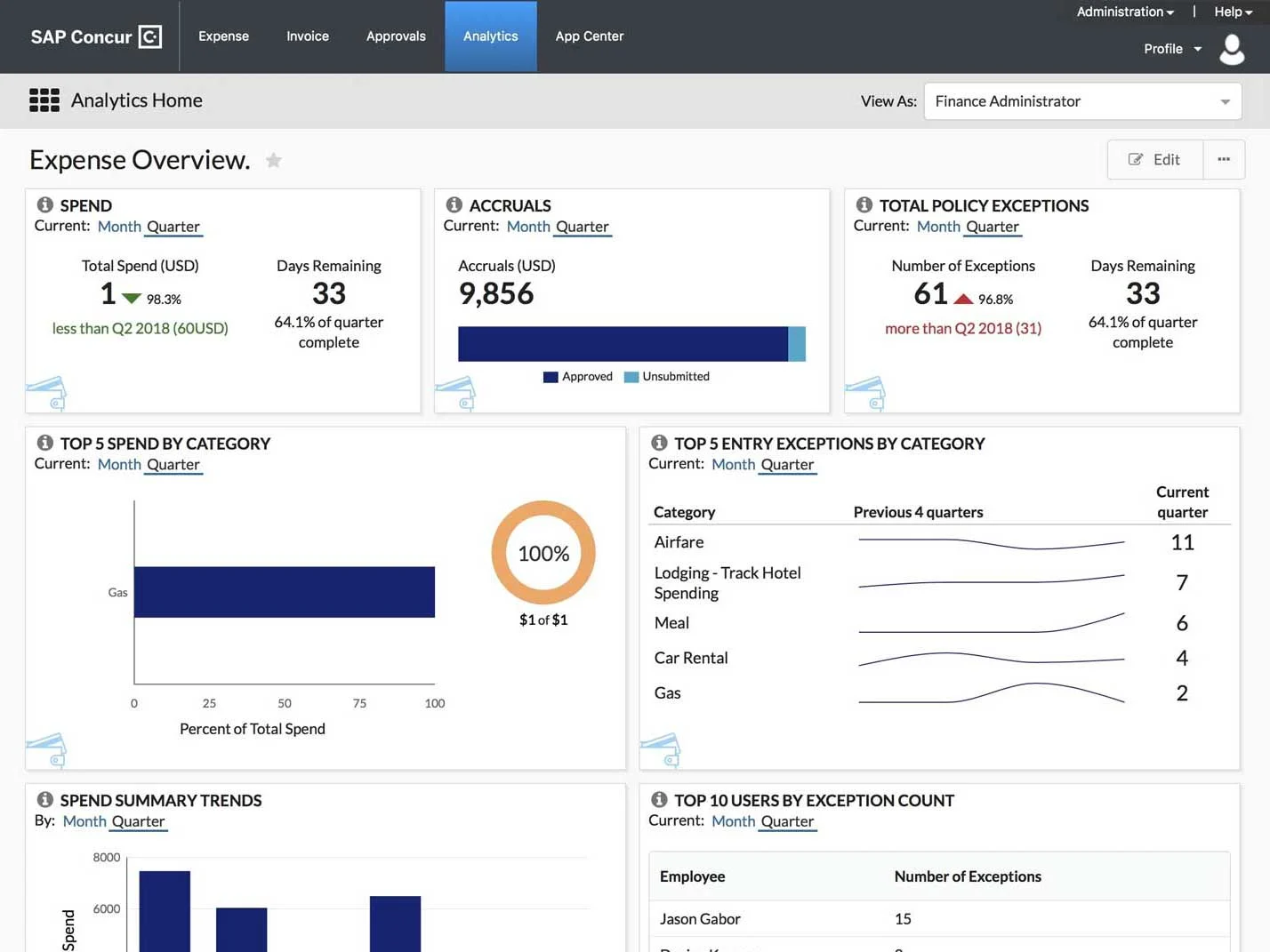
SAP provides several built-in capabilities and complementary products for automating accounts payable. For businesses that already rely heavily on SAP, these options provide a way to extend invoice processing, approvals, and supplier management while keeping financial operations within the same software ecosystem.
The options vary depending on your SAP version and automation requirements:
-
SAP Business One: Handles basic invoice processing, purchase order matching, and approval procedures for small and midsize businesses.
-
SAP S/4HANA: Provides invoice verification, automated posting, flexible approval workflows, and financial controls for complex enterprise operations.
-
SAP Concur Invoice: Automates invoice capture, approval routing, and spend tracking, with documented integrations for SAP S/4HANA and ECC.
-
SAP Ariba Buying and Invoicing: Manages purchase requests, supplier invoices, PO matching, and approvals, with integration support for SAP S/4HANA and ECC.
Key features of SAP-native options
-
Invoice processing and posting: Record supplier invoices directly in SAP, apply accounting rules, and manage payment obligations within the ERP.
-
PO matching: Supports two-way and three-way matching to verify invoice amounts, quantities, and pricing against purchasing and receiving records.
-
Configurable approvals: S/4HANA supports one-step and multi-step invoice approvals, while SAP Concur Invoice provides additional routing capabilities.
-
Supplier collaboration: SAP Business Network allows suppliers to submit electronic invoices, check transaction statuses, and exchange purchasing documents with buyers.
-
Financial controls and reporting: Built-in accounting tools help finance teams monitor liabilities, review transaction histories, and maintain records for audits.
Standout feature: Unified SAP ecosystem
Businesses can manage purchasing, invoicing, and accounting through SAP's interconnected applications, using familiar workflows and existing financial controls. This approach also lets organizations build on their current SAP investment, although the degree of automation depends on the modules and products they implement.
Who it's built for
SAP-native options suit businesses that have invested heavily in SAP and prefer to expand their existing setup rather than adopt an independent AP automation platform.
They're particularly relevant to S/4HANA and ECC organizations with dedicated SAP administrators who can configure workflows, manage integrations, and maintain additional SAP applications.
What to consider
Using SAP's own solutions doesn't automatically mean lower costs or simpler implementation. Products like SAP Concur Invoice and SAP Ariba have separate licensing requirements and may need additional configuration or integration work.
Before committing, assess what your current SAP setup can already automate, where it falls short, and whether adding another SAP product is more practical than using a dedicated AP automation solution.
Read: 11 best SAP Concur Invoice alternatives for AP automation in 2026
How to choose AP automation for SAP
The right AP automation software should work with your SAP environment, handle the complexity of your invoice processes, and fit your team's budget and technical resources.
Here are nine factors to consider when comparing your options:
-
Your SAP version and upgrade plans: If you use SAP Business One, explore Rillion, Yooz, or Stampli. For S/4HANA or ECC, consider Rillion, Medius, Basware, Esker, OpenText VIM, or Stampli. But if you're planning to migrate from ECC to S/4HANA, choose a tool that supports both systems.
-
SAP certification requirements: If your IT team requires SAP-certified connectors, consider enterprise solutions like Medius, Esker, and OpenText VIM. For Business One, prioritize reliable integrations that keep invoices, approvals, and payments synchronized. But if you prefer SAP's own products, consider SAP Concur Invoice or SAP Ariba Buying and Invoicing.
-
Invoice volume and team size: Rillion suits mid-market businesses with lean AP teams, while Yooz works well for smaller teams and businesses with distributed approvers. Medius, Basware, and OpenText VIM are better suited to large enterprises with complex financial operations.
-
AI capture and coding: Look for software that accurately extracts invoice details and learns from previous transactions to suggest accounting codes. Rillion's template-free AI capture is particularly useful for Business One teams processing invoices in different formats.
-
PO matching depth: If your business handles lengthy POs, partial deliveries, or frequent discrepancies, prioritize advanced two-way and three-way matching. Rillion handles complex matching for Business One, while Medius, Basware, and SAP Ariba Buying and Invoicing offer similar capabilities for enterprise SAP environments.
-
Approval workflows: Consider how easily employees can review invoices, resolve questions, and approve transactions. Stampli is particularly useful for collaboration-heavy approvals, Yooz for distributed teams, and Rillion for flexible multi-step routing within Business One. SAP Concur Invoice is another option for businesses that prefer SAP-managed approval workflows.
-
Payment capabilities: Check whether the tool supports supplier payments directly or relies on SAP to process them. Rillion Pay, for example, supports ACH, virtual cards, wires, and e-checks, then syncs payment information back to Business One.
-
Implementation effort and IT involvement: Rillion and Yooz offer relatively straightforward setup through prebuilt integrations. Enterprise platforms like Medius, Basware, and OpenText VIM may require weeks or months of configuration, particularly for complex SAP environments.
-
Pricing model: Compare subscription fees, implementation costs, and charges for additional users or modules. Rillion, for example, offers a custom quote instead of charging per user, which is cost-effective for businesses with many approvers. For enterprise solutions and SAP-native products, factor in integration, customization, licensing, and ongoing maintenance costs.
Running SAP Business One or S4/HANA? See what Rillion can do for your AP team.
From AI invoice capture to complex PO matching and approvals, see how Rillion simplifies your AP workflow without complicating your SAP setup.
AP automation for SAP FAQs
1. What is the best AP automation software for SAP?
The best AP automation software depends on your SAP version and business needs. For example, if you’re a small to mid-size company using SAP Business One, consider Rillion, Yooz, and Stampli. But if you’re an enterprise organization with complex needs, Medius, Basware, Esker, and OpenText VIM might be better fits.
If you’d rather centralize your AP processes within the SAP ecosystem, you can opt for SAP-native tools like SAP Concur Invoice and SAP Ariba Buying and Invoicing.
2. What's the best AP automation for SAP Business One?
Rillion is a great choice for SAP Business One users who need advanced invoice automation without a complicated setup. Its AI captures invoice details accurately, predicts accounting codes, and handles complex PO matching and approvals with minimal manual intervention.
It also syncs financial data with Business One and doesn’t charge per user, which makes it practical for growing AP teams.
3. Does SAP Business One have built-in AP automation?
Yes, but its capabilities are limited. SAP Business One supports purchase order matching, invoice posting, and basic approval procedures. However, employees may still need to enter invoice details manually and manage more complicated approval processes themselves.
Dedicated AP automation tools like Rillion extend these capabilities with AI invoice capture, advanced matching, and flexible approval workflows.
4. Do I need an SAP-certified AP tool?
Not necessarily. SAP certification provides assurance that an integration meets specific SAP technical requirements, but it isn't mandatory for every business.
For SAP Business One, prioritize reliable data synchronization and compatibility with your ERP setup. Larger S/4HANA and ECC organizations may require certified connectors to meet internal IT policies and integration standards.
5. What happens to my AP tool when I move from ECC to S/4HANA?
Your AP tool may need a new connector, updated configuration, or workflow adjustments when you migrate. Solutions like Medius, Basware, Esker, and OpenText VIM support both environments, but migration requirements vary.
Confirm compatibility with your target S/4HANA deployment and discuss the transition with your vendor before committing to an AP automation platform.
6. How long does it take to implement AP automation for SAP?
Implementation can take a few weeks to several months, depending on your SAP version, integration requirements, and workflow complexity.
For example, implementing Rillion with full integration and customization typically takes 12–14 weeks, while enterprise deployments involving multiple entities, custom configurations, or extensive testing often take longer.
Your vendor should provide a realistic implementation timeline after assessing your SAP environment.