


NetSuite can handle core AP tasks, but teams with complex POs, and approvals across subsidiaries need more control over matching and routing.
When finance teams start chasing exceptions, fixing coding, or routing invoices by hand, NetSuite alone may no longer cover the full workflow.
The best AP automation tools for NetSuite add control without pulling finance out of the ERP.
In this guide, we compare eight options by integration method, invoice capture, PO matching, approvals, multi-entity support, payments, and pricing so you can see which one fits your AP setup.
- Rillion: Best for complex, multi-subsidiary NetSuite AP
- Payhawk: Best for NetSuite teams that want AP, cards, and expenses together
- Stampli: Best for NetSuite teams with collaboration-heavy AP
- Zone & Co (ZoneCapture): Best for keeping AP inside NetSuite
- DOKKA: Best for lean NetSuite teams that want AP and close in one workspace
- Medius: Best for high-volume NetSuite AP with complex matching
- Centime: Best for NetSuite AP with cash flow forecasting
- NetSuite Bill Capture + Intelligent Payment Automation: Best for keeping AP native
Best AP automation for NetSuite at a glance
| Tool | Best for | NetSuite connection | Standout feature |
| Rillion | Complex, multi-subsidiary NetSuite AP | Certified Oracle NetSuite SuiteApp with two-way sync | AI Invoice Capture learns coding and routing from past invoices |
| Payhawk | Combining NetSuite AP with cards and expenses | NetSuite SuiteApp and API connection | Financial Controller AI Agent helps chase receipts, code spend, and fill missing data |
| Stampli | Collaboration-heavy NetSuite approvals | Built for NetSuite verified SuiteApp with token-based integration | Billy learns coding, routing, and approval patterns |
| Zone & Co (ZoneCapture) | Keeping AP inside NetSuite | Native Built for NetSuite SuiteApp | Zoe AP Intelligence helps surface exceptions, bottlenecks, and invoice issues |
| DOKKA | Lean NetSuite teams that want AP and close in one place | Direct, bi-directional NetSuite integration | DOKKA Brain supports capture, coding, routing, and matching |
| Medius | High-volume NetSuite AP with complex matching | SuiteApp-certified hybrid integration with NetSuite and OneWorld | Medius Copilot helps teams work with invoice, supplier, and payment data |
| Centime | NetSuite AP with cash flow forecasting | Built for NetSuite certified SuiteApp with two-way sync | Cash Forecasting Workbench shows how payment timing can affect future cash |
| NetSuite Bill Capture + Intelligent Payment Automation | Keeping AP native with no extra AP platform | Native NetSuite tools, with BILL powering payment automation | Bill Capture reads more complex invoice layouts, including multiple columns and mixed content. |
Does NetSuite have AP automation?
Yes. NetSuite has native AP automation for invoice capture, approvals, PO matching, vendor access, and payments, but teams with high invoice volumes, multiple entities, or complex approval rules may need additional tools.
NetSuite can handle several parts of the process:
- Bill Capture uses AI and OCR to read invoices, pull vendor and line-item data, and create draft bills. It can also match invoices to purchase orders and receipts.
- SuiteApprovals and 3-way matching route bills for review and check them against POs and item receipts. Discrepancies are routed to an assigned approver, before payment.
- Vendor Center lets suppliers view purchase orders and payment history, while Intelligent Payment Automation, powered by BILL, lets eligible teams pay vendors from NetSuite.
However, NetSuite's native AP tools can start to feel limited as volume and complexity grow.
For example, NetSuite supports custom approval rules and can route matching exceptions, but multi-subsidiary workflows still need detailed setup. Its 3-way matching also has limits, including no support for partially received items.
That is where specialist AP platforms can help. They add deeper capture, matching, routing, and approval controls while keeping NetSuite as the system of record.
How we chose these AP automation tools
We focused on what matters most when AP has to work inside NetSuite, especially for teams with higher invoice volume, multiple subsidiaries, and PO-heavy workflows.
We assessed each tool on:
- NetSuite integration: how it connects, what data moves both ways, and whether NetSuite stays the system of record
- Invoice capture: how well it handles invoice data, coding, and line items
- PO matching: support for two-way and three-way matching, including exceptions
- Approvals: how flexible routing is across teams and subsidiaries
- Multi-entity support: whether it can handle OneWorld and more complex company structures
- Payments: available payment methods and how payment data flows back to NetSuite
- Pricing and company fit: how the pricing model works and which size of finance team it suits
We used these criteria to narrow down the options, including only tools that we felt could meet the needs of finance teams using NetSuite.
1. Rillion
Best for complex, multi-subsidiary NetSuite AP

Rillion is an AI-powered AP automation platform for finance teams that handle high invoice volumes and need more control than NetSuite's native AP tools provide.
It adds invoice capture, coding, PO matching, approvals, payments, and reporting while keeping NetSuite as the system of record.
For NetSuite teams, the integration is the key advantage. Rillion connects through a certified Oracle NetSuite SuiteApp with two-way sync. Supplier data, GL accounts, cost centers, purchase orders, and receipts can flow into Rillion, while approved invoices and payment data sync back to NetSuite.
That makes it a strong fit for multi-subsidiary teams that want a more advanced AP workflow without replacing NetSuite.
How Rillion works with NetSuite
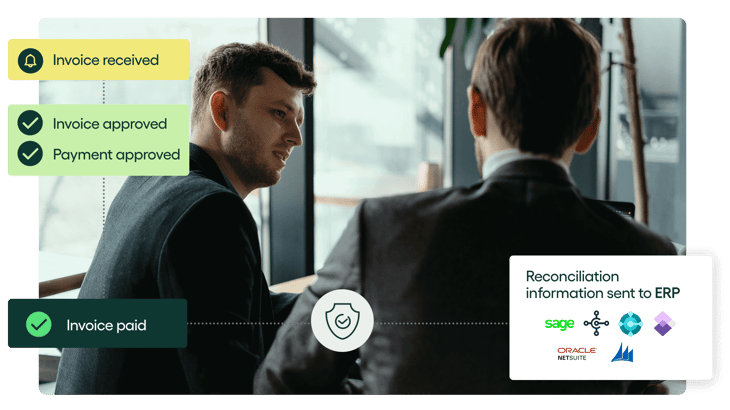
Rillion handles the invoice process from capture through approval, while keeping NetSuite data in sync. It reads invoices received by email, PDF, or scan, then extracts key details such as vendor names, amounts, and PO numbers.
For PO invoices, Rillion matches the details against NetSuite purchase orders and goods receipts. It can also suggest GL codes for non-PO invoices, route exceptions to the right people, and send invoices through the approval process.
Once approved, invoices can return to NetSuite for payment or go through Rillion Pay, with payment data synced back to keep both systems aligned.
Key features include:
- Certified NetSuite SuiteApp: Two-way sync keeps NetSuite at the center of the accounting process.
- AI-native invoice capture: Extracts invoice data with more than 95% accuracy from the first invoice.
- 2- and 3-way PO matching: Matches invoices to POs and receipts, including more complex line-level cases.
- Flexible approval routing: Rules can vary by entity, department, amount, or exception.
- Multi-entity support: Finance teams can manage invoices across several subsidiaries from one view.
- Unlimited users: Rillion does not charge per user, so approvers across different entities can be added without increasing seat costs.
- Optional payments: Rillion Pay adds ACH, virtual cards, remittance, and payment reconciliation.
- Riley AI Assistant: Finance teams can ask questions about invoices, suppliers, and payment status inside Rillion.
Meet Riley – Rillion's AI Assistant for Accounts Payable
Rillion's standout feature: AI invoice capture
Rillion's AI Invoice Capture uses advanced AI to understand and extract invoice data, including headers and line items, with 95% accuracy from the first invoice. No templates or supplier-specific training required.
Extracted data is validated against your master data, while customizable capture rules help resolve supplier-specific exceptions, such as mismatched item numbers, PO references, and units of measure.
This means fewer manual corrections, more accurate invoice data, and higher levels of automated PO matching, even when dealing with complex invoices or changing supplier formats.
Who Rillion is built for
Rillion is best suited to mid-market NetSuite teams with high invoice volumes, multiple subsidiaries, and PO-heavy workflows.
It is a great option for finance teams in industries such as manufacturing, healthcare, and hospitality, where AP has to coordinate invoices across several entities and approvers.
Read more about how healthcare firm Smiles First eases the workload for its accounts payable team.
If you want to see how Rillion can work as your AP automation software alongside NetSuite, book a demo to explore the platform with one of our team.
2. Payhawk
Best for NetSuite teams that want AP, cards, and expenses together
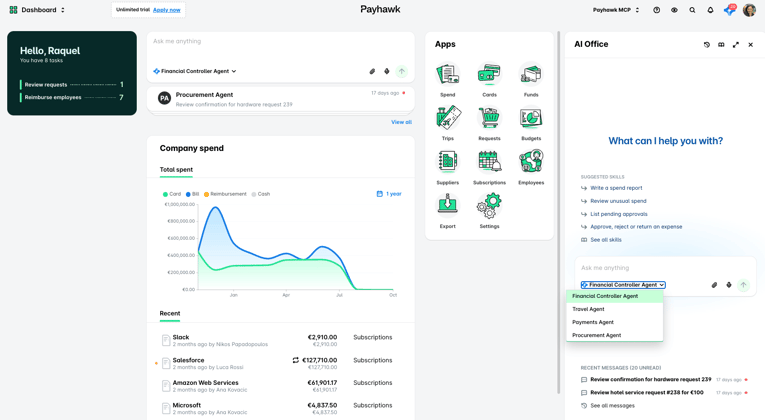
Payhawk combines accounts payable with corporate cards, employee expenses, procurement, and travel spend.
For NetSuite teams, the appeal is having supplier bills and employee spend move through the same finance platform before the accounting data reaches NetSuite.
Payhawk also supports NetSuite OneWorld, so finance teams can manage spend across several subsidiaries without creating a separate setup for each one.
How Payhawk connects to NetSuite
Payhawk connects through its NetSuite SuiteApp and API. The setup links Payhawk to a chosen subsidiary, then maps AP accounts, tax rates, bank accounts, and other master data so spend can sync back into NetSuite with less manual work.
Key features include:
- Accounts payable automation: Capture invoices, route them for approval, and prepare them for payment.
- PO matching: Match supplier invoices against purchase orders and requests.
- Multi-entity management: Manage several NetSuite subsidiaries from one Payhawk environment.
- Cards & expenses: Bring card purchases, reimbursements, and supplier invoices into the same workflow.
- Real-time NetSuite sync: Push reviewed transactions and settled payments back to NetSuite as they happen.
Payhawk's standout feature: Financial Controller Agent
Payhawk's Financial Controller AI Agent handles repetitive finance work such as chasing receipts, filling in missing expense data, coding spend, and collecting invoices from supplier portals.
The agent can also work through Slack, Teams, Payhawk's web app, and mobile app. That makes it useful for finance teams trying to keep expense data complete before month-end rather than fixing everything during the close.
Who Payhawk is built for
Payhawk is a good option for mid-market or global NetSuite companies that want AP to sit beside cards, employee expenses, procurement, and travel.
It's relevant when finance wants one view of spend across several entities, rather than a dedicated AP tool focused mainly on invoices and approvals.
Watch-out
Payhawk covers a broad finance stack, so the AP workflow may need careful testing if invoices are your main priority. For example, Jaroslaw K., a director of support on Capterra, found the system easy to use but noted that extra receipts or evidence could not always be added after the first submission unless finance sent the expense back.
3. Stampli
Best for NetSuite teams with collaboration-heavy AP
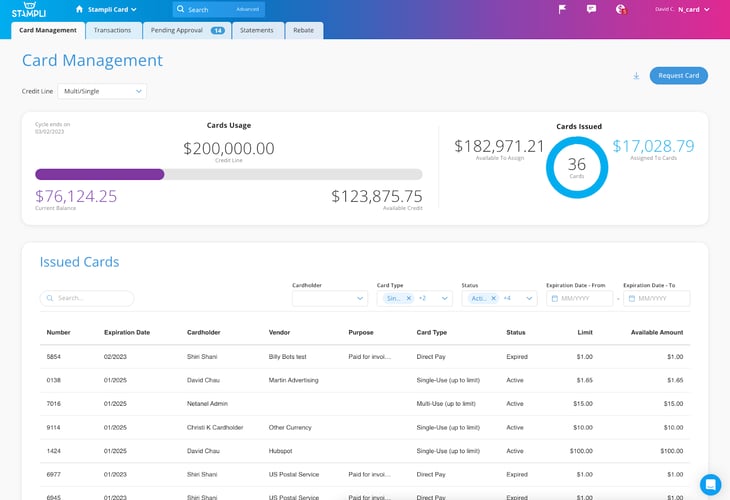
Stampli is an AP automation platform built around the invoice. It brings invoice capture, coding, approvals, comments, PO matching, payments, and audit history into one workspace. This can be useful when many people need to review bills before they reach NetSuite.
For NetSuite teams, collaboration is one of the main strengths. Approvers can ask questions, add comments, and resolve issues on the invoice itself rather than moving the conversation into email or Slack.
How Stampli connects to NetSuite
Stampli uses a Built for NetSuite verified SuiteApp with token-based authentication. It syncs vendors, GL accounts, open POs, receipts, subsidiaries, departments, locations, and custom fields from NetSuite, then sends approved bills and payment data back.
It also supports NetSuite OneWorld and can mirror custom header and line-level fields.
Key features include:
- Invoice-level collaboration: Keep questions, documents, comments, and approval history with the bill itself.
- 2- and 3-way PO matching: Match invoices against purchase orders and item receipts, including split and partial orders.
- Flexible approvals: Route bills by entity, amount, department, vendor, or other rules, with the option to add approvers when needed.
- Custom NetSuite fields: Mirror custom fields and saved-search data without rebuilding your existing setup.
- Multi-subsidiary support: Work across NetSuite OneWorld entities from one Stampli account.
Stampli's standout feature: Billy
Billy is Stampli's AI assistant for invoice processing. It learns from your team's past coding and approval decisions, then suggests GL coding, predicts approvers, identifies vendors, and flags invoices that fall outside normal patterns.
Who Stampli is built for
Stampli is a good fit for NetSuite teams where invoice approval involves a lot of people and context. It also works well for finance teams that want approvers outside NetSuite to work in a simpler AP interface.
Watch-out
Some teams may need to test how Stampli handles their exact coding controls. Skylar B., a director of finance reviewing Stampli, said her team could not restrict which GL accounts some users could select, which added review work.
4. Zone & Co (ZoneCapture)
Best for keeping AP inside NetSuite
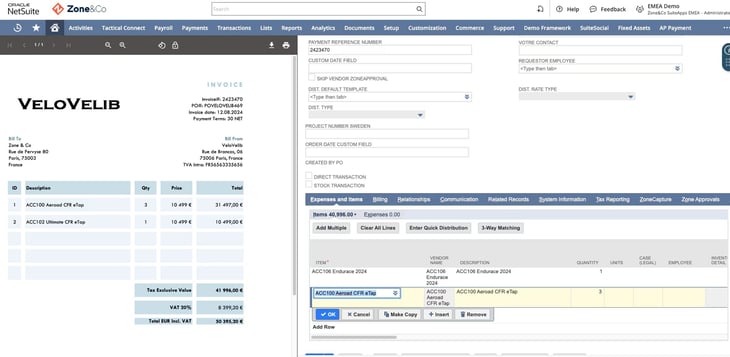
ZoneCapture takes a different approach from many AP tools on this list. Instead of running AP in a separate platform and syncing the results back, it works inside NetSuite itself.
That keeps invoice capture, matching, approvals, payments, and related records close to the ERP. ZoneCapture can read invoices from PDF or email, create vendor bills in NetSuite, match them against purchase orders and receipts, and send them into the approval flow.
Zone & Co also offers separate tools for payments and reconciliation, so teams can extend the workflow from invoice receipt through to the bank.
How ZoneCapture connects to NetSuite
ZoneCapture is a native NetSuite SuiteApp. There is no external AP database that needs to sync back to NetSuite because the invoice workflow runs on NetSuite records. That means vendor bills, approvals, audit history, and accounting data stay inside the ERP.
Key features include:
- AI-powered invoice capture: Extract vendor details, line items, and accounting fields from invoices.
- 3-way PO matching: Compare invoices with NetSuite purchase orders and receipts.
- Split-screen review: See the source invoice beside the NetSuite record while checking captured data.
- Native e-invoicing: Handle supported structured e-invoices and PDFs in the same AP queue.
- Global vendor payments: Zone AP Payments supports ACH and wire payments in more than 140 currencies.
ZoneCapture's standout feature: Zoe AP Intelligence
Zoe by Zone adds an AI layer to the AP data already inside NetSuite. You can ask questions about invoices, vendor risk, late payments, duplicate bills, and other AP activity instead of building a report each time.
Zoe can also check capture accuracy against the final saved bill, flag payment risk, and surface changes to supplier bank details.
Who ZoneCapture is built for
ZoneCapture suits NetSuite-only finance teams that want to avoid another AP interface. Also beneficial to controllers who want one NetSuite audit trail from capture through approval.
Watch-out
That NetSuite-native model is also the main tradeoff. ZoneCapture is built specifically for NetSuite, so it will not solve AP across a second ERP.
Document quality can also affect automation. Bethany O., a supply chain analyst on G2, liked the time saved through automated capture but said unsupported document formats still needed manual review.
5. DOKKA
Best for lean NetSuite teams that want AP and close in one workspace
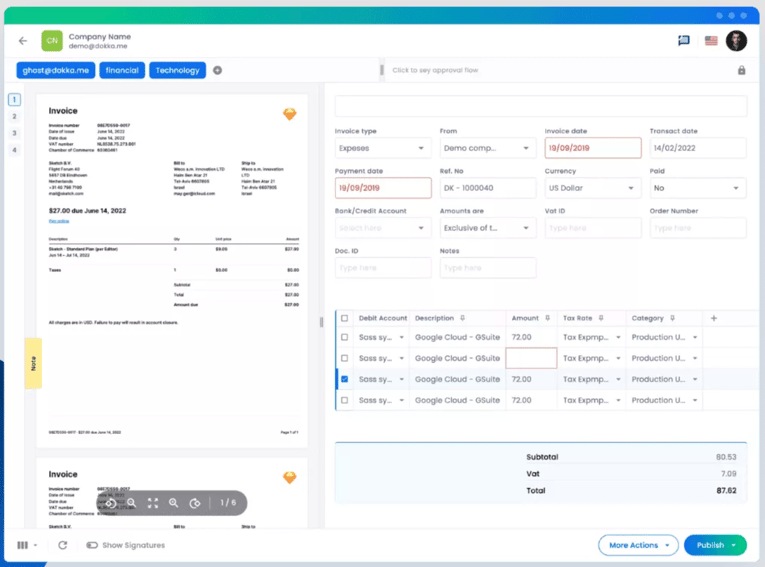
DOKKA is an accounting automation platform with separate products for accounts payable and financial close.
Its AP product gives you a dedicated workspace for invoice capture, coding, approvals, PO matching, and posting, while NetSuite stays the system of record.
That setup can work well for teams that want less time inside NetSuite for routine AP work. Approvers can work in DOKKA or approve from email, so they do not need their own NetSuite license just to review an invoice.
DOKKA also offers a relatively fast rollout, with some NetSuite implementations taking as little as 1-2 weeks, depending on the setup.
How DOKKA connects to NetSuite
DOKKA uses a direct, bi-directional NetSuite integration. Vendors, chart of accounts, subsidiaries, custom fields, open POs, line items, and receipt data can sync into DOKKA.
Approved invoices then post back to NetSuite as vendor bills, while payment status syncs back into DOKKA.
Key features include:
- Automated invoice capture: Pull invoices from email, PDFs, or uploads and extract both header and line-item data.
- AI coding: Suggest GL accounts and classifications based on past behavior.
- Approval workflows: Route invoices by rules, hierarchy, and invoice data, with reminders for slow approvals.
- Multi-entity support: Sync subsidiaries, custom fields, and other NetSuite dimensions into the AP process.
- AP and financial close: Carry cleaner AP data into reconciliations, journal entries, and other close work.
DOKKA's standout feature: DOKKA Brain
DOKKA Brain learns how your team handles invoices and uses that context to support invoice entry, coding, approvals, PO matching, and other repetitive finance work.
DOKKA now pairs that layer with specialist agents such as its Invoice Processing Agent, Approval Agent, and PO Matching Agent. The idea is to move more routine work into the background while finance reviews the output before anything reaches NetSuite.
Who DOKKA is built for
DOKKA fits smaller and mid-sized NetSuite finance teams that want a purpose-built AP workspace without a long implementation project.
6. Medius
Best for high-volume NetSuite AP with complex matching
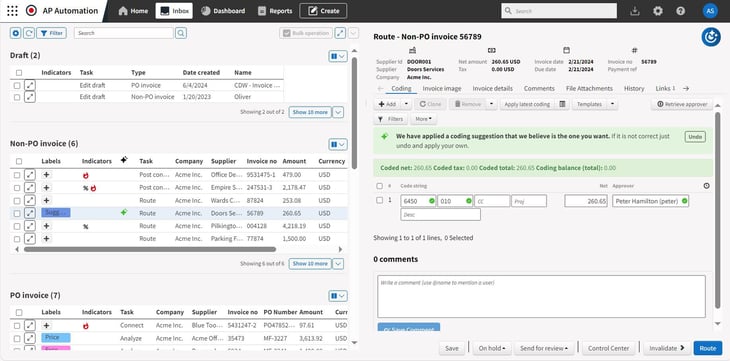
Medius is an AP automation and spend management platform built for mid-market and enterprise finance teams. It covers invoice capture, coding, matching, approvals, supplier management, payments, and analytics.
For NetSuite users, Medius automates clean invoices with minimal manual work and routes mismatches or exceptions to the right person for review.
How Medius connects to NetSuite
Medius uses a SuiteApp-certified hybrid integration with NetSuite and NetSuite OneWorld. Its pre-built connector moves master data from NetSuite into Medius, while approved invoice and payment data flows back so NetSuite remains the financial system of record.
Medius can also connect to other ERPs through managed connectors, REST APIs, and its iPaaS.
Key features include:
- AI invoice capture: Reads header and line-item data across PDF, XML, EDI, and other invoice formats.
- Multi-way matching: Matches invoices against POs and receipts before routing exceptions for review.
- Touchless processing: Medius says its NetSuite customers can reach up to 95% touchless invoice processing.
- Multi-entity support: Works with NetSuite OneWorld and wider multi-company finance setups.
- AP analytics: Tracks invoice status, cycle times, exceptions, and cost per invoice.
Medius's standout feature: Medius Copilot
Medius Copilot is an AI assistant for invoice approvers. It answers questions inside the approval flow, gives users more context around an invoice, and can help reduce the back-and-forth AP teams often handle by email.
Who Medius is built for
Medius suits larger NetSuite teams where invoice volume and PO complexity create most of the AP workload. Multi-ERP businesses needing AP automation across NetSuite and other systems can also leverage Medius.
Watch-out
Medius offers a lot of control, but that can mean more setup and a higher cost than a smaller finance team needs. Brian A., a mid-market reviewer on G2, liked the OCR, flexibility, and support, but found the pricing high and the self-service documentation hard to use when solving problems himself.
7. Centime
Best for NetSuite AP with cash flow forecasting
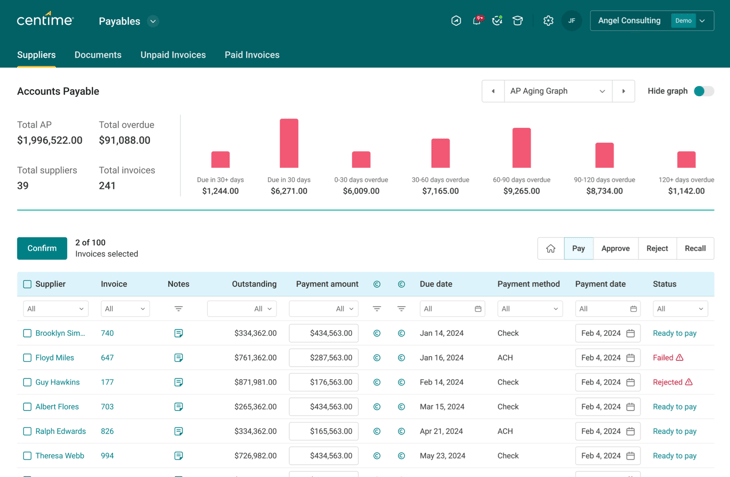
Centime is a finance automation platform that combines accounts payable with payments, accounts receivable, expenses, and cash forecasting. Its AP product covers invoice capture, coding, approvals, PO matching, supplier management, and payments.
Centime connects payable decisions to a live view of cash, so finance can see how upcoming bills and payment timing may affect liquidity before money leaves the business.
How Centime connects to NetSuite
Centime is a Built for NetSuite certified SuiteApp that works inside NetSuite. It uses bidirectional sync for vendors, bills, purchase orders, receipts, payments, custom segments, classifications, and other accounting data.
That means a team can capture and approve invoices through Centime while NetSuite remains the accounting system of record.
Key features include:
- AI invoice capture & coding: Reads header and line-item data, then codes invoices against your NetSuite accounts, segments, and classifications.
- Approval workflows: Routes invoices by policy before they post for payment.
- Supplier payments: Supports ACH, checks, cards, international payments, partial payments, and scheduled payment runs.
- Multi-subsidiary support: Keeps AP activity tied to the correct NetSuite entity while giving finance a wider view across the group.
Centime's standout feature: Cash Forecasting Workbench
Cash Forecasting Workbench connects AP decisions to a rolling 13-week view of cash.
Centime builds the forecast from ERP, banking, AP, and AR activity. Teams can then use its Decision Desk to test scenarios in plain language, such as delaying a large supplier payment or moving expected customer cash into a later week.
Who Centime is built for
Centime fits NetSuite teams that want AP automation tied more closely to cash management. It's also beneficial for NetSuite teams with detailed coding across subsidiaries, departments, classes, or custom segments.
Watch-out
The wider platform can take some getting used to. Narbeh A., an accounting supervisor using Centime with NetSuite, liked the direct connection, easy approval setup, and support, but found the number of tabs confusing when looking for historical data.
8. NetSuite Bill Capture + Intelligent Payment Automation
Best for keeping AP native
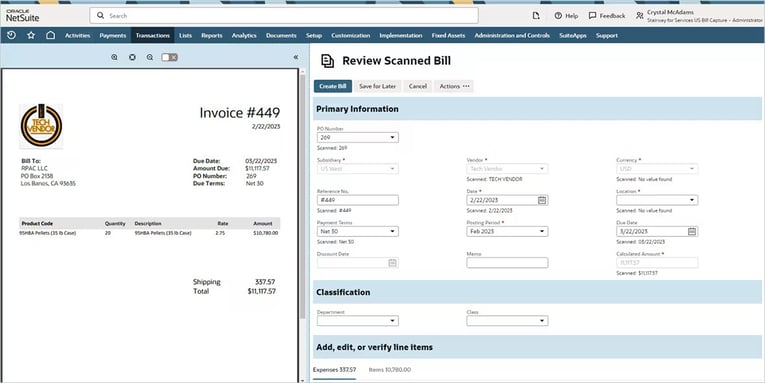
If your AP is pretty simple, NetSuite's own tools might be all you need. Most teams start here and add a specialist tool once volume or subsidiaries make it harder.
Bill Capture handles invoice intake and data extraction, while Intelligent Payment Automation, powered by BILL, handles payment approval, execution, and tracking inside NetSuite.
This setup keeps the workflow close to the ERP. Finance can capture an invoice, match it to a PO, approve the bill, and manage payment without moving the process into a separate AP workspace.
Key features include:
- AI invoice extraction: Reads PDFs, JPEGs, and PNGs and pulls key invoice data into a draft vendor bill.
- PO matching: Captured bills can flow through NetSuite's existing 2- and 3-way matching setup.
- Native approvals: SuiteApprovals and other NetSuite workflows can continue after the bill is created.
- Payment automation: Schedule, approve, and track vendor payments from inside NetSuite.
NetSuite's standout feature: Bill Capture
Bill Capture now uses Oracle Cloud Infrastructure's Document Understanding model to read more complex invoice layouts, including multiple columns and mixed content.
It also learns from user corrections over time. Once the data is reviewed, the invoice becomes a normal NetSuite vendor bill and moves through the matching and approval rules already set up in your account.
Who NetSuite's native AP tools are built for
This setup works well for:
- Teams already comfortable working in NetSuite and happy to keep AP there
- Companies with straightforward approval flows that SuiteApprovals can already support
- PO-based teams using NetSuite's existing matching rules
Watch-out
The tradeoff is that NetSuite itself can take more skill to configure and manage as workflows become complex.
Xochitl B., a mid-market NetSuite reviewer on G2, liked the platform's reporting and invoice lookup but found subsidiary corrections frustrating because an invoice assigned to the wrong subsidiary had to be deleted and entered again.
There are also payment limits to check. Oracle currently caps submissions to BILL at 600 payments at a time and places other limits on payment runs.
How to choose AP automation for NetSuite
Start with how AP already works in NetSuite, then look for the parts that still take too much time or create too much manual work.
Here are the steps we would go through:
- Check the NetSuite connection: Look at whether the tool uses a SuiteApp, API, or connector, and what data moves both ways. Vendors, POs, receipts, coding, bills, and payment status should stay in sync with the setup you already use.
- Match the tool to your invoice volume: A team processing thousands of invoices each month needs stronger capture, coding, and exception handling than a smaller AP team.
- Look closely at PO matching: If your business relies on purchase orders, test 2- and 3-way matching with real examples, including partial receipts and multi-line POs.
- Review approval rules: NetSuite OneWorld teams should check whether invoices can route by subsidiary, department, amount, location, or other fields without extra manual steps.
- Think about who will use it: Some tools are built around dedicated AP teams. Others work better when managers outside finance need to approve invoices without spending much time in NetSuite.
- Check payments and ERP scope: Some tools handle payments directly, while others send approved bills back to NetSuite. Multi-ERP companies should also check whether the platform can support systems beyond NetSuite.
- Compare the full cost of the tool: Include platform fees, user fees, payment charges, implementation, add-ons, and support. A lower starting price can become less attractive once the full workflow is included.
The goal is to find a tool that fits the way your NetSuite AP process already works, then removes the steps your team still handles by hand.
See Rillion with your own NetSuite invoices
Book a demo to see how Rillion handles capture, matching, approvals, and sync in your NetSuite setup.
AP automation for NetSuite FAQs
What's the best AP automation for NetSuite?
Rillion is our top pick for NetSuite teams with high invoice volume, several subsidiaries, and complex PO workflows. Its certified SuiteApp supports two-way sync, while Rillion adds AI invoice capture, coding, approval routing, and 2- and 3-way matching around NetSuite.
What's the difference between a SuiteApp and an API integration?
A SuiteApp is built for the NetSuite platform and installs into your NetSuite account.
An API integration connects an outside platform to NetSuite so data can move between them.
Both can work well, but you should compare what data syncs, how often it syncs, and how much setup is needed.
How long does it take to implement AP automation with NetSuite?
It depends on your setup. A standard NetSuite connection with simple approvals can go live much faster than a OneWorld rollout with several subsidiaries, custom fields, PO matching, and complex routing. Ask each vendor to scope implementation around your real invoice and approval process.
Can AP automation pay vendors from NetSuite?
Yes. NetSuite's Intelligent Payment Automation uses BILL to support vendor payments from within NetSuite.
Third-party AP platforms can also handle payments and send the payment data back to NetSuite, depending on the product and integration you choose.