
Your purchase order is valid. Your supplier has included the right number. But the invoice still fails to match and ends up with your AP team for manual review.
The problem could be as small as a few extra digits or letters in the PO number on the invoice.
It’s a minor variation, but enough to interrupt an otherwise automated invoice flow. And if a supplier uses the same format on every invoice, your team can end up correcting the same issue again and again.
With customizable prompts in Rillion Capture, you can teach the AI how to handle these exceptions automatically.
How custom PO rules work in Rillion
Tell Rillion Capture how your PO numbers should work
Rillion Capture uses AI to understand both the content and context of an invoice, rather than relying on fixed templates or field positions. But sometimes reading what’s on the invoice isn’t enough. The data also needs to follow the rules of your AP process.
That’s where customizable prompts come in.
You can give Rillion Capture additional instructions in plain language. For example:
“The PO number is always six digits. Remove any additional characters.”
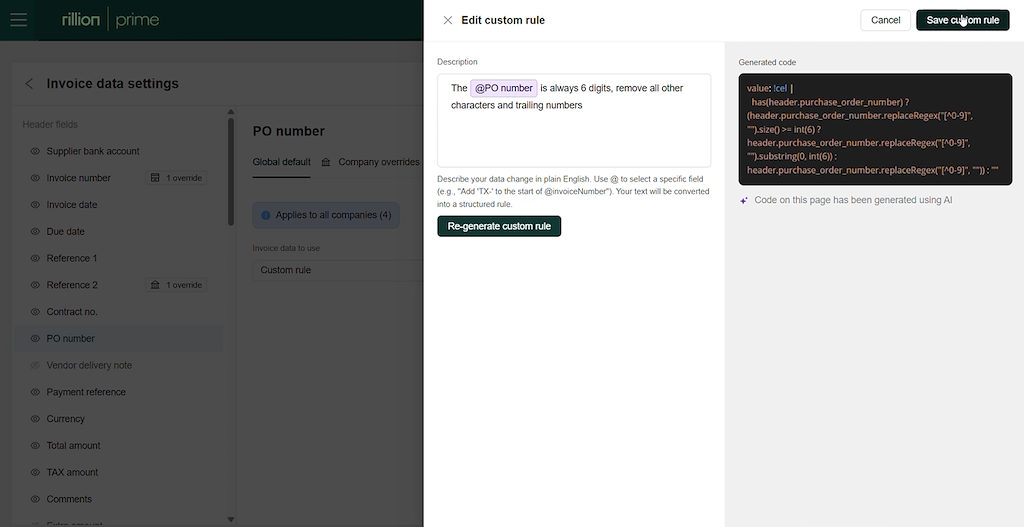
When the invoice arrives, Capture follows your instruction, removes the extra characters and keeps the six-digit PO number. It can then validate that number against your purchase orders in Rillion.
What used to create an exception can now result in a successful PO match without your team having to fix it first.
Why traditional OCR struggles with exceptions in invoice capture
Traditional OCR-based invoice capture relies on templates, rules and predefined fields to extract data.
If the invoice says “PO123456XX”, for example, an OCR solution may correctly extract the entire value. Technically, it has read the invoice correctly. But it hasn’t understood that the value needs to be adjusted to successfully match.
Rillion’s AI-native invoice capture can go a step further. You can tell the AI that your PO number should contain six digits and that any additional characters should be removed.
Instead of only asking “What does the invoice say?”, you can tell Capture how the information should be handled.
Create your own PO rules without templates
Every supplier does things a little differently. Your own AP requirements can be just as specific.
With customizable prompts, you can tell Rillion Capture how to extract, adjust or enrich invoice data without building supplier templates or requesting a development change.
For example, you can use prompts to:
- Remove prefixes, suffixes or unwanted characters from PO numbers
- Find the reference you need even when suppliers use different labels
- Extract company-specific information from anywhere on the invoice
- Adapt captured values to the format your AP process requires
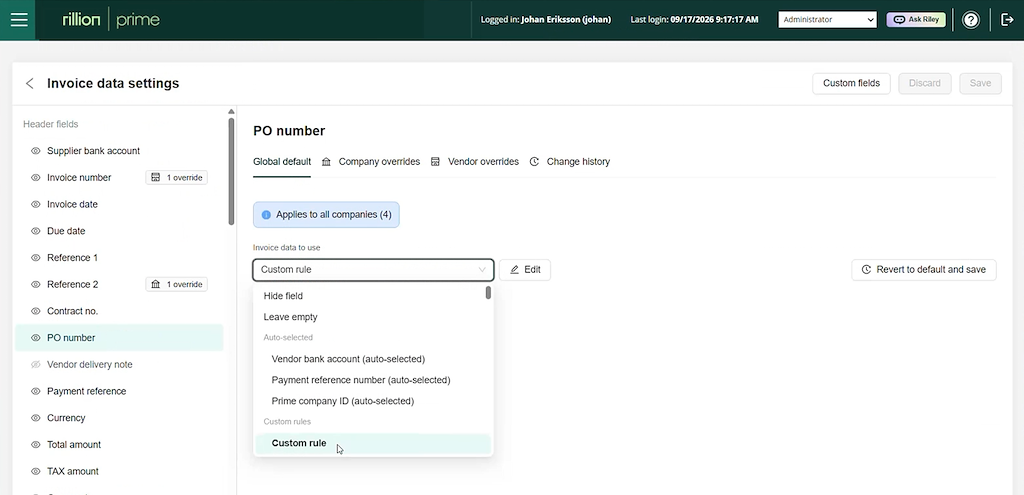
You can configure instructions for different levels, for example a specific supplier or business entity, depending on where the requirement applies. Built-in guardrails help you tailor Capture while keeping your configuration controlled.
Fix the exception once, not invoice after invoice
Customizable prompts are most useful in the small, recurring exceptions that consume your AP team’s time.
Once you’ve told Capture how to handle a supplier-specific variation, you don’t have to keep correcting it manually. Cleaner data enters your workflow, more invoices can move forward automatically and fewer exceptions need your attention.
As Andreas Jungmar, Product Manager at Rillion, explains in the video:
“In your natural language, whether it is English, Swedish or Danish, you instruct the system to remove those digits.”
That’s what makes customizable prompting useful. You bring the knowledge of how your invoices and AP processes work. Rillion Capture applies that knowledge automatically as invoices come in.
So when a supplier adds that one annoying extra character again, you don’t have to fix it again.