
Ramp has come a long way from corporate cards. Its platform now also covers expense management, accounts payable, procurement, travel, banking, and more, which makes it a strong all-in-one option for teams that want to manage spend in one place.
But that doesn't mean every part of it works for every business. Depending on where your finance team is running into friction, you may want an alternative that's stronger in that particular area.
In this guide, we compare 7 of the best Ramp alternatives, including broader spend management platforms and options that are especially strong in specific areas like AP automation, expenses, travel, global spend, and fleet management.
Compare Ramp alternatives
Here’s a quick look at the best Ramp alternatives, who they fit, and what makes them stand out:
| Alternative | Why it’s a good Ramp alternative | Best for | Stand-out feature |
|
Rillion |
Goes deeper on AP automation, with AI invoice capture, 3-way PO matching, approvals, payments, and 50+ ERP integrations.
|
AP automation and complex invoice workflows |
AI invoice capture |
|
Brex |
Offers a similarly broad spend platform, with corporate cards, expenses, AP, travel, and global spend. |
Corporate cards and broad spend management |
Scalable spend limits |
|
SAP Concur |
Offers more depth for established travel programs, with dedicated travel and expense tools and a large partner network. |
Travel and expense management |
Native SAP integration |
|
Expensify |
Offers a simpler, lower-cost way to manage everyday expenses and reimbursements without requiring you to replace your existing cards. |
Simple expense tracking and reimbursements |
Bring Your Own Cards |
|
Payhawk |
Lets businesses manage global and multi-entity spend while choosing the modules they actually need. |
Global and multi-entity spend management |
Multi-entity management |
|
BILL |
Adds dedicated AP and AR products alongside free corporate cards and expense management. |
Managing payables and receivables alongside company spend |
Enforceable budgets |
|
Coast |
Better suited to businesses with fleets that need more control over how, where, and when drivers spend. |
Corporate fuel cards |
Fuel-specific spending controls |
1. Rillion
Best for AP automation and invoice workflows
If accounts payable is the part of your spend process you really want to improve, Rillion goes much deeper there than a broader platform like Ramp.
It's an AI-powered AP automation platform that handles the invoice process from capture and coding through approvals and payment.
Built-in AI supports invoice coding and approval routing, while secure payment automation reduces errors, improves control, and lowers your fraud risk.
With centralized multi-entity management and 50+ ERP integrations, Rillion adapts to how finance teams already work, making it especially valuable for mid-market companies that want end-to-end AP automation without enterprise-level complexity.
Rillion includes all the traditional features of an AP automation solution, with AI applied where it makes a real difference:
-
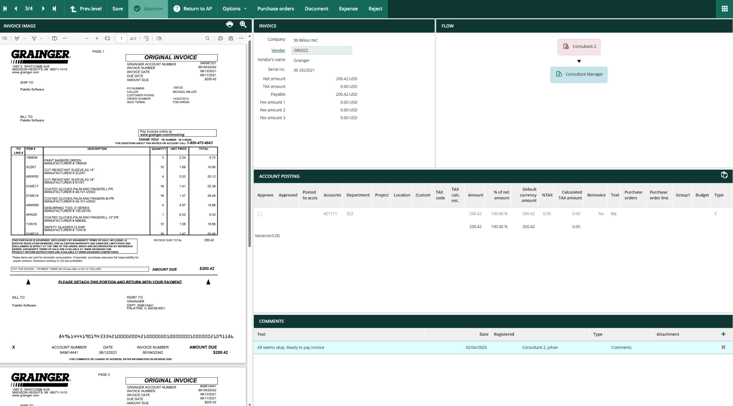
AI invoice capture that extracts data across invoice formats with over 95% accuracy from the first invoice and suggests correct general ledger codes based on past patterns.
-
Automated approval workflows that can be set to customizable rules or AI-driven suggestions.
-
Payment automation including secure virtual cards and automated reconciliation.
-
Advanced reporting and analytics for spend visibility across entities.
Multi-entity, mid-market organizations benefit most from Rillion’s ability to route invoices, approvals, and payments across different subsidiaries or locations, all from a single dashboard. For these reasons, it’s one of the best Ramp alternatives on the market.
Other key features in the Rillion platform:
-
Multi-entity management: Approve invoices, manage spend, and gain real-time visibility across multiple companies or locations from one screen. Perfect for healthcare groups, hospitality chains, or manufacturers with distributed finance operations.
-
Advanced PO matching: Rillion handles complex purchase order matching, including partial deliveries, multiple POs on one invoice, and external POs. This ensures invoices are validated accurately before payment, even in industries with complex procurement flows.
-
Riley, the AI Assistant: Ask the built-in AI questions about invoices, suppliers, or workflows and get instant answers. Riley helps users navigate the system, resolve issues quickly, and stay productive without delaying AP financial tasks.
-
Role-based approval workflows: Assign permissions based on roles to improve security, compliance, and efficiency. Finance leaders maintain control and approvers get automated reminders with the option to approve via mobile or desktop.
-
Virtual card payments with rebates: Securely pay vendors using virtual cards, reducing fraud risk while earning rebates, turning AP from a cost center into a value driver.
-
50+ ERP integrations: Sync invoices, approvals, and payments directly into 50+ leading ERPs, including Microsoft Dynamics, NetSuite, Sage Intacct, and SAP Business One, eliminating double entry and ensuring clean data for month-end close.
Why Rillion is a good Ramp alternative
If AP is the part of Ramp you want to replace, Rillion lets you go deeper without taking on another broad spend management platform.
Because it’s built specifically around accounts payable, the focus stays on getting invoices processed, approved, and paid with as little manual work as possible.
It delivers touchless invoice capture, 3-way PO matching, customizable approval workflows, and secure payment automation, all tightly integrated with 50+ ERPs.
For finance teams that have outgrown Ramp's AP capabilities or simply need a platform built around more complex invoice workflows, Rillion offers deeper AP automation and AI, as well as centralized visibility across multiple entities.
What to be aware of
Unlike Ramp, Rillion doesn’t include expense management or travel booking. So, if expense management is a priority, you may want to pair Rillion with a dedicated T&E solution.
Who is Rillion built for?
Rillion is best suited to mid-market companies processing 10,000+ invoices annually, particularly in industries like healthcare, manufacturing, and hospitality.
It’s especially valuable for organizations with multiple entities or subsidiaries that need consolidated visibility and streamlined workflows.
Rillion is for finance leaders who want to:
- Cut invoice processing and approval time with AI-driven automation, going 85% faster
- Centralize AP across multiple entities for better control and reporting
- Reduce fraud risk and payment errors with secure, automated vendor payments
- Eliminate manual double entry through seamless ERP integration (with 50+ leading ERPs)
- Give AP teams peace of mind with intuitive, user-friendly software
- Work with a trusted partner to implement AI across their finance processes, confidently and securely
Read how Björn Axén has used Rillion’s AP automation to cut hours spent processing invoices, increased visibility over spend, and given their finance team greater confidence in the numbers.
Stand-out feature: AI-native invoice capture
Rillion’s AI-native invoice capture uses multimodal AI to understand and extract invoice data with 95% accuracy from the first invoice, without templates or supplier-specific training.
For supplier-specific exceptions, custom capture rules tell the AI exactly how to interpret and correct incoming data. For example, Rillion can automatically fix item numbers, remove extra characters from PO numbers, or resolve unit-of-measure differences before the invoice reaches matching.
That means cleaner invoice data enters the process from the start, helping more invoices match automatically and reducing the exceptions your AP team needs to review manually.
2. Brex
Best for corporate cards and broad spend management
.png?width=733&height=406&name=accounting-blog_inline-3%20(1).png)
If you like the all-in-one approach of Ramp but want to shop around, Brex is one of the closest alternatives to consider. It started with corporate cards and has since expanded into expense management, accounts payable, travel, business accounts, and global spend.
That makes it a strong option for businesses that don't want to replace Ramp with several different tools. You can still manage how employees spend, issue physical and virtual cards, pay bills, book travel, and track expenses through the same platform.
Key features include:
-
Corporate cards: Issue physical and virtual cards with customizable spend limits and policies for employees, teams, and different types of purchases.
-
Expense management: Automate receipt collection, expense categorization, policy checks, approvals, and reconciliation.
-
Accounts payable: Capture invoices, onboard vendors, route bills for approval, match bills to purchase orders, and make payments.
-
Travel: Book flights, hotels, and rental cars in Brex, with travel policies and spending controls built into the booking process.
-
Global spend management: Issue local-currency cards, reimburse employees internationally, and manage spending across multiple entities from one platform.
-
Business accounts: Manage operating cash alongside company spend, with checking and treasury options available through Brex.
-
Accounting automation: Automatically code transactions and sync card, expense, and AP data with accounting and ERP systems.
Why Brex is a good alternative to Ramp
Brex is one of the closest swaps for Ramp if you want to keep the all-in-one setup, but there are a few areas where it may give you more.
For one, companies with a lot of spend in Brex's bonus categories could get more mileage out of their card spend. Instead of Ramp's flat-rate cashback, Brex offers up to 7x points on rideshare, 4x on eligible Brex Travel bookings, 3x at restaurants, and 2x on recurring software.
Brex also gives global teams more room to work locally. You can issue physical and virtual cards in 30+ currencies across 60+ countries, while Ramp currently offers local card issuing in 30+ countries. That's a meaningful difference if you're issuing cards to employees across several markets.
Need a lot of spending power? Brex is also known for high corporate card limits. It underwrites businesses based on factors like cash and financial performance, and says qualifying companies can access limits up to 20x higher than traditional business credit cards.
Then there's price. Brex's paid plans start at $12 per user per month, while Ramp Plus starts at $15 per user per month plus a platform fee based on team size.
However, since both offer free plans, you'll want to check which features are gated behind paid tiers if you're planning to stick with the free version, and whether what's included actually covers what your team needs.
What to be aware of
Brex and Ramp both score very highly for ease of use on G2, with each earning 9.6/10. Still, the experience won't be identical for everyone.
One reviewer who uses both platforms says they find Brex's interface more complicated and less intuitive than Ramp's, and think it could be simplified to make navigation easier.
Stand-out feature: Scalable spend limits
Employees can use the same Brex card to spend from multiple spend limits. They can choose which limit to use before making a purchase, and if they don't, Brex automatically assigns the transaction to the limit with the most money available. Employees can then reassign the purchase to a different spend limit later if needed.
3. SAP Concur
Best for travel and expense management
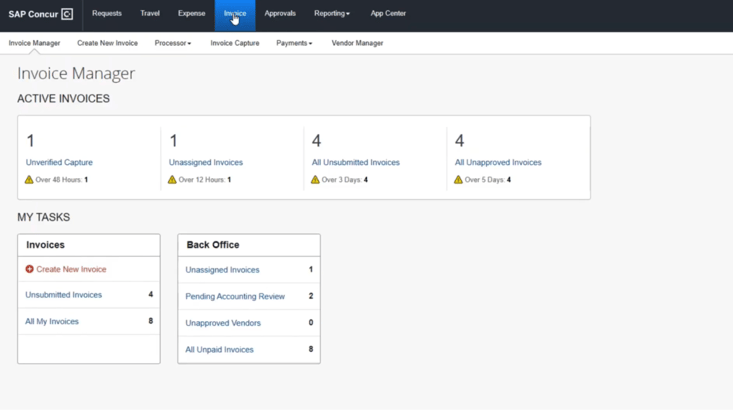
If business travel makes up a big part of your company spend, SAP Concur is one of the strongest Ramp alternatives to consider. Travel and expense management has been its core focus for decades, with dedicated products for booking and managing business trips and handling the expenses that come with them.
Concur Travel lets employees book flights, hotels, rail, and rental cars within company policy, while Concur Expense handles everything from receipt capture and policy checks to approvals and reimbursements.
The two work together, so travel bookings and the expenses they generate can flow through the same process.
Key features include:
-
Concur Travel: Let employees search, compare, and book flights, hotels, rail, and rental cars, with company travel policies applied during booking.
-
Concur Expense: Capture receipts and expenses, automate data entry and categorization, check expenses against company policies, route reports for approval, and manage reimbursements.
-
Concur Invoice: Automate invoice capture, data extraction, approval workflows, purchase order matching, and vendor payments.
-
Concur Request: Manage pre-spend requests and approvals for expenses and business travel, with workflows built around company policies.
-
Concur TripLink: Bring travel booked outside your managed booking system back into SAP Concur for better visibility into itineraries and travel spend.
-
ExpenseIt: Turn photos of receipts into automatically created, categorized, and itemized expense entries.
-
Reporting and analytics: Build reports on travel, expense, and invoice activity to spot trends and keep track of spending.
Why SAP Concur is a good alternative to Ramp
While Ramp already covers travel, SAP Concur has a lot to offer companies with more established travel programs.
Concur Travel can work natively with your preferred travel management company (TMC) and global distribution system (GDS), so you can keep the travel partners your company already works with.
SAP Concur also has a large partner network spanning travel, ERP, accounting, HR, and other systems, giving you plenty of options for connecting your travel program with the rest of your tech stack.
What to be aware of
Unlike Ramp, SAP Concur doesn't issue its own corporate cards. Instead, Concur Expense connects with corporate card programs from banks and other card providers, so you'll need to bring your existing card program or set one up separately.
There's also a noticeable gap in ease of use on G2. Ramp currently scores 9.6/10 for ease of use compared with 8.0 for SAP Concur, and 9.4 versus 8.0 for ease of setup. If you're looking for something employees can pick up quickly, that's one aspect to factor into the decision.
Stand-out feature: Native SAP integration
If your company already runs on SAP, Concur is a natural fit. Its native integration with SAP ERP and SAP S/4HANA automatically syncs expense and financial data between the systems, so your finance team doesn't have to spend as much time moving data back and forth manually.
4. Expensify
Best for simple expense tracking and reimbursements

Expensify is a spend and expense management platform for managing employee expenses, reimbursements, company cards, travel, bill payments, and invoicing in one place.
Its biggest appeal is simplicity. For teams that mainly want to track expenses and reimburse employees, you don't have to start with a long list of advanced controls. The Collect plan keeps the workflow focused on the basics. Employees scan receipts, submit expenses for approval, get reimbursed, and the data can sync with QuickBooks or Xero.
And if you outgrow that setup, the Control plan gives you more room for customization, with multi-step approvals, ERP and HR integrations, custom expense rules, and more advanced company card management.
Key features include:
-
SmartScan receipt capture: Employees can snap a photo of a receipt, and SmartScan automatically extracts the merchant, date, amount, and currency to create the expense. It can also match the receipt to the corresponding card transaction.
-
Expense management and reimbursements: Track expenses, route them for approval, reimburse employees directly, and sync expense data with your accounting system.
-
Company cards: Use the Expensify Card with configurable spending limits and controls, or connect your existing corporate cards and automatically import transactions for reconciliation.
-
Travel: Employees can book flights, hotels, rental cars, and rail directly in Expensify, with travel rules applied to bookings and expenses automatically reconciled against them.
-
Bill pay: Capture vendor bills, route them for approval, and make payments through Expensify.
-
Invoicing: Create and send customer invoices, track their status, and collect payments.
-
Accounting integrations: Sync expenses and card transactions with systems including QuickBooks, Xero, NetSuite, and Sage Intacct.
Why Expensify is a good alternative to Ramp
One of Expensify's biggest draws is how much of the everyday expense workflow you can manage at a relatively low cost.
For one, there's a free Submit plan for employees who need to track and submit their own expenses.
For businesses, Collect costs $5 per member per month and includes receipt scanning, reimbursements, corporate card management, expense and travel approvals, travel booking and rules, and QuickBooks and Xero integrations, with no annual contract required.
That's notably cheaper than Ramp Plus, which starts at $15 per user per month plus an additional platform fee.
The other big difference is that adopting Expensify doesn't mean adopting a new corporate card. You can keep the cards and banking relationships your company already has and bring those transactions into Expensify for expense management and reconciliation. Or, if you want to, you can use the Expensify Card instead.
Ramp, on the other hand, requires using its card exclusively, even on the free tier.
What to be aware of
The $5 Collect plan won't give you everything Expensify has to offer. Features like multiple approval flows, NetSuite and Sage Intacct integrations, custom expense rules, SSO, budgeting, and custom reporting require the Control plan.
And while Expensify advertises Control for as low as $9 per member per month, that price depends on how much you spend on the Expensify Card. Without the card discount, the standard annual price is $18 per member per month.
That's worth keeping in mind if one of the reasons you're choosing Expensify is to stick with the corporate cards you already use.
Stand-out feature: Bring Your Own Cards
Expensify doesn't require you to switch corporate card programs to use its expense management tools. You can connect the cards your company already uses, including cards from providers like American Express, Chase, Citi, Capital One, and thousands of other financial institutions.
Once connected, transactions flow into Expensify automatically, where they can be matched with receipts, categorized, and reconciled.
That means you can add Expensify on top of your existing card program without giving up the rewards, credit terms, or banking relationships you already have.
5. Payhawk
Best for global and multi-entity spend management
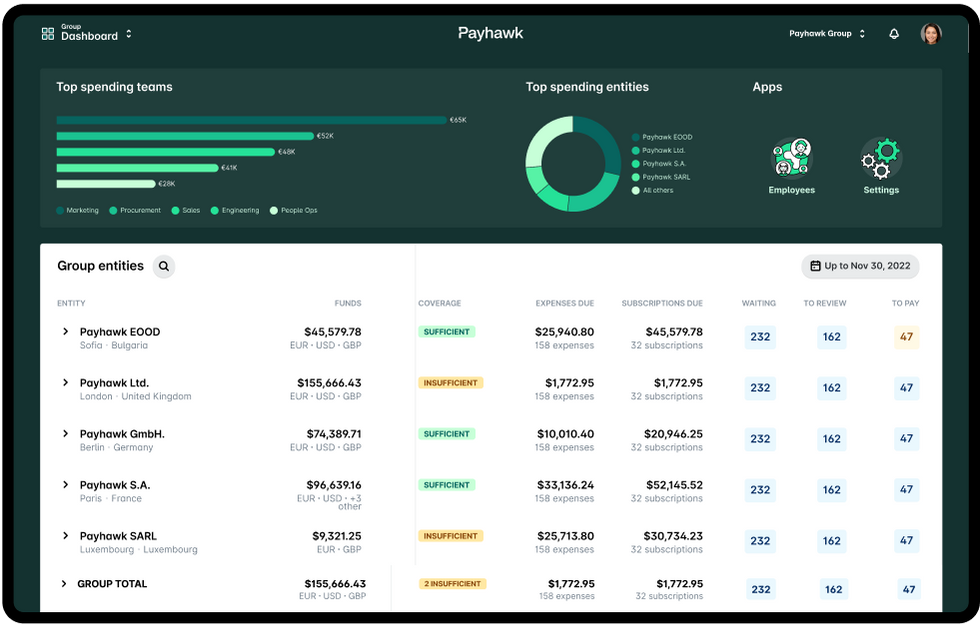
Payhawk is another all-in-one spend management platform, but it's built with international and multi-entity businesses in mind.
Finance teams can manage multiple entities from one group dashboard, with a consolidated view of spending across the business while each entity keeps its own controls, approval workflows, and accounting settings.
For companies operating across borders, Payhawk also supports corporate cards in EUR, GBP, USD, and several other major currencies, plus international payments in 115+ currencies across 150 countries.
Key features include:
-
Multi-entity management: Manage spend across multiple entities from a group dashboard, with consolidated visibility and group- or entity-level workflows and settings.
-
Corporate cards: Issue physical and virtual cards with spending limits, approval workflows, and controls over when and where employees can spend.
-
Expense management: Capture receipts, automate expense coding, manage reimbursements, and track employee spending in real time.
-
Accounts payable: Capture invoice data with OCR, route bills for approval, match invoices to purchase orders, and pay suppliers from the platform.
-
Global payments: Pay suppliers internationally in 115+ currencies across 150 countries and manage payments across multiple currencies.
-
Procurement: Manage purchase requests, approvals, purchase orders, and two- and three-way matching before invoices are paid.
-
ERP and accounting integrations: Connect with systems including NetSuite, Sage Intacct, Microsoft Dynamics 365, QuickBooks, and Xero to sync expense and accounting data.
Why Payhawk is a good alternative to Ramp
Payhawk gives you flexibility in how much of the platform you actually pay for. Instead of buying the entire spend management suite from day one, you can start with the modules you need, choosing from Travel, Cards & Expenses, Bill Pay, and Procure to Pay.
That can be useful if you're only trying to fix one part of your spend process today but want the option to manage more of it through Payhawk later.
And like Expensify, Payhawk doesn't necessarily require you to replace your existing corporate cards. For U.S.-based companies, Payhawk lets you connect existing Visa, Mastercard, and American Express corporate cards and use its expense management and spend controls on top of them.
What to be aware of
Ramp has a slight edge when it comes to ease of use and setup. On G2, Payhawk scores 9.1/10 for ease of use compared with Ramp's 9.6, and 8.8 versus 9.4 for ease of setup.
Those are still solid scores for Payhawk, but the difference suggests Ramp may be a little easier to get started with and use day to day.
Stand-out feature: Multi-entity management
Payhawk gives finance teams one place to keep an eye on what's happening across every entity. They can see how much cash each entity has against upcoming spend, get warnings when balances are running low, and quickly spot expenses that are still waiting for approval or payment.
It also cuts down on repetitive admin. Employees, teams, and group administrators can be managed centrally instead of setting everything up separately for each entity.
6. BILL
Best for managing payables and receivables alongside company spend
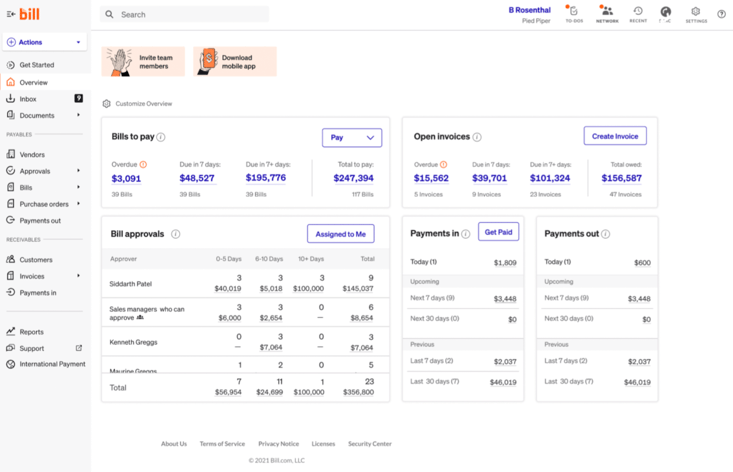
BILL Spend & Expense, formerly Divvy, gives businesses corporate cards with built-in expense management and budgeting. But the bigger reason to consider BILL as a Ramp alternative is what sits around it.
The wider BILL platform also includes dedicated accounts payable and accounts receivable products, so you can manage employee spend, pay vendors, and invoice and collect payments from customers in one place.
That makes BILL especially interesting if you want to manage both sides of your cash flow alongside corporate card spend.
Key features include:
-
Corporate cards: Issue physical and virtual cards and control spending through budgets, transaction limits, and merchant restrictions.
-
Expense management: Track employee spending in real time, collect receipts, manage reimbursements, and keep expenses organized for reconciliation.
-
Budget management: Create budgets for teams, departments, projects, or vendors, with controls over how much employees can spend.
-
Accounts payable: Capture and code invoices, automate approval routing, match invoices against purchase orders and receipts, and pay vendors through multiple payment methods.
-
Accounts receivable: Create and send invoices, automate recurring invoices and payment reminders, track outstanding invoices, and accept ACH or credit card payments.
-
Accounting integrations: Sync financial data with accounting and ERP systems to reduce manual entry and simplify reconciliation.
Why BILL is a good alternative to Ramp
You don't have to pay anything to get started with BILL Spend & Expense. It's free to use and gives you corporate cards, expense management, reimbursements, and budgeting without a per-user subscription.
If you need more than that, you can add BILL's AP and AR products. That gives you the option to manage employee spend for free, then bring vendor bills, payments, customer invoices, and collections into BILL as your needs grow.
What to be aware of
The free part only goes so far. BILL's AP and AR plans start at $49 per user per month, so costs can climb once you move beyond Spend & Expense.
That's especially worth considering if AP is your main priority. Ramp already includes core AP features in its free plan, and its paid plan starts at a much lower per-user price. BILL's paid offering may only make more sense if you'll actually use the AR side too.
Stand-out feature: Enforceable budgets
BILL allows you to create separate budgets for teams, departments, projects, or vendors, set how much can be spent, and decide whether purchases should be declined or allowed to go over budget by a certain amount.
As employees spend, transactions are reflected against the relevant budget in real time.
7. Coast
Best for corporate fuel cards
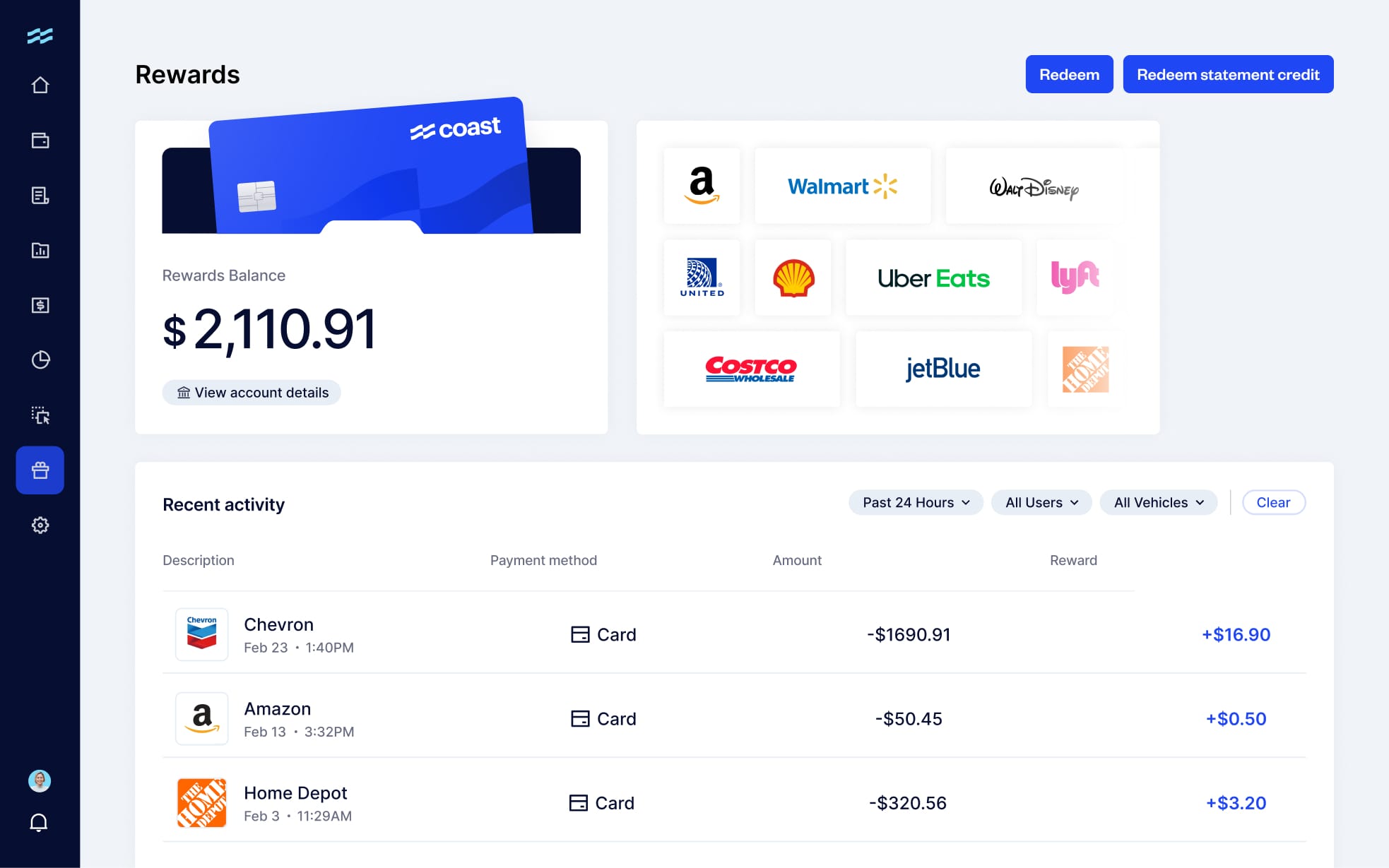
Unlike broader spend management platforms like Ramp, Coast is built specifically for businesses with vehicles on the road.
You get a Visa card that drivers can use for fuel and other approved business expenses, with granular controls that let you set spending limits, restrict purchases by merchant or category, and decide when and where each card can be used.
Plus, Coast offers 3-9¢ per gallon in fuel rebates at more than 30,000 partner gas stations, so everyday fuel purchases can put some money back into the business.
Key features include:
-
Fleet spending controls: Set spending limits by driver, vehicle, or card, restrict purchases by merchant or category, and control when cards can be used.
-
Driver and vehicle tracking: Tie transactions back to the driver and vehicle involved, even when cards are shared across your fleet.
-
Fuel fraud protection: Connect Coast with telematics data to check whether a vehicle is actually at the pump, flag purchases that exceed its tank capacity, and block suspicious transactions in real time.
-
Fuel rebates: Earn 3-9¢ per gallon at 30,000+ partner gas stations, plus 1% cash back on non-gas-station purchases.
-
Expense management: Digitize and enforce expense policies, capture receipts and job codes at the time of purchase, track transactions in real time, and sync them with your accounting system.
-
Fleet and telematics integrations: Connect with tools like Samsara, Geotab, Fleetio, and Verizon Connect to sync vehicle data, odometer readings, and fuel activity.
-
Accounting integrations: Sync transactions, receipts, memos, and accounting categories with QuickBooks, NetSuite, and Sage Intacct to simplify reconciliation.
Why Coast is a good alternative to Ramp
If most of the cards you're handing out are going to drivers, Coast gives you a lot more that's specific to the way fleets spend.
Its controls don't just let you set dollar limits. You can use GPS and vehicle data to verify that a vehicle is actually at the pump, flag fuel purchases that exceed its tank capacity, and block suspicious transactions before they go through.
Plus, Coast backs those protections with a fuel fraud guarantee of up to $25,000 per year for eligible losses when its required security features are enabled.
Coast can also be a more affordable option if you mainly need cards for fuel and other fleet expenses. It costs $4 per active user per month, so instead of paying for a broader spend management platform with features your fleet may not need, you're paying for a card and expense management system built around how your drivers actually spend.
What to be aware of
Coast is much more specialized than Ramp. It's mainly built around fleet fuel management, so you won't find the same range of spend management features you'd get with a broader platform.
If you also need to automate accounts payable, manage procurement, book business travel, or manage other types of company spend in one place, Ramp will probably be the better fit.
Stand-out feature: Fuel-specific spending controls
Coast can connect with your fleet's telematics system to bring vehicle data into the authorization process. If a driver tries to buy fuel while the vehicle isn't actually at the gas station, Coast can decline the transaction. It can also flag purchases when the amount of fuel doesn't line up with the vehicle's tank capacity.
That’s a layer of protection against fuel misuse that you don’t typically get with the standard merchant and spending limits you’d find on a general corporate card.
How to choose your Ramp alternative
Start with the reason you're looking beyond Ramp in the first place:
-
Looking to replace Ramp for AP? Choose Rillion.
-
Like Ramp's all-in-one model but want another option? Choose Brex.
-
Travel and expenses are the priority? Choose SAP Concur.
-
Want a simpler, lower-cost way to manage expenses and reimbursements? Choose Expensify.
-
Managing spend across multiple entities and countries? Choose Payhawk.
-
Want to manage AP and AR alongside company spend? Choose BILL.
-
Most of your cards are going to drivers? Choose Coast.
Once you've narrowed it down, compare implementation, integrations, usability, and support before making the final call.